
How to Find eBay Sold Items for Smarter Flipping
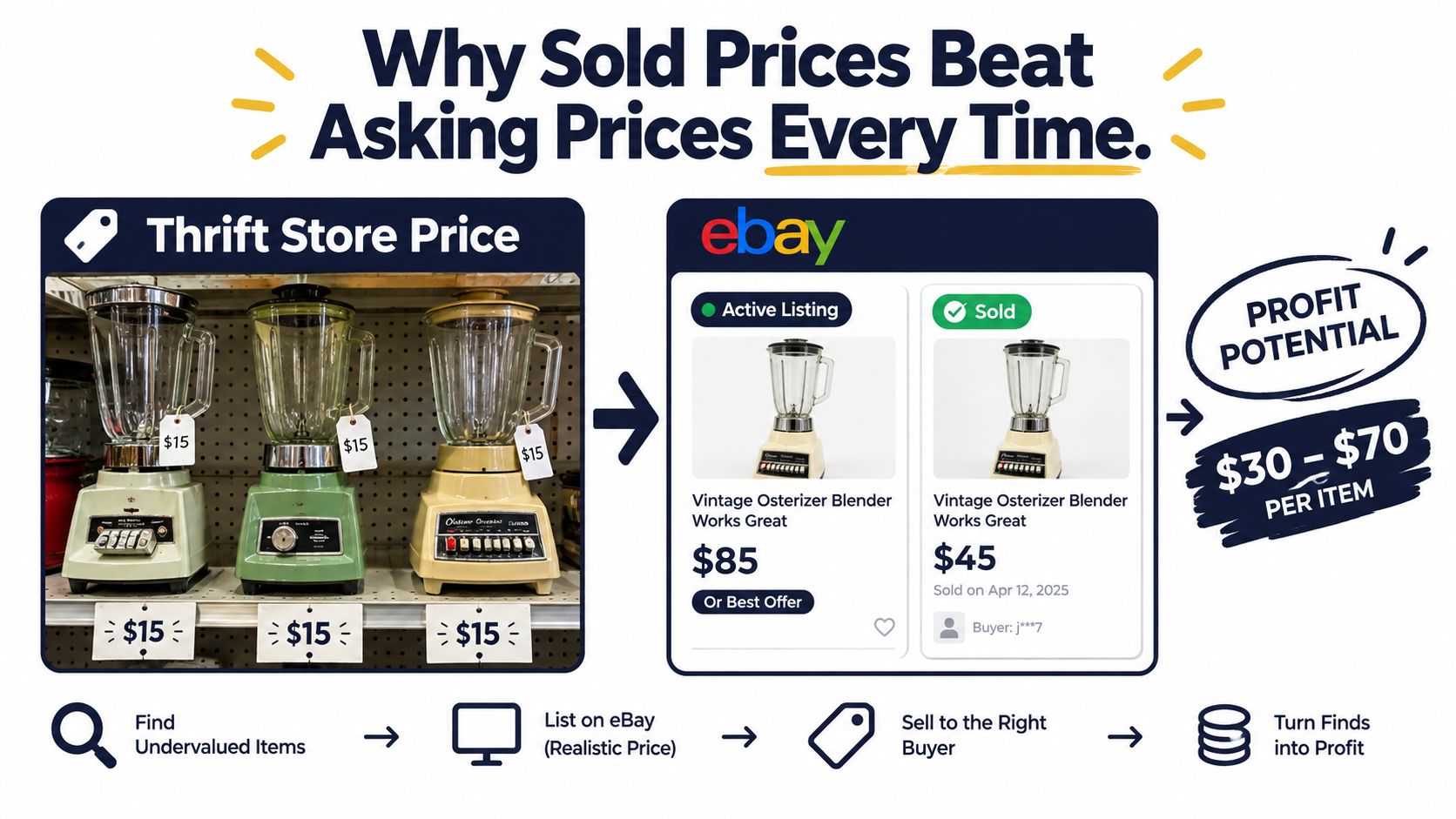
You're standing in a Goodwill aisle with three vintage blenders priced at $15 each. Active eBay listings show the same model at $60 to $85 with “Or Best Offer,” so the flip looks obvious until you tap Sold and find months of completed sales clustered around $28 to $34. That's the difference between a promising shelf find and three more appliances in your death pile.
eBay sold items give you evidence of what buyers paid. The useful question isn't what another seller hopes to receive. It's whether the item sells often enough, at a price that leaves room for fees, shipping, prep, and your cost of goods.
Table of Contents
- Why Sold Prices Beat Asking Prices Every Time
- Finding Sold Items on eBay Step by Step
- Reading the Sold Results Like a Flipper
- Turning Sold Comps into Real Net Profit
- When to Cross-Check Sold Items on Other Marketplaces
- Common Sold-Comp Traps and How to Avoid Them
- The Aisle Checklist for Faster Buy Decisions
Why Sold Prices Beat Asking Prices Every Time
Active listings are easy to misread. A seller can leave a vintage blender at $85 for months, accept no offers, relist it, and still make that price look like a market signal. It isn't. The listing only proves that someone wants $85.
Sold results prove that a buyer completed the transaction. eBay's Product Research tool provides up to 3 years of sales history for millions of items, including actual sold prices, average sold price, sold-price range, average shipping costs, free-shipping share, sell-through rate for items sold within the last 90 days, and the number of sellers who sold the item. That history gives you a much stronger base than active asking prices.
Practical rule: Treat active listings as competition. Treat sold comps as evidence.
The distinction matters at the buy decision. If your cost of goods, eBay fees, packing, and outbound shipping consume more than the typical sold price, an $85 active listing won't rescue the deal. The seller may eventually accept $30, end the listing, or carry it into a death pile. Your calculation has to use the price buyers paid.
eBay's marketplace also gives sold research considerable depth. Its 2015 financial filing reported more than 800 million items listed for sale across its platforms as of December 31, 2015, while a sold-listings tracker reported 25,570,233 sold items and about $1.5 billion in observed 30-day sales by September 2026. Another category tracker reported 20.48 million items sold across all categories during a 30-day period in September 2026. Those figures come from different sources and measurement methods, so they aren't a single clean market-size estimate, but they show why eBay remains a deep source of resale comps across books, collectibles, electronics, apparel, and more. See the marketplace sold-listings data for the underlying tracker figures.
Start every sourcing lookup with Sold, not the default search view. The default view encourages anchoring on the highest visible number. Sold results force you to ask a better question: what price and conversion pattern can this item realistically support?
Finding Sold Items on eBay Step by Step
The fastest route depends on whether you're using a browser or the eBay app. Either way, search as precisely as possible before applying the Sold filter. A model number, ISBN, UPC, MPN, or exact brand and variant will beat a broad keyword every time.
Desktop workflow
- Open eBay and enter the item name, model number, or identifier.
- Set the category to All Categories if eBay has placed the search in the wrong department.
- In the left rail, find Show only and select Sold items. Add Completed items if it appears as a separate option.
- Open More filters and narrow the results by condition, price range, buying format, item location, category, and date range.
- Use the most recent useful window. eBay Product Research supports date ranges from 1 day to 3 years, along with filters for sale price, listing format, condition, buyer or seller location, category, and identifiers such as UPC, EAN, ISBN, MPN, and EPID. The official eBay Product Research documentation explains the available transaction filters.
For power users on a slow thrift-store connection, adding LH_Sold=1 to an eBay search URL can bypass several menus. The filter is only useful when the query itself is clean, so don't use it as an excuse to search something vague like “vintage blender.”
Mobile workflow
Tap the magnifying glass, search for the item, tap Filter, toggle Sold items, set condition and price controls, then confirm the results. Sold items are available to signed-in accounts in the app. eBay's mobile sold-items workflow describes the practical path through Filter, Sold items, and Show results.
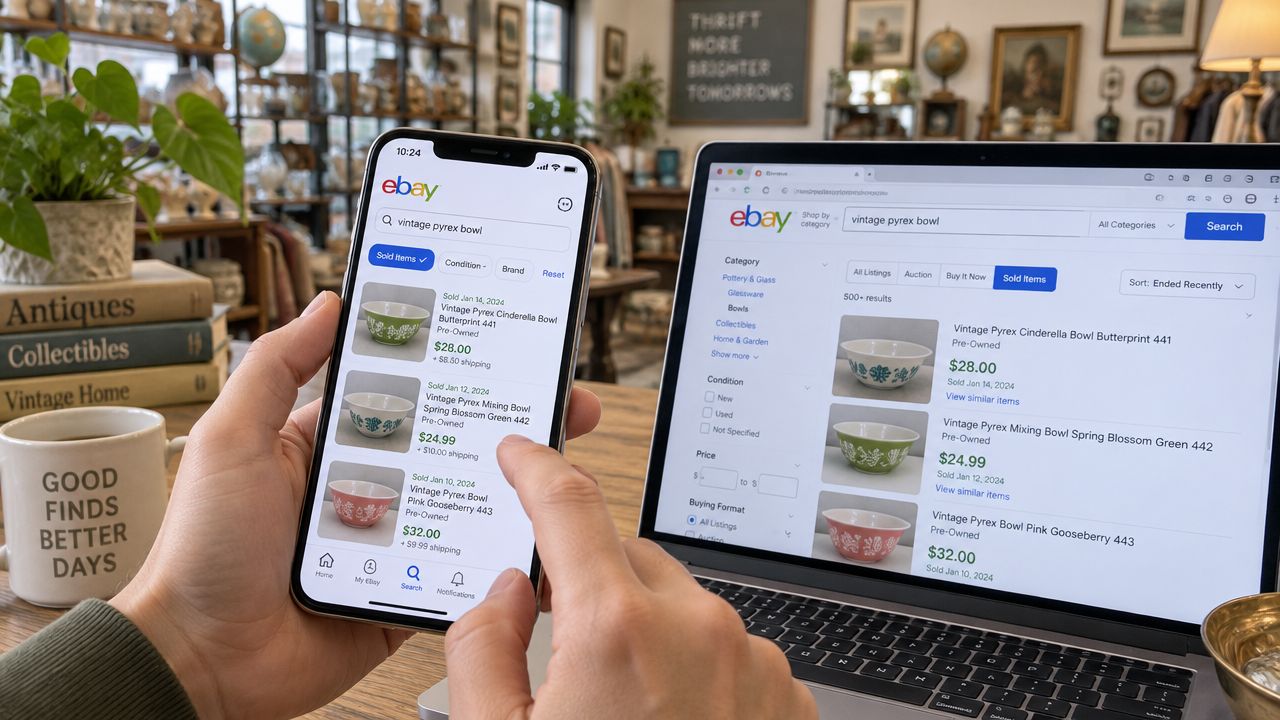
Once you have a useful filtered search, select Save search and enable email alerts. That helps you notice price drift without rebuilding the same query before every sourcing trip. Save separate searches for meaningful variants, such as “tested complete” and “parts only,” rather than mixing them.
Reading the Sold Results Like a Flipper
A sold-results page can still mislead you. The Sold filter removes unsold asking prices, but it doesn't automatically understand that a five-piece bundle is not comparable to one loose item, or that an untested unit isn't equivalent to a tested working one.
Start with four signals: sell-through rate, sample size, median price, and repeat-seller strength. Product Research exposes sell-through and related execution metrics, while a practical eBay sold-listings research guide defines sell-through rate as sold listings divided by active listings, multiplied by 100. A sell-through rate above 50% is commonly treated as strong demand, but the figure only helps when the active and sold sets describe the same product and condition.
Use the middle of the market
The median usually beats the average when results contain an auction outlier, a rare color, or a premium bundle. A set with a $22 median and a $120 outlier can produce an average that makes a beginner overpay. Look for a cluster in the price column, then open individual results to inspect condition notes, shipping cost, completeness, and photos.
Sample size determines confidence. Expert comp workflows recommend at least 5 sold comps in the last 90 days as a minimum signal and 10 to 20 comps when you need more confidence. If only 2 or 3 close matches appear, the search may be too narrow or the market too thin. The eBay comps and sell-through workflow covers the value of recent matching results, condition buckets, lot normalization, and outlier fencing.
Repeat sellers add another useful clue. If several recent sales come from sellers consistently moving the same item, that pattern is more meaningful than one flashy auction. If your 60 to 90-day set has fewer than five clean, condition-matched comps, treat the item as unsourced and walk away unless you have a strong specialist reason to accept the uncertainty.
| Metric | How to Calculate | Healthy Signal | Red Flag |
|---|---|---|---|
| Sell-through rate | Sold listings divided by active listings, multiplied by 100 | Above 50% is commonly treated as strong demand | Low conversion or mismatched data |
| Sample size | Count recent, condition-matched sold comps | At least 5, with 10 to 20 for higher confidence | Only 1 to 3 close matches |
| Median price | Order comparable sold prices and select the middle value | Prices cluster around a defensible center | Average is lifted by one outlier |
| Repeat-seller strength | Check whether multiple sellers appear across recent sales | Several sellers show repeat demand | One seller or one isolated sale dominates |
Turning Sold Comps into Real Net Profit
A sold price is revenue, not profit. Start with the total sale amount, including shipping charged to the buyer, then subtract the fees that apply to your category and order. eBay says selling fees are calculated as a percentage of the total sale amount plus a per-order fee, as described in its seller-fee documentation.
Independent 2026 fee breakdowns put the standard final value fee for most categories at 13.6% of the total sale up to $7,500, with 2.35% on the portion above that, plus a per-order fee of $0.30 for orders of $10 or less or $0.40 for orders over $10. Books, movies, and music are listed at 15.3% up to $7,500, while qualifying athletic shoes can be 8% when both the listing or start price and total sale are at least $150. Check your current fee schedule before buying because category and account details can change.
The worked example below uses a vintage cast iron skillet sold for $45 plus $8 shipping. It assumes a standard-category final value fee, a managed-payments processing estimate of around 2.9% plus $0.30, no promoted-listing premium, an actual outbound shipping cost of $8, $2 in supplies, and the stated cost of goods. The fee assumptions are illustrative, so your seller account and category should take priority.
| Line Item | Low COGS ($8) | Mid COGS ($20) | High COGS ($32) |
|---|---|---|---|
| Sale price plus buyer shipping | $53.00 | $53.00 | $53.00 |
| Estimated eBay final value fee | -$7.21 | -$7.21 | -$7.21 |
| Estimated processing fee | -$1.84 | -$1.84 | -$1.84 |
| Outbound shipping | -$8.00 | -$8.00 | -$8.00 |
| Supplies | -$2.00 | -$2.00 | -$2.00 |
| Cost of goods | -$8.00 | -$20.00 | -$32.00 |
| Estimated net profit | $25.95 | $13.95 | $1.95 |
The low-cost version produces roughly $22 of profit if you calculate the sale against the $45 item price rather than treating the buyer's shipping payment as margin. That is close to a 49% margin on the $45 sold price. At $20 COGS, the same sale becomes a thin return, and at $32 it is effectively a pass after handling your time and risk.
Promoted listings, insurance, cleaning, repairs, and packing complexity can reduce the result further. For a deeper pricing framework, use this guide to price items for resale, then write the net number into your sourcing notes before buying.
When to Cross-Check Sold Items on Other Marketplaces
eBay is usually the default because its sold ecosystem is deep, but one marketplace doesn't always describe the whole demand picture. A common, inexpensive item with a clean eBay cluster and simple shipping may not need a second lookup. A niche collectible, fragile appliance, or high-ticket piece deserves more scrutiny.
Mercari can show what buyers accept in a lower-fee, lower-hassle environment, with comparable sold prices often 10% to 15% below eBay according to the verified marketplace guidance. Poshmark matters for apparel and accessories, especially when bundle behavior changes the apparent value of an individual piece. Etsy can help with handmade and vintage demand, particularly for pre-1980s items and craft supplies. Facebook Marketplace reveals the local cash floor for furniture, large electronics, and anything whose shipping cost destroys the eBay margin.
Use a risk-based threshold
Cross-check two platforms before buying when the item is:
- Over $50: A small pricing error has a larger effect on your cash tied up.
- Niche: Rare variants can have too few exact eBay comps.
- Fragile: Damage and packing risk can erase a gross margin.
- Heavy or oversized: Local demand may be stronger than shipped demand.
For an item under $25 that is generic and fits in a poly mailer, one strong eBay sold set is usually enough. For a vintage lamp or a discontinued electronics bundle, comparing markets can change the buy decision even when eBay appears profitable.
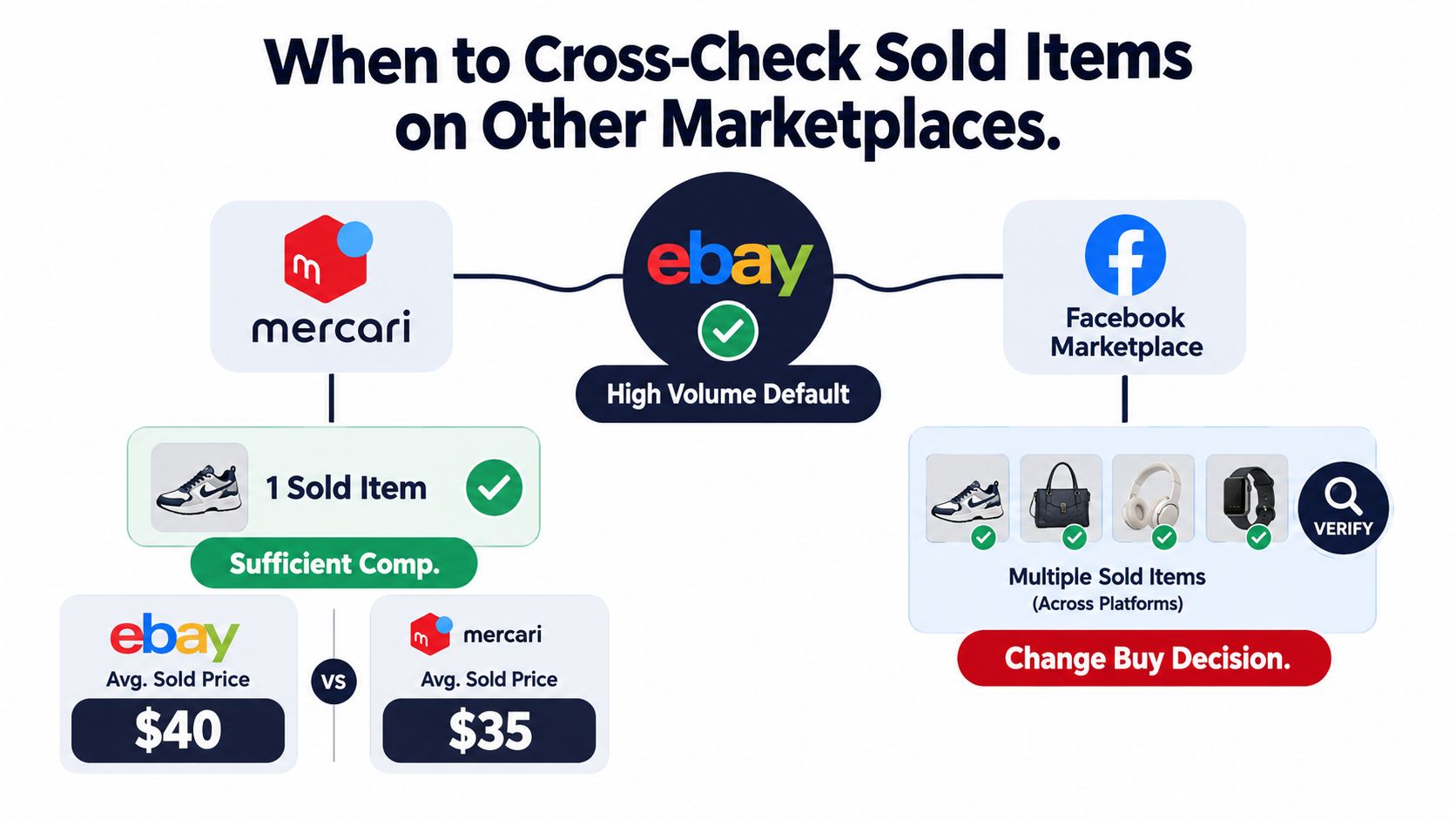
The point isn't to collect numbers from every platform on every item. It's to identify situations where the eBay result is incomplete. A recent sold-prices comparison can help frame that multi-market check, but you still need to confirm condition, shipping, and buyer location for the specific item in your hand.
Common Sold-Comp Traps and How to Avoid Them
The Sold filter doesn't protect you from bad matching. It only narrows the result set to completed transactions. Your job is to decide whether each transaction belongs in the comp sample.
A five-piece lot selling for $120 can make a single loose piece look far more valuable than it is. Parts-only listings can also drag the median down when they share the same model number as a tested working unit. Damaged, incomplete, open-box, untested, and restored examples need separate buckets.
Fence out the bad matches
Search titles and descriptions for terms such as for parts, not working, as is, cracked, and broken, then inspect the photos anyway. Sellers don't always describe damage consistently, and a title can hide missing lids, replacement parts, heavy wear, or a bundle that isn't obvious from the first image.
Use the same unit quantity in your comparison. If only lots appear, divide the result proportionally as a starting point, then apply a sanity check for bundle discounts. A five-item lot rarely establishes the exact single-item value.
Stale data is another problem. For fast-moving categories, comps older than 6 months can be too old, while slow niches may support data older than 12 months. Re-run the search before a sourcing trip when a category is seasonal, trend-sensitive, or affected by changing buyer demand.
One $400 sale surrounded by $60 sales is a reason to investigate, not a reason to buy at $400.
The evidence-based purchasing guide is useful for building a repeatable habit, but the aisle-level rule is simple: require at least five clean recent sales before committing to a price, use the median instead of the average, and assume the highest result needs an explanation.
| Trap | How It Skews Comps | Fix |
|---|---|---|
| Bundle or lot | Inflates the apparent per-item value | Match unit quantity or normalize carefully |
| Parts-only sale | Pulls a working-item sample downward | Exclude non-working and parts-only conditions |
| Damaged or incomplete item | Makes a poor condition look comparable | Open the listing and inspect photos and details |
| Stale result | Reflects an older market, not current demand | Re-run the search before sourcing |
| Auction outlier | Anchors the buy price to an unusual event | Use the median and demand several clean comps |
The Aisle Checklist for Faster Buy Decisions
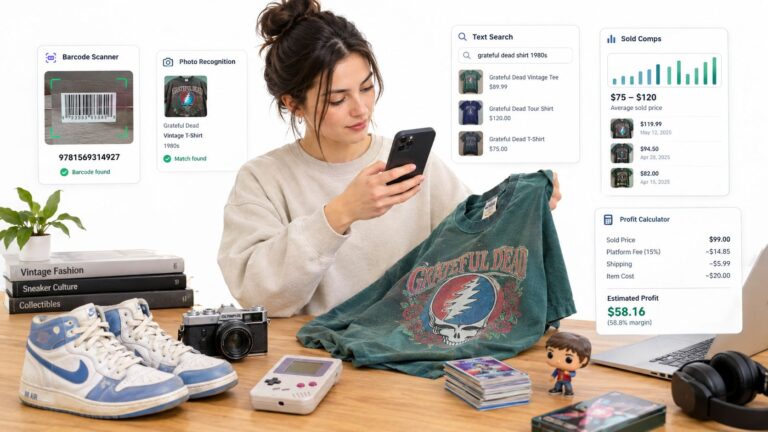
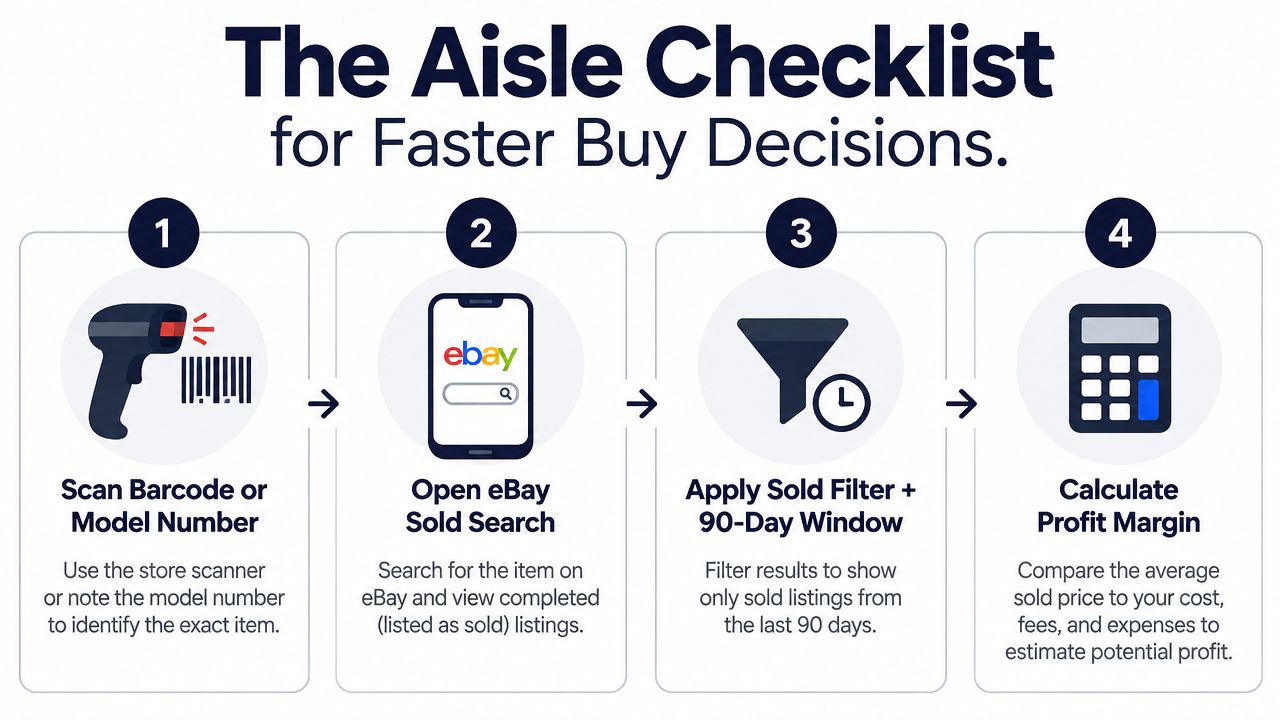
A good sourcing workflow should be quick enough for a crowded Goodwill aisle and strict enough to stop impulse buys. Scan the barcode or model number first, then verify the physical item against the result. If there's no barcode, use the model text, brand, dimensions, color, and visible variant details.
Run this sequence:
- Identify the exact item. Confirm model, size, variant, completeness, and condition.
- Open eBay Sold search. Apply Sold items and a recent 90-day window.
- Check the cluster. Look for at least 10 comparable sales when the market supports that sample, then record the median and note shipping.
- Calculate the take-home. Subtract eBay fees, shipping, supplies, repairs, and your sourcing cost.
- Cross-check riskier finds. Use another marketplace for items that are expensive, fragile, heavy, or niche.
- Apply your margin floor. A 30% minimum margin is the stated buy rule here, not a promise of profit.
The exact threshold can vary by category and handling time. A $10 book with quick processing may deserve a different standard from a large tested appliance that occupies shelf space and carries return risk. The formula should stay consistent even when the threshold changes.
ScanFlip AI is one option for compressing this workflow into the sourcing moment. It offers AI photo scanning without a barcode, barcode scanning, and text search, then aggregates sold comps across eBay, Poshmark, Mercari, Depop, Amazon, Whatnot, ThredUp, Facebook Marketplace, and TikTok Shop. It also factors fees and shipping into an expected net-profit result and returns a red or green flip-or-pass verdict. Crosslisting tools such as Vendoo and List Perfectly serve a different part of the resale process and can be used alongside a sourcing tool.
Profitable resellers don't wait until they reach the truck to decide whether an item was worth buying. They use the same sold-comps and net-profit formula at the shelf, accept uncertainty when the data is thin, and pass when the numbers only work under an optimistic asking price.
Use ScanFlip AI while you're sourcing to identify items by photo, barcode, or text and compare real sold comps across major marketplaces. Check the net profit after fees and shipping, then use the red or green verdict to make a faster flip-or-pass decision before the money leaves your pocket.