
Barcode Scanner App Price Comparison for Resellers
You're standing in a Goodwill aisle with a $1.50 paperback in your hand. One app shows a promising price, another returns nothing, and a third gives you a number pulled from active listings instead of sold comps. The next shopper is already reaching toward the same cart, so you've got roughly a minute and a half to decide whether the book belongs in your tote or back on the shelf.
That decision isn't about finding the highest gross price. It's about knowing what survives cost of goods, marketplace fees, shipping, returns, and your time. A scanner that saves a few seconds but misses difficult items can cost more than its subscription. A scanner that finds a $6 to $18 gross book flip but ignores fulfillment costs can turn a full bin run into a death pile.
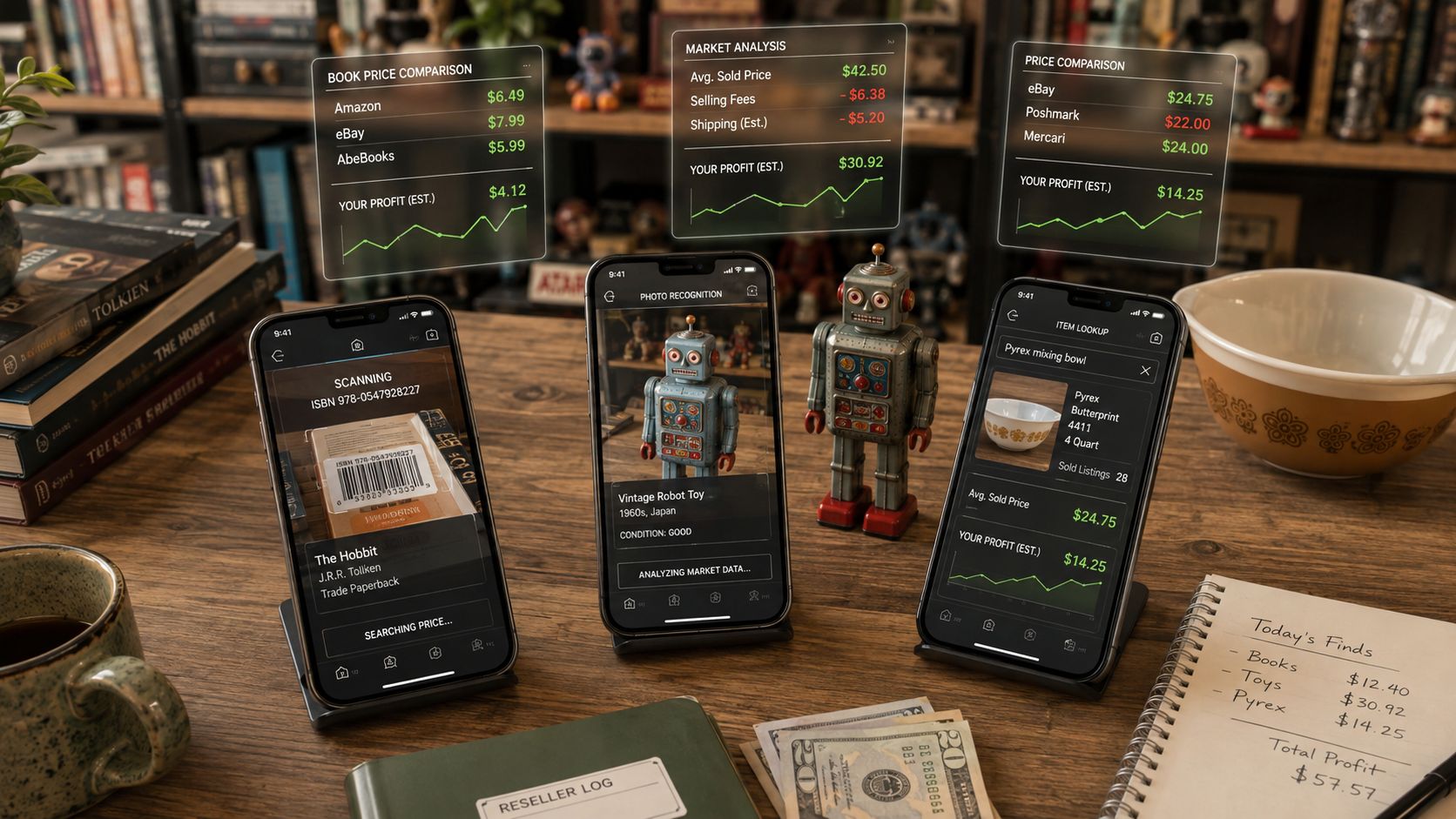
This barcode scanner app price comparison uses three practical lenses: barcode scanning, AI photo scanning, and text search. The right choice depends on what you source, where you sell, and whether the app shows actual take-home profit instead of a shiny sticker price.
Table of Contents
- Why Resellers Are Comparing Scanner Apps at the Aisle
- The Three Scan Methods and Where Each One Actually Works
- Sold Comps Coverage Across Marketplaces
- Net Profit After Fees vs. Sticker Price
- Subscription Pricing and Free Tiers Compared
- Matching the App to Your Sourcing Style
- Which Scanner App Fits Your Reselling Game
Why Resellers Are Comparing Scanner Apps at the Aisle
A paperback bought for $1.50 can look attractive when an app returns a $15 sale price. That number means very little until you subtract the selling fee, shipping, packaging, possible returns, and the cost of getting the item ready for sale. If the book sells through Amazon FBA, fulfillment and referral charges can change the decision again.
The same problem appears with clothing, shoes, collectibles, and electronics. A reseller sees a $40 sold comp, pays $12 at an estate sale, and later discovers that shipping and marketplace deductions leave too little profit for the time spent photographing, measuring, listing, packing, and answering questions.
Practical rule: A scanner should answer “Should I buy this?” rather than merely “What price can I search for?”
The category has grown beyond simple barcode lookup. One market report valued the global barcode scanner app market at $1.8 billion in 2025 and projected $3.6 billion by 2034, with an 8.7% CAGR. The same report gave retail a 34.2% share of applications and estimated North American revenue at about $0.72 billion in 2025, roughly 40% of global revenue. Those figures point to a mature buying workflow, not a novelty utility, particularly for retail sourcing and mobile price checks. Market Intelo's barcode scanner app market report provides that market context.
Another report placed the market at $935.9 million in 2024, projected $1.023 billion in 2025, and forecast $2.5 billion by 2035, with a 9.3% CAGR. It connects scanner adoption with inventory efficiency, price comparison, and profit screening, which is exactly where resellers feel the value. WiseGuy Reports' bar code scanner app market forecast offers the second estimate.
What choosing wrong costs
A barcode-only app can be excellent for sealed media and retail books, then useless on an untagged vintage jacket. An app built around Amazon may suit an FBA seller but waste time for someone selling mainly on Poshmark or Mercari. A low-cost subscription can become expensive if it forces you to open multiple marketplace apps for every item.
Evaluate every scanner against three questions:
- Can it identify the inventory you find?
- Does it use sold prices rather than asking prices?
- Does it calculate net profit after the fees and shipping that apply to your sale?
The rest of the decision follows from those answers.
The Three Scan Methods and Where Each One Actually Works
Barcode scanning is still the fastest route when the item has a clean, readable UPC, ISBN, or other product code. It works especially well for retail books, sealed DVDs, video games, boxed electronics, and grocery-store sourcing. Point the camera at the code, verify the product match, and inspect sold comps before spending money.
It breaks down quickly on thrift inventory. A worn spine, glare from shrink wrap, a handwritten estate-sale sticker, or a reissued paperback with a stripped cover can produce a bad match or no match at all. Barcode data identifies the product code, not necessarily the exact edition, condition, bundle, or variation sitting in your hand.
Photo scanning handles visual inventory
AI photo scanning earns its keep when the object has no barcode but has recognizable visual signals. A Funko figure, Beanie Babies, vintage shoes, graphic clothing, box art, or a distinctive collectible may be easier to identify from shape, color, and design than from typed keywords.
Lighting still matters. A dim Goodwill back room, cluttered background, reflective plastic, or partially hidden label can confuse image recognition. You should photograph the useful evidence, including the front, model label, brand stamp, and any condition flaw, rather than firing one careless shot and trusting the first result.
Text search fills the identification gaps
Text search works when you know the name, model, designer, or distinctive phrase but can't get a useful image or barcode. It's practical for vintage Pyrex patterns, handbags, mid-century glassware, artisan goods, and electronics with a visible model number.
The weakness is spelling and specificity. If you can't identify the designer, pattern, or model accurately, broad text searches return noisy comps. Text search also needs careful filtering because similar names can represent very different products.
| Category | Barcode Scan | Photo Scan | Text Scan |
|---|---|---|---|
| Retail books and sealed media | Excellent when the code is readable | Useful for edition confirmation | Useful for title or model searches |
| Untagged vintage clothing | Usually unavailable | Strong for recognizable styles and labels | Strong when brand or model is known |
| Shoes and collectibles | Strong for boxed items | Strong for shape, color, and packaging | Useful for brand and model terms |
| Vintage glassware and Pyrex | Rarely useful | Helpful for pattern recognition | Strong when the pattern name is known |
| Worn or reissued paperbacks | Unreliable if the code or edition differs | Helpful for cover comparison | Useful for title, author, and edition terms |
| Electronics | Fast for boxed retail products | Helpful for model and condition checks | Strong when the model number is visible |
The practical answer isn't choosing one method forever. Pair two methods, then verify the sold comp and condition manually. For a deeper look at identification workflows, see this guide to item identifier apps.
Sold Comps Coverage Across Marketplaces
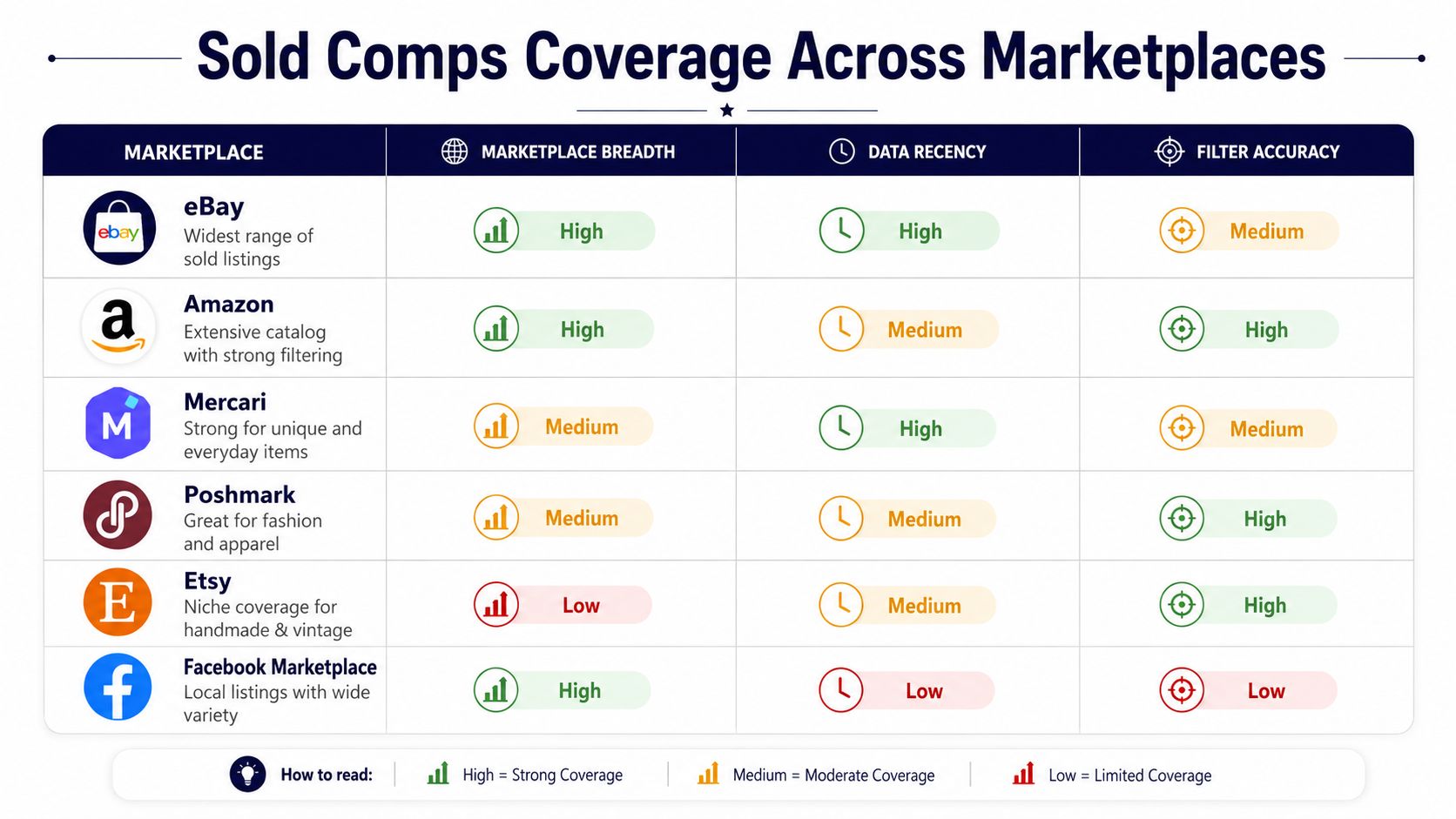
A scanner that returns one marketplace's number isn't giving you a complete price comparison. You need to know which marketplaces contribute sold comps, how the results are filtered, and whether the app handles selling costs.
eBay usually supplies broad resale evidence, particularly for books, electronics, collectibles, and general merchandise. Amazon can help with product demand and retail sourcing, but an Amazon price without referral, closing, or FBA outbound deductions can create a false ceiling. Mercari and Poshmark matter for clothing and lifestyle goods, while Etsy may matter for vintage and handmade categories. Facebook Marketplace can reveal local demand, but its data can be less consistent and harder to filter.
The three comparison criteria
Marketplace breadth tells you whether the app checks one channel or several. A narrow eBay-only tool can be perfectly adequate for an eBay specialist, but it's limiting when your inventory could sell faster on Depop, Mercari, Poshmark, Whatnot, ThredUp, or another channel.
Fee handling matters more than the raw number. Some apps display a sale price and leave you to calculate final value fees, payment processing, shipping, promoted listing costs, and fulfillment deductions. Others put those deductions directly into the scan result.
Aggregation speed affects decisions in categories that flood quickly. A comp set that reflects older sales can make a declining product look healthier than it is. Recent sold comps matter more than stale historical highs, especially after a viral trend or retail clearance wave creates a pile of identical inventory.
Price-comparison apps commonly scan a code, search retailer or marketplace data, and return prices quickly. OneScan describes a workflow that checks Amazon, Walmart, Best Buy, and eBay after the user points the camera at a product barcode. That's useful for initial research, but reseller decisions still require sold comps, condition matching, and fee deductions. OneScan's barcode price-checking workflow illustrates the basic model.
Use a recent sold prices workflow when a category is moving fast. Don't let an old high sale convince you to buy an item that current buyers no longer want.
Net Profit After Fees vs. Sticker Price
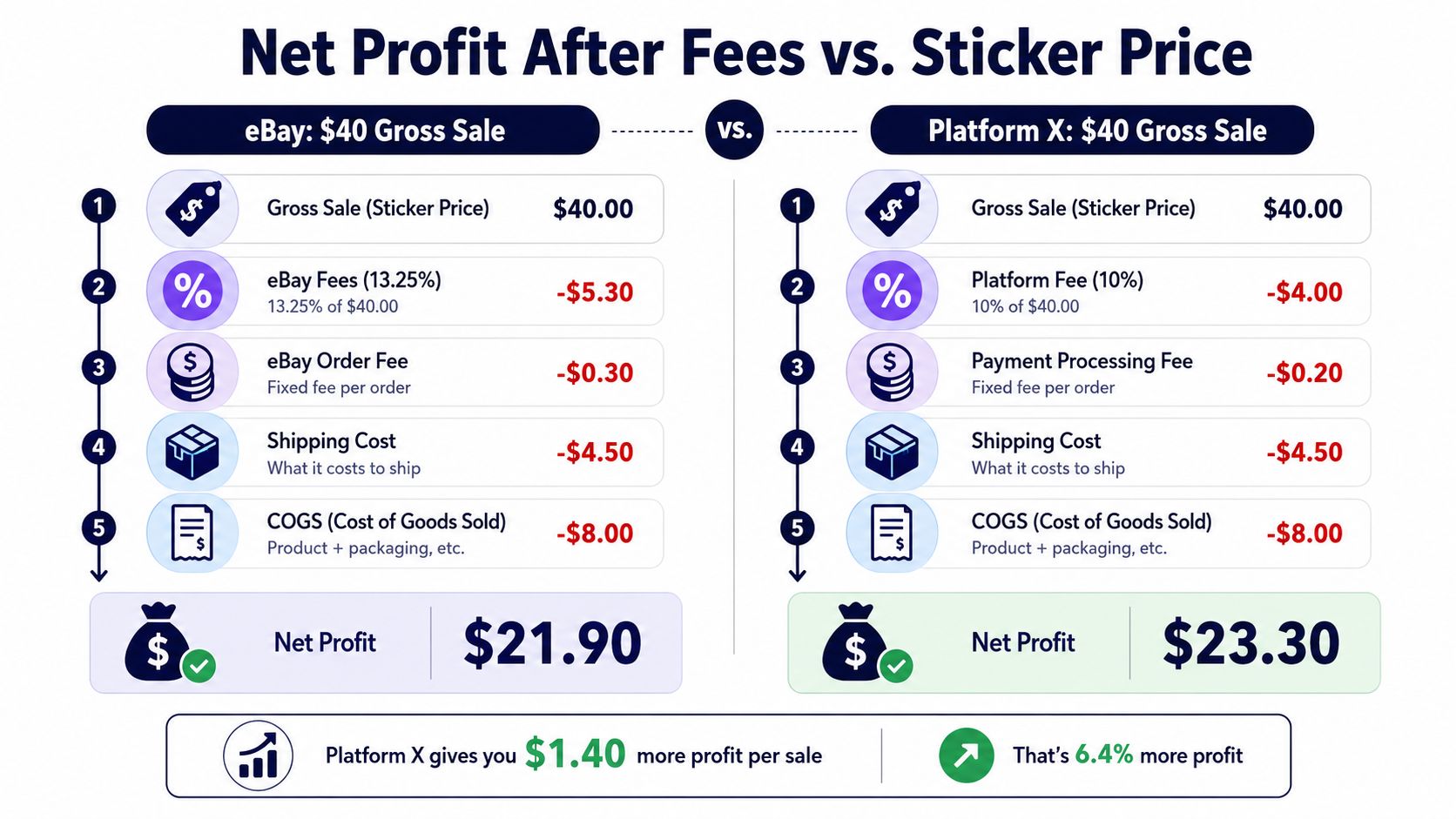
A $40 eBay sale isn't a $40 payday. Using the example supplied for this comparison, a 13.25% final value fee removes $5.30, then a $0.30 order fee, $4.50 shipping cost, and $8.00 cost of goods leave $21.90 in net profit. The arithmetic is simple, but most scanner apps don't show every deduction on the first result.
That distinction changes sourcing decisions. A $40 item bought for $8 can look like a strong flip from the gross comp alone. After the listed deductions, the take-home amount is much smaller, and you still haven't accounted for packing materials, returns, prep labor, or a prep center.
Why the marketplace changes the answer
Take the same hypothetical $45 sold comp and compare eBay with Amazon FBA. The gross number is identical, but the deductions aren't. FBA referral, closing, fulfillment, storage, prep, and outbound costs can consume a substantial portion of revenue, while FBM or Mercari may leave a different amount in the reseller's pocket.
A paper ROI calculation can look acceptable before the hidden costs arrive. Shipping supplies, returns, prep-center charges, and handling time can reduce the final result sharply. That's why “20% ROI” on a sourcing screen can collapse to 6% after realistic operating costs in the example described here. Those figures are scenario inputs, not universal marketplace rates.
Work backward from your required net profit:
- Set the minimum amount you need after fees and shipping.
- Enter the actual cost of goods, not an estimated average.
- Use a condition-matched sold comp, not the highest result.
- Add shipping, supplies, prep, and likely return exposure.
- Pass when the remaining profit doesn't justify your time.
Apps handle this differently. Some show gross comps first and push fees into a separate calculator. Others present a net-profit estimate in the scan result. The latter is more useful in a Goodwill aisle because it puts the buy decision where it belongs, before the money leaves your pocket. The net profit calculation guide is useful when you're building your own worksheet or checking an app's math.
Subscription Pricing and Free Tiers Compared
Scanner subscriptions vary widely, and the cheapest monthly price isn't automatically the cheapest workflow. Apple's Barcode Scanner: Price Checker offers 5 free scans per day, with paid access listed at $8.99 per week or $48.99 per year. It also allows users to rescan items in history for free. Apple's Barcode Scanner price-checker listing shows how subscription pricing can replace the old one-time-purchase model.
Independent reseller comparisons show a broad spread across tools. A 2026 roundup lists ScoutIQ at $14 per month and Scoutly at $16 per month, while other scanning and inventory tools range from free tiers to hundreds per month depending on capabilities. BarcodeTalk's reseller scanner roundup provides that comparison.
| App | Free Tier | Monthly | Annual | Key Add-Ons |
|---|---|---|---|---|
| Barcode Scanner: Price Checker | 5 scans per day | $8.99 per week | $48.99 per year | Free history rescans |
| ScoutIQ | Not specified in the cited data | $14 | Not specified | Feature depth varies |
| Scoutly | Not specified in the cited data | $16 | Not specified | Feature depth varies |
| Amazon Seller App | Not specified in the cited data | Not specified | Not specified | Marketplace-specific tools |
| eBay built-in scanner | Not specified in the cited data | Not specified | Not specified | eBay-only workflow |
| Other reseller tools | Free tiers may exist | Can range widely | Can range widely | Advanced features and access levels |
The detailed price points for Seller Assistant, ScanPower, HobbyDB, Amazon Seller App scan caps, eBay's historical comp limitations, annual discounts, lifetime deals, VA seats, and revenue-share plans aren't provided in the verified data. Don't treat a roundup or an app-store page as proof of a current add-on structure. Check the live plan page before subscribing, particularly if you need multi-marketplace access or additional users.
What subscription math actually matters
A part-time garage-sale hunter may scan too little to justify a full research stack. A bookseller who scans every sourcing trip may benefit from a dedicated tool, provided the app's database and fee assumptions match the selling channel.
Per-scan limits can punish high-volume sourcing, while broad subscriptions can make low-volume sourcing unnecessarily expensive. Test the free tier with the exact inventory you buy, then compare the subscription cost against the net profit from items you would have passed on without the tool.
Matching the App to Your Sourcing Style
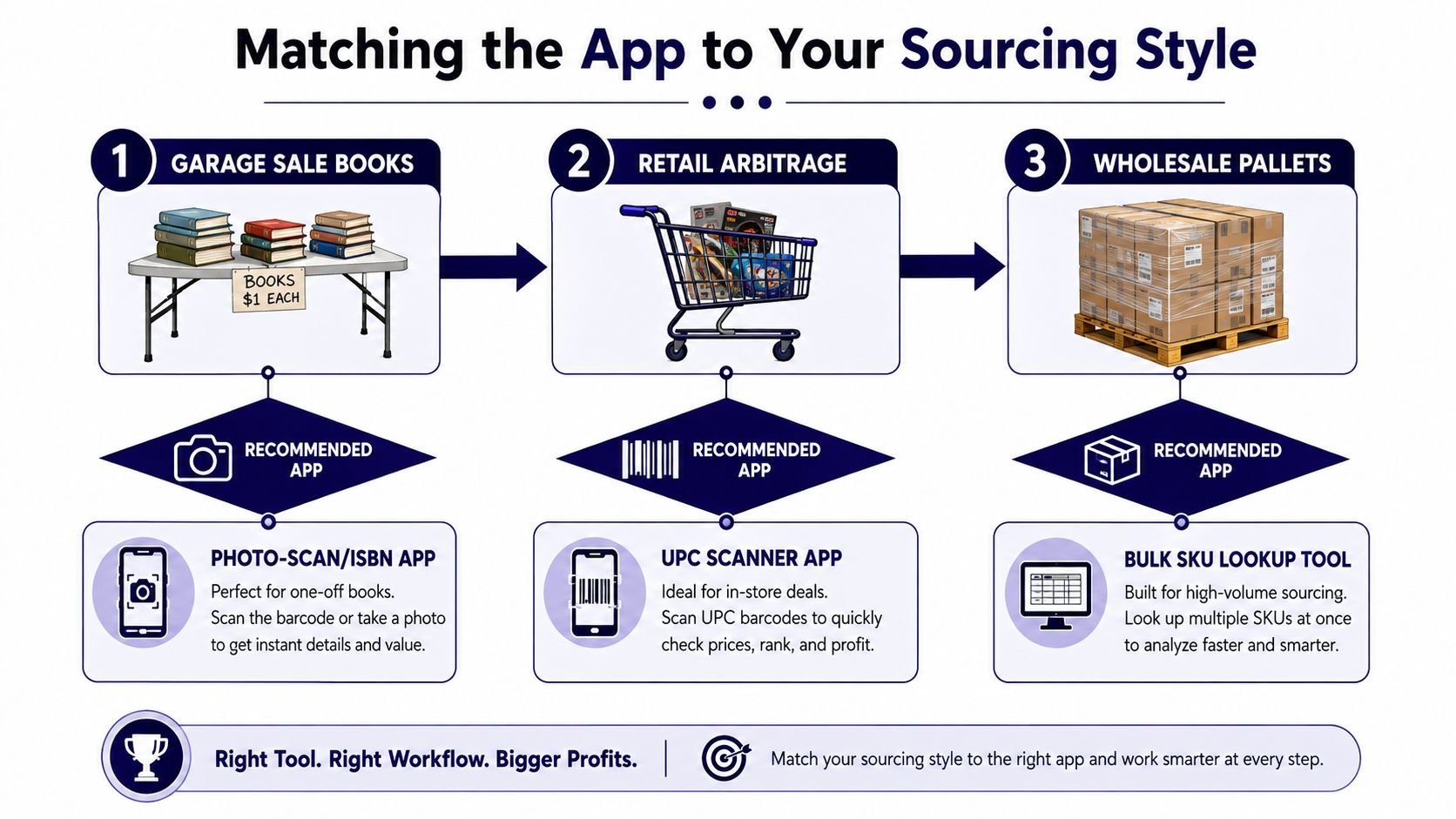
At a garage sale, the best app is the one that identifies the item before the seller packs it away. A card table covered with paperbacks often contains mixed editions, missing dust jackets, and books without useful barcodes. Photo scanning or ISBN lookup gives you a better starting point than repeatedly aiming at a damaged UPC.
Suppose you find a recognizable hardcover with a $2 sticker. Photograph the cover, check the edition, inspect sold comps, and account for shipping before buying. A barcode result that matches a newer edition can make an ordinary book look like a BOLO, so visual confirmation still matters.
Untagged vintage needs more than a UPC reader
An untagged vintage rack is where barcode-only apps lose their value. Clothing, shoes, handbags, and older accessories often have no scannable product code. Photo recognition can identify visual patterns, while text search helps when a label, designer name, or model number is visible.
The photo needs to show the evidence buyers care about. Capture the label, logo, stitching, outsole, hardware, and distinctive print. If the image result is broad, use text search to narrow it, then compare condition and measurements against actual sold comps.
Estate-sale electronics reward speed
An estate sale with high-end electronics is different. Model labels, serial references, and clean UPCs can make barcode scanning and text search efficient, especially when several similar devices sit on one table. You still need to check included accessories, power status, cosmetic condition, and whether the sold comps match the exact configuration.
A dual-mode workflow prevents the most common mistake, trusting one identification method. Barcode for retail-new and sealed goods. Photo or text for untagged thrift inventory. Use both when you move between retail arbitrage, books, vintage, and collectibles in the same week.
Which Scanner App Fits Your Reselling Game
There isn't one universal winner. An Amazon-heavy FBA seller, an eBay vintage clothing flipper, a book scanner, and a part-time garage-sale hunter have different research problems, so paying for the same app can be wasteful.
| Reseller Archetype | Dominant Sourcing | Best App Match | Why It Wins |
|---|---|---|---|
| Amazon-heavy FBA seller | Retail arbitrage and boxed goods | Amazon-focused barcode tool | Fast product lookup and channel-specific research |
| eBay vintage clothing flipper | Thrift racks and estate sales | Photo and text identification tool | Handles untagged items and brand details |
| Thrift-book scanner | Used books and media | Barcode or ISBN scanner | Fast matching when codes and editions are clear |
| Part-time garage-sale hunter | Mixed household goods | Free or dual-mode scanner | Avoids paying for unused marketplace depth |
| Card and collectibles flipper | Boxes, loose items, and visual variants | Dual-mode photo and barcode tool | Handles both sealed products and untagged finds |
The FBA seller should prioritize accurate product matching and Amazon-specific deductions. A tool that returns an Amazon price but ignores referral, closing, fulfillment, and prep costs can encourage bad buys.
The vintage clothing flipper needs photo recognition and text search more than a polished UPC workflow. A niche app can beat an all-in-one if it identifies the exact brands and styles that fill your racks, but it still needs reliable sold comps.
The thrift-book scanner benefits from speed, history, and edition accuracy. The part-time seller who scans fewer than ten items a week should start with a free tier or narrow subscription, not a large plan built for constant sourcing.
Pricing also shouldn't decide the purchase by itself. A subscription fee is visible. The hidden cost is opening multiple apps, retyping product names, checking sold comps manually, calculating fees, and still making a rushed decision before another picker takes the item.
The most expensive scanner is the one that makes you research the same item twice.
One tool can cover all three methods without replacing your listing or crosslisting stack. ScanFlip AI offers AI photo identification with no barcode needed, barcode scanning, and text search, then aggregates sold comps across eBay, Poshmark, Mercari, Depop, Amazon, Whatnot, ThredUp, Facebook Marketplace, and TikTok Shop. It also estimates net profit after fees and shipping and returns a red or green flip-or-pass verdict. Use it as a sourcing decision tool alongside crosslisting products such as Vendoo or List Perfectly, not as an inventory-management replacement.
Choose the method by the item in front of you: barcode for clean retail goods, photo for untagged visual inventory, and text for items whose identity is known but can't be scanned.
If you're tired of comparing gross prices and discovering the profit disappeared after fees, ScanFlip AI gives you photo, barcode, and text scanning with sold comps across major marketplaces and a net-profit flip-or-pass result. Try it on your next Goodwill run, garage sale, or estate-sale sourcing trip before you buy another questionable item.