
Barcode Scanner Resellers Guide to Faster Flip Decisions
You're standing in a Goodwill aisle with a $4.99 book in one hand and your phone in the other. The cover looks promising, but the question isn't whether someone is asking $25 for it. The question is whether it has recent sold comps, what the marketplace takes, what shipping costs, and whether anything is left after your cost of goods.
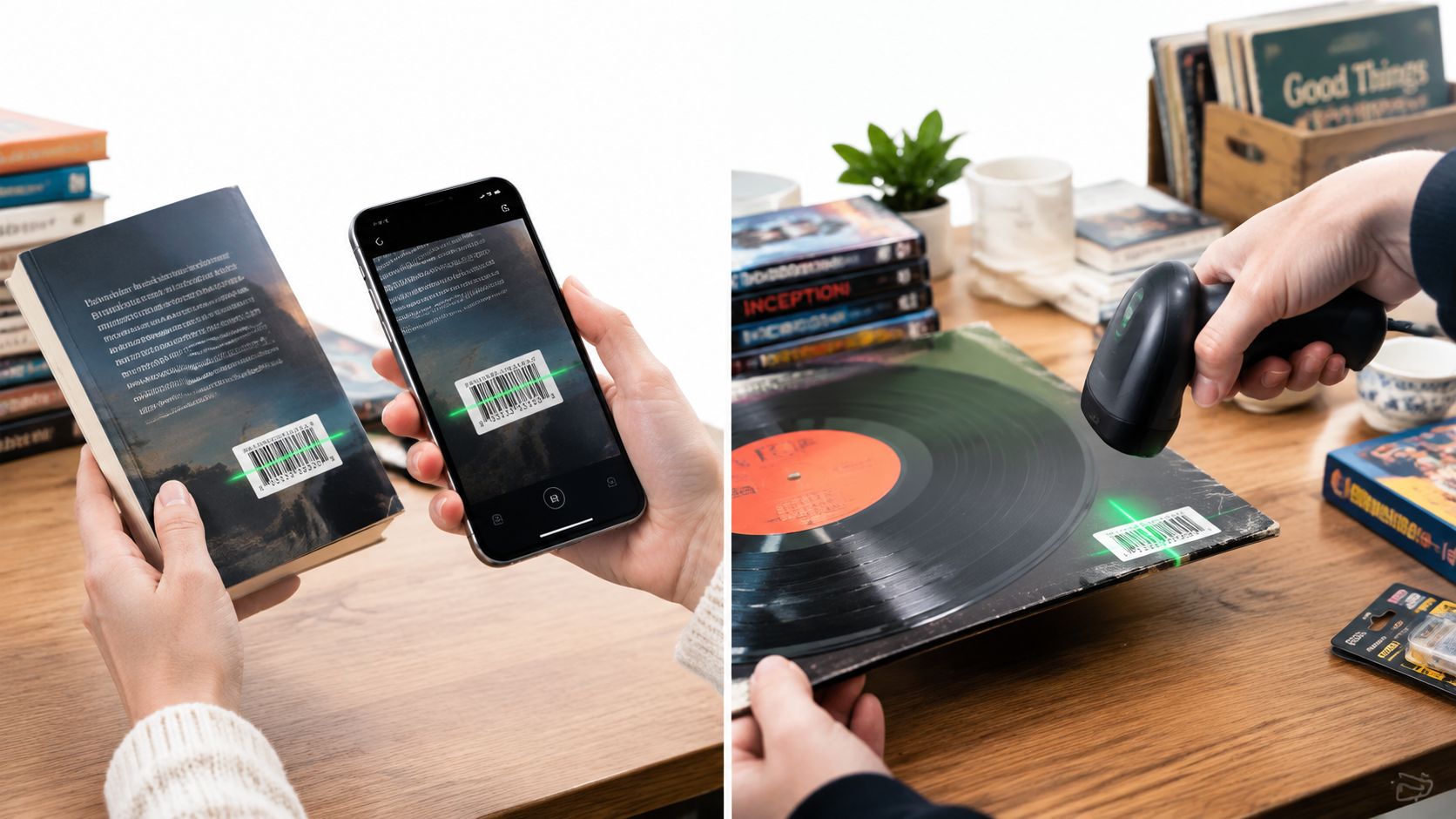
That's where barcode scanner resellers have an advantage. A UPC or ISBN can identify a book, game, movie, or boxed retail item before another picker grabs it. But a scan only tells you what the item is. It doesn't automatically tell you whether buying it is smart.
The useful workflow connects identification, sold prices, fees, shipping, and net profit. You need a fast way to scan when a barcode exists, a backup when the label is damaged, and a clear flip-or-pass rule before money leaves your pocket. The practical difference between a productive sourcing trip and another death pile often comes down to whether you checked sold comps instead of guessing from asking prices.
For barcode scanner resellers, the goal isn't chasing the most expensive hardware. It's building a decision process that works in a crowded thrift aisle, at a garage sale bin, or during retail arbitrage. A dedicated scanner may improve speed, but it won't rescue a weak comp, an oversaturated category, or a sale price that disappears after fees.
This guide focuses on that complete process, including where barcode lookup wins, where it fails, and how to combine barcode scans, AI photo identification, and text search into a fee-aware buy decision. For a closer look at the sourcing logic behind scanning before buying, see this practical guide to scanning items before you buy.
Table of Contents
- Introduction Why Barcode Scanning Still Decides Your Profit
- How Barcodes Became the Reseller Pricing Backbone
- Phone Apps vs Dedicated Scanners for Resellers
- Where Barcode Scanning Falls Short and What to Use Instead
- Building a Fast Barcode Sourcing Workflow That Checks Profit
- Turning Sold Comps Into Net Profit Before You Buy
- Choosing Your Scanning Stack and Sourcing Smarter Next Trip
Introduction Why Barcode Scanning Still Decides Your Profit
The first mistake many resellers make is treating a barcode scan as a verdict. It isn't. It's an identification shortcut.
A scan can confirm that the item in your hand is a specific edition of a book, a particular video game release, or a boxed product with a recognizable UPC. That matters because accurate identification gives you a better chance of finding relevant sold comps instead of comparing your item with a newer version, a different format, or an incomplete bundle.
The second mistake is trusting the gross sale price. A $20 sold price sounds useful until marketplace fees, shipping, returns, and your purchase cost take their share. If the item cost $4.99 and leaves only a few dollars after expenses, the scan saved time but didn't create a good flip.
A barcode answers “what is it?” Sold comps and fee math answer “should I buy it?”
That distinction matters most when the aisle is moving. You might have a book scanner behind you, another reseller working the same shelf, and only a short window to decide. Opening several marketplace apps, searching the title manually, checking sold history, estimating shipping, and doing fee math can turn a quick opportunity into a pass by default.
A practical barcode workflow should answer four questions:
- Identity: Does the code match the exact item, edition, size, or bundle?
- Demand: Are buyers completing purchases for this item?
- Net: What remains after platform fees, shipping, and cost of goods?
- Decision: Does the result meet your minimum profit threshold?
Barcode scanner resellers who skip the last two questions often buy attractive inventory that sits. The shelves fill with books, media, games, and boxed goods that looked profitable at a glance but never made sense after deductions.
The best setup balances speed with accuracy. A slow process causes missed opportunities. A fast process built on asking prices and incomplete matches creates bad buys faster. Your scanner is valuable because it compresses the identification step, but the money is made or lost in the decision that follows.
How Barcodes Became the Reseller Pricing Backbone
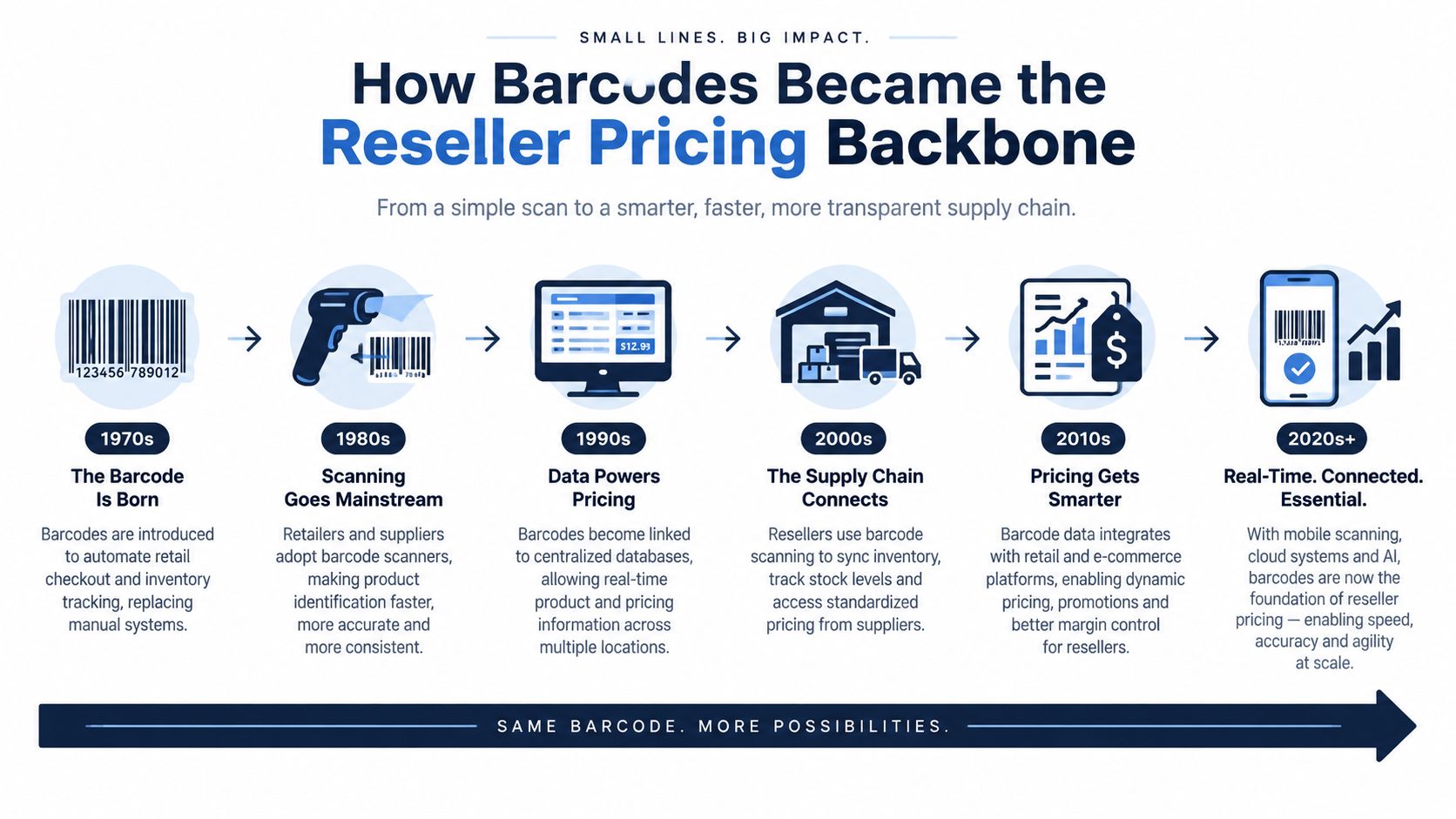
The modern resale workflow grew from a retail system designed to make products identifiable across stores. On June 26, 1974, the first Universal Product Code scan was completed on a pack of Wrigley's Juicy Fruit gum at Marsh Supermarket in Troy, Ohio. That commercial debut gave retailers a shared product identity, which later made catalog lookup, pricing databases, and resale comparisons possible at scale, as documented in this history of the first barcode scan.
Early adoption took time. Fewer than 200 U.S. stores had scanners by 1977, about 33% of U.S. grocery stores had them by 1984, and adoption exceeded 90% by 1990, according to the same historical account. Early scanners also cost more than $100,000 per store in 1974 dollars, so the technology began as expensive retail infrastructure rather than a casual sourcing tool.
Why a universal identity helps resellers
A UPC doesn't tell you the item's current value. It gives software a consistent reference point. That reference can connect the physical product in your hand with catalog records, marketplace history, and sold-price data.
That's why barcode lookup works especially well for books, media, games, and boxed retail goods. These products often have stable manufacturer identities and repeatable versions. A barcode can narrow the search before you evaluate condition, completeness, edition, or demand.
The system is weaker for vintage clothing, shoes, handmade goods, older collectibles, and untagged household items. Those products may have no retail barcode at all, or the code may identify a broad product family rather than the exact color, size, release, or condition. A scan can still be technically successful while producing a poor match.
Retail symbology affects sourcing coverage
Retail units are primarily encoded with EAN-13, UPC-A, EAN-8, or UPC-E. GS1 DataBar is increasingly relevant, while GS1-128 and ITF-14 aren't used at retail point of sale, according to GS1 Canada's barcode standards guidance.
That distinction matters if your workflow only supports basic 1D UPC lookups. A scanner that recognizes the broader retail barcode family gives you better coverage, while filtering out logistics codes prevents irrelevant results from entering your pricing process.
Barcode scanning became economically valuable because it improved store operations. A U.S. Census working paper found that early scanners increased store labor productivity by about 4.5% on average in the first few years after adoption, with larger gains in stores carrying more packaged goods likely to bear barcodes, as shown in the U.S. Census working paper on scanner adoption. Historical summaries also report checkout processing that was 20% to 40% faster and pricing errors reduced by more than 80%, which explains why barcode scanning remains useful when a reseller needs to process many similar items quickly.
Phone Apps vs Dedicated Scanners for Resellers
Phone scanning apps win on convenience. Your phone is already in your hand, it has a camera, and it can connect identification with pricing data in one workflow. For a casual garage sale run or a thrift trip with mixed categories, that simplicity is hard to beat.
Dedicated handheld scanners win on repetitive volume. If you're processing shelves of books, stacks of games, or large batches of boxed retail goods, a physical trigger and consistent aiming can feel faster and less tiring than opening a camera interface for every item. The retail history is relevant here, since scanner-equipped stores processed checkout 20% to 40% faster, according to the U.S. Census scanner adoption research.
The trade-off is that hardware speed doesn't equal sourcing accuracy. A fast handheld can identify an item, but it won't know whether the match is the right edition or whether the net profit clears your threshold. You still need pricing data and fee math.
Match the tool to the aisle
| Feature | Phone Scanning App | Dedicated Handheld Scanner |
|---|---|---|
| Up-front setup | Uses a device you already own and usually requires less equipment | Requires separate hardware, pairing, charging, and compatibility checks |
| Sourcing speed | Convenient for mixed items and occasional scans | Strong for repetitive scanning and high-volume shelves |
| Ergonomics | Familiar, but repeated camera use can be slower in crowded aisles | Physical trigger can make batch scanning more comfortable |
| Barcode coverage | Depends on the app and phone camera | Depends on the scanner's supported symbologies |
| Photo identification | Can support visual workflows when no barcode exists | Usually focused on barcode capture rather than item recognition |
| Pricing integration | Often connects directly to search and sold-comp workflows | May need a phone, tablet, or separate software connection |
| Best fit | Mixed-category thrift, estate sale, garage sale, and side-hustle sourcing | Books, media, games, and boxed goods processed in volume |
A dedicated scanner makes sense when your sourcing is barcode-heavy and repetitive. A phone app is more flexible when your inventory shifts between books, apparel, collectibles, shoes, and household goods.
The best choice also depends on scan conditions. A phone camera may handle a label well when you can move close and adjust the angle. A handheld may be easier when you're scanning quickly, but only if it supports the barcode types you encounter.
For a deeper comparison of phone-based sourcing tools, use this guide to barcode scanning apps for retail arbitrage. Don't buy hardware just because its specification sheet looks impressive. Test it against your real inventory, your average sourcing environment, and the amount of manual comp checking you're willing to do after identification.
Where Barcode Scanning Falls Short and What to Use Instead
A barcode fails in two different ways. Sometimes the scanner can't read the label. Other times it reads the label perfectly, but the result doesn't answer the resale question.
Thrifted inventory creates difficult image conditions. Labels may have low contrast, a damaged edge, a missing quiet zone, inconsistent printing, or a surface that forces an awkward reading angle. GS1 guidance also points to configurable timeout settings in the 200 to 700 millisecond range as a way to balance scan completeness with checkout speed, along with support for multiple barcode types. Those practical details are covered in this GS1 scanner guidance document.
Repeatedly rescanning a faded label usually wastes more time than switching methods. Wipe the surface if it's dirty, change the angle, and try once more. If the label is physically damaged or the product has no barcode, move on.
Know which categories need a different input
Barcode lookup is strongest when the product has a stable retail identity. It underperforms when value depends on visual details, age, condition, or an item-specific variation.
- Apparel: Vintage labels, fabric, cut, and era often matter more than a missing retail code.
- Shoes: The model, colorway, size, and condition can change the comp set, even when a tag exists.
- Collectibles: Packaging, edition details, signatures, and completeness may determine value.
- Vintage goods: Many pieces have no barcode, and the maker's mark or design is the useful identifier.
- Handmade or untagged items: A photo or descriptive search may be the only practical starting point.
AI photo identification helps when the camera can capture the item clearly, especially for shoes, apparel, vintage pieces, collectibles, and electronics. Text search works as the fallback when the item is too reflective, too crowded, too small, or impossible to photograph cleanly. Search the brand, model, title, or visible mark, then verify the match against sold comps.
A barcode-only workflow creates false confidence. It makes books and boxed goods efficient, but it can leave profitable untagged inventory untouched and send you toward the wrong product record when the code doesn't describe the exact version in your hand.
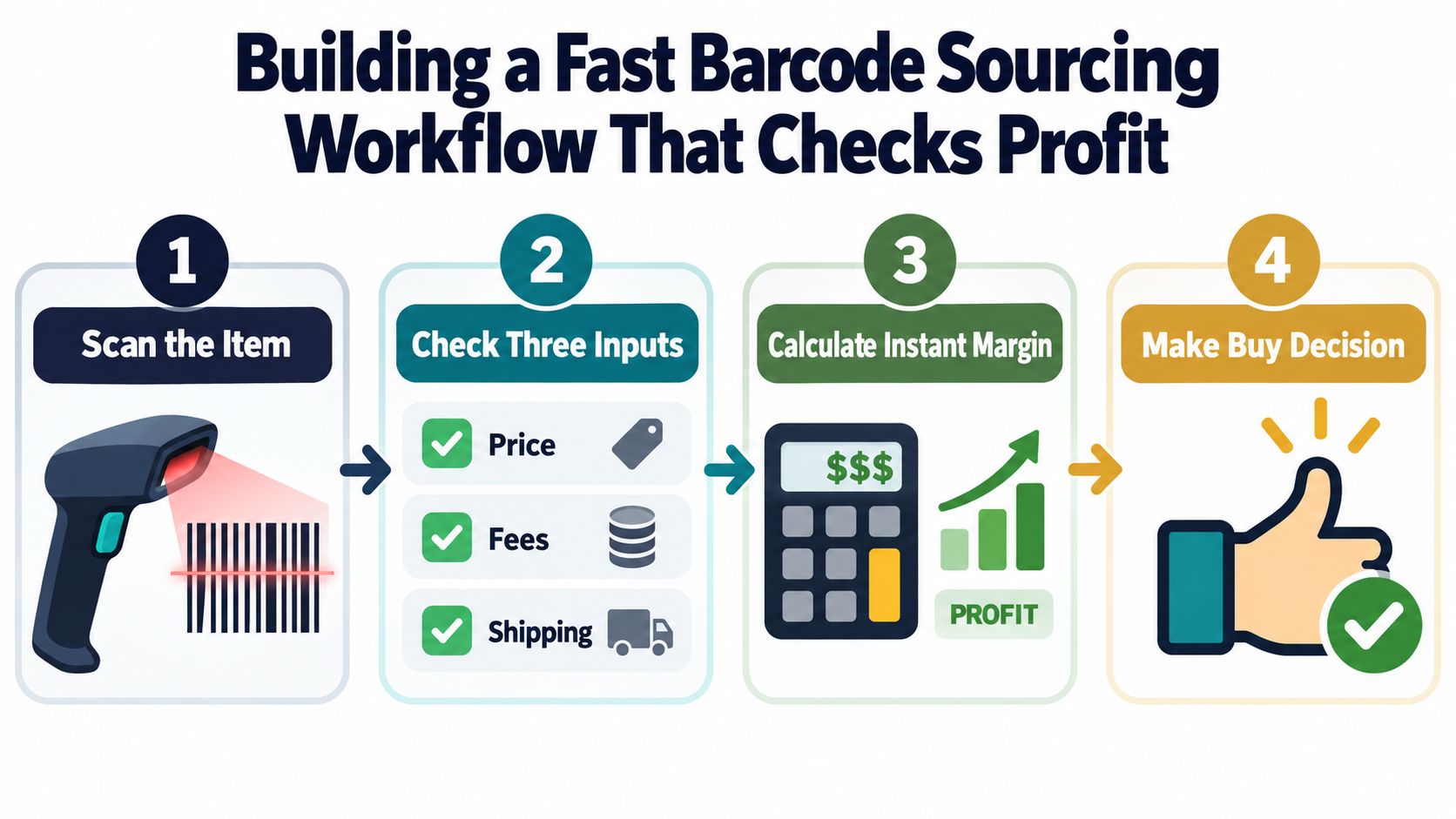
Building a Fast Barcode Sourcing Workflow That Checks Profit
A useful sourcing routine starts with the item, not the app. Pick up the product, inspect the condition and completeness, then choose the fastest reliable identification method.
Start with the right scan method
Use a barcode scan for UPC-tagged books, media, games, and boxed retail items. If the barcode returns a product match, confirm that the title, edition, format, package contents, and condition align with what you're holding.
Use an AI photo scan with no barcode needed for untagged vintage clothing, shoes, collectibles, and other visually identifiable items. Use text search when a name, model number, brand mark, or title is easier to type than to photograph.
The goal isn't to force every item through a barcode. It's to identify the item with the least friction while preserving match quality.
Pull sold comps from more than one marketplace
Asking prices show what sellers hope to get. Sold prices show what buyers paid. A useful comp view can aggregate sold data across eBay, Poshmark, Mercari, Depop, Amazon, Whatnot, ThredUp, Facebook Marketplace, and TikTok Shop, giving you a broader reference than checking one marketplace in isolation.
Turn the comp into a decision
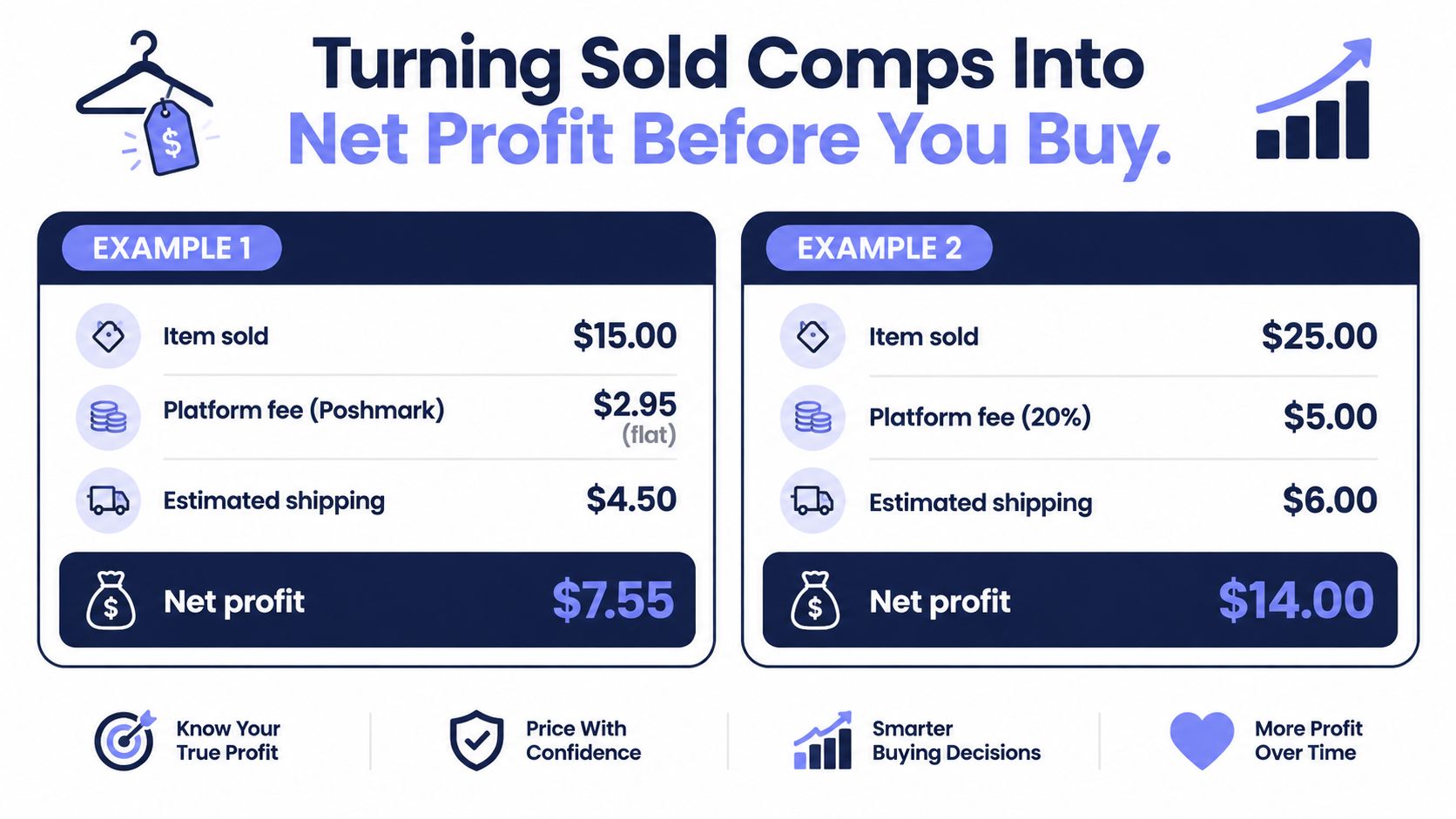
A sourcing tool should show more than a raw sale price. It should account for platform fees, shipping, and cost of goods, then return a clear signal against your minimum profit or margin threshold.
ScanFlip AI combines AI photo identification, barcode scanning, and text search with sold comps across those marketplaces. It calculates expected net profit after fees and shipping and displays a red or green flip-or-pass verdict. Its scan history can also retain photos, locations, and timestamps, which helps you see whether particular stores, estate sales, or sourcing routes produce better inventory.
That makes it a sourcing-phase tool, not an inventory or crosslisting system. The practical question is simple: should I buy this before money leaves my pocket? The same principle applies when you're deciding how to price items for resale, because the price decision should start with actual sold evidence rather than optimism.
A good routine becomes nearly automatic:
- Identify the item with barcode, photo, or text.
- Verify the match against the physical product.
- Review sold comps and condition differences.
- Subtract fees, shipping, and cost of goods.
- Buy only when the result clears your threshold.
- Save the scan when the item is unusual or the store is worth tracking.
Turning Sold Comps Into Net Profit Before You Buy
Gross price lies by omission. It leaves out the costs that determine whether a flip pays you for your time.
Poshmark's fee structure makes the point clearly. Sales under $15 carry a flat $2.95 fee, while sales of $15 or more carry a 20% fee, according to this Poshmark fee comparison. On a $50 sold comp, the Poshmark fee is $10 before shipping or cost of goods.
Mercari uses a flat 10% seller fee, and current fee summaries note that the standard model no longer adds a separate seller-side payment-processing fee, as explained in this Mercari marketplace comparison. On the same $50 sold comp, the seller fee is about $5 before other costs.
Two identical sale prices can produce different flips
Suppose you find an item with a $50 sold comp. On Poshmark, subtracting the $10 seller fee leaves $40 before shipping and cost of goods. On Mercari, subtracting about $5 leaves about $45 before those same deductions.
That difference can change the buy decision when the item is bulky, fragile, slow to sell, or expensive to acquire. A reseller who looks only at the $50 gross price may buy on either platform without noticing that the net result differs.
Shipping also needs a realistic estimate. A lightweight book and a boxed appliance shouldn't share the same assumption, and a collectible that needs protective packaging may consume more of the sale than the comp suggests at first glance.
Use the sold price, then subtract every cost you can identify before you call it profit.
Independent marketplace guidance continues to emphasize that sold comps matter more than asking prices because fees, shipping, and payment costs can erase the spread between an attractive listing and a real flip, as discussed in this marketplace margin guidance. That rule is especially important at a Goodwill shelf, where a $4.99 purchase can look cheap until the completed-sale data says otherwise.
Set your own minimum profit threshold before sourcing. The exact threshold depends on your time, storage space, category, and sell-through expectations. A low-dollar item may not deserve a place in your workflow even when the math is technically positive. The point of a red or green signal isn't to replace judgment. It's to stop gross prices from making the decision for you.
Choosing Your Scanning Stack and Sourcing Smarter Next Trip
Choose your scanning stack based on what you source, not what other resellers show in gear videos.
If most of your inventory is books, media, games, and boxed retail goods, a phone app with reliable barcode coverage may be enough. If you process large batches of barcode-heavy inventory, a dedicated handheld can reduce friction. If your finds regularly include vintage clothing, shoes, collectibles, and untagged goods, you need photo identification and text search in the same routine.
Keep this checklist ready for your next trip:
- Scan clear UPC-tagged items first: Confirm the exact product and condition before checking sold comps.
- Switch quickly on damaged labels: Adjust the angle once, then move to photo or text search if the code still fails.
- Check sold prices only: Ignore optimistic asking prices when deciding what to pay.
- Model the platform fee: Poshmark and Mercari can produce different net results from the same gross comp.
- Apply your threshold: Mark the item flip or pass before putting it in your cart.
- Save useful scans: Photos, locations, and timestamps can reveal which stores and sale types produce.
- Use complementary tools later: Vendoo and List Perfectly can support listing workflows, while sourcing decisions happen before inventory enters that stack.
Test the process on a small batch rather than changing your entire setup at once. Compare your predicted net profit with the result after the items sell, then adjust your minimum threshold, shipping assumptions, and category focus based on real outcomes. That's how barcode scanner resellers build a faster system without confusing more scans with better buys.
ScanFlip AI combines barcode scanning with AI photo identification, text search, sold comps across major marketplaces, and net profit after fees and shipping, so you can make a flip-or-pass decision before buying. Visit ScanFlip AI before your next thrift run and test the workflow on the items you're already sourcing.