
Best Scanning App for Retail Arbitrage: Top Picks for 2026
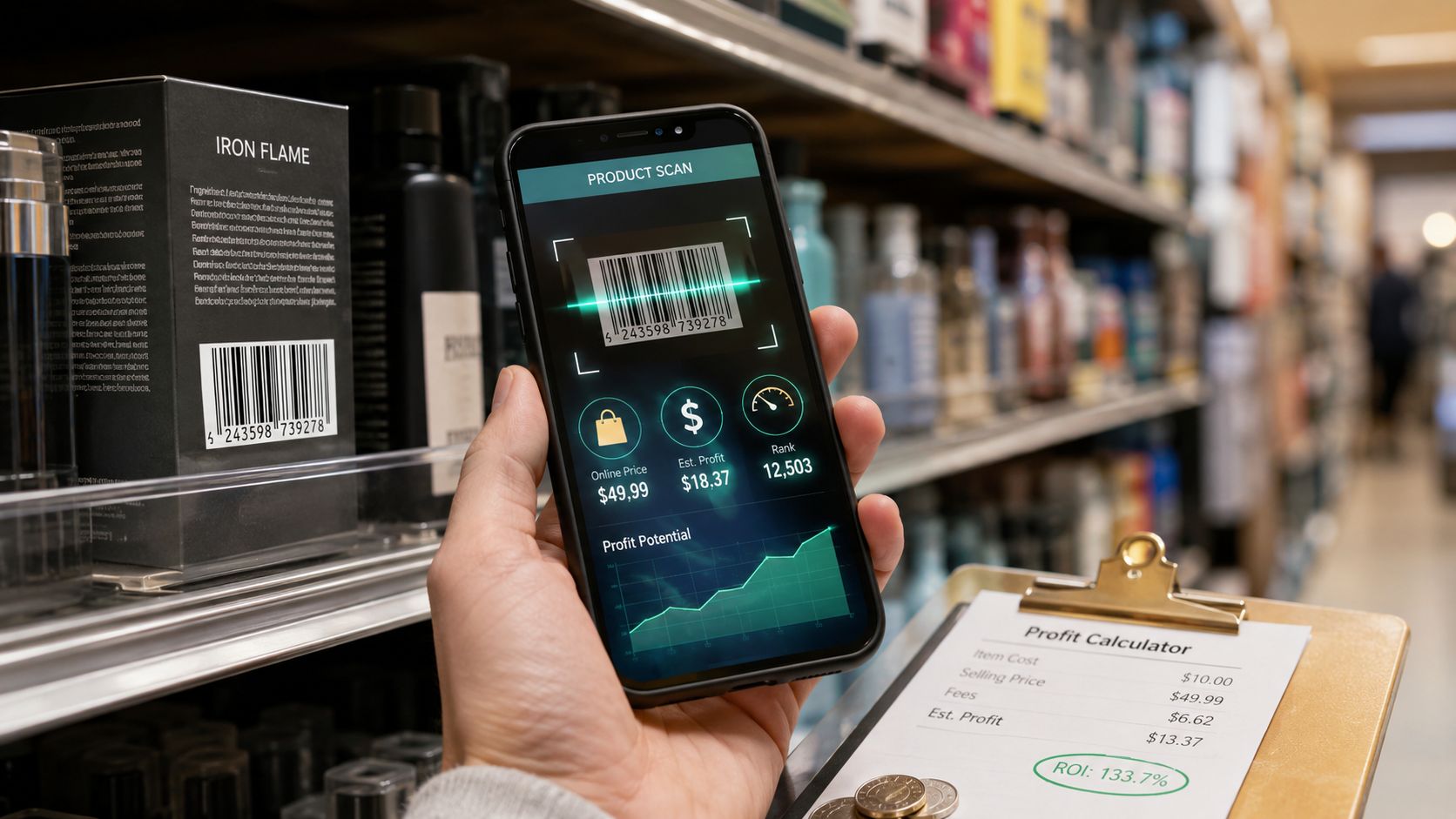
You're in a thrift aisle holding a pair of shoes with no box, one hand on your phone, the other on a cart that's already half full. The barcode won't scan. Amazon shows one price, eBay another. Poshmark sold listings tell a different story again. Meanwhile, someone else is moving down the same rack.
That's the main problem behind the search for the best scanning app for retail arbitrage. Most sellers don't need more raw data. They need a faster verdict. Buy, pass, or research later.
The gap between those outcomes usually comes down to three things: how quickly the app identifies the item, whether it shows net profit instead of headline price, and whether it gives enough context to trust the decision in-store. Hidden shipping costs, stale fee assumptions, and app-switching are what turn a promising find into a bad buy.
Table of Contents
- Introduction to Retail Arbitrage Scanning Apps
- Key Criteria for Evaluating Scanning Apps
- Top Scanning Apps at a Glance
- In Depth Feature Comparison of Scanning Apps
- Matching Tools to Reseller Personas
- Analyzing Cost and Pricing Structures
- Decision Framework for Choosing the Right App
Introduction to Retail Arbitrage Scanning Apps
Retail arbitrage usually stops being a sourcing problem first. It becomes a decision-speed problem.
Many new sellers begin with Amazon's built-in scanner because it is the default, low-friction option for checking live listings from a store aisle. That workflow works on straightforward inventory with clean UPCs and obvious Amazon matches. It breaks down once you hit the conditions that define real sourcing volume: damaged barcodes, used goods, multipacks, restricted listings, inconsistent fees, and items whose best resale market is not Amazon.
The gap is not just product identification. It is whether the app can turn a scan into a usable buy or pass decision before the inventory is gone.
The aisle problem most guides miss
A good scanner does more than return a title match and a market price. It needs to compress four judgments into one screen: what the item is, where it should be sold, what the net profit looks like after costs, and whether the expected sell-through justifies tying up cash.
That is why hidden profitability metrics matter more than broad feature counts. A scanner that shows gross resale price but forces you to estimate prep, shipping, storage, and marketplace fees still leaves the highest-error part of the analysis to the seller. In practice, the strongest tools reduce this manual work by surfacing configurable flip and pass thresholds, then placing the result in context with scan history so you can tell whether an item is a repeat winner, a marginal bet, or a pass that only looks attractive at first glance.
That context changes in-aisle behavior.
A seller sourcing new clearance inventory may prioritize fast barcode recognition and Amazon fee estimates. A thrift or liquidation buyer has a different problem set. They need stronger item recognition for imperfect inventory, more tolerance for edge cases, and enough history to avoid rebuying slow movers. If your sourcing mix includes untagged, secondhand, or visually ambiguous products, a tool with broader recognition logic than standard UPC lookup becomes more useful. This guide to an item identifier app for resellers shows why barcode-first workflows weaken outside clean retail stock.
The practical dividing line is simple. An app that helps you identify inventory is useful. An app that helps you set profit thresholds, compare true net outcomes, and interpret prior scans is the one that improves sourcing quality.
That distinction has direct margin impact. Faster scans matter, but better pass decisions often matter more. One bad buy avoided can offset weeks of app subscription cost, especially for sellers operating on thin arbitrage spreads.
Key Criteria for Evaluating Scanning Apps
Most app roundups overvalue feature lists and undervalue decision quality. A scanner can have a long checklist and still be weak where it counts, especially if it shows only market price and makes you infer profit yourself.
Why gross price is the wrong metric
One of the clearest signals in current retail arbitrage content is how often guides stop too early. Frequently asked questions about real-time net profit after fees and shipping remain poorly answered because 80% of existing guides only show gross Amazon prices or estimated FBA fees, according to Threecolts' review of Amazon seller scanner apps.
That explains why so many sellers compare apps and still feel uncertain in the aisle. Gross price is not the buying decision. Net take-home is.
If you want a broader framework for item recognition before pricing even starts, this guide to an item identifier app for resellers is useful because it highlights the front-end problem many barcode-only tools can't solve.
The seven criteria that actually matter
Here's the framework I use when comparing the best scanning app for retail arbitrage.
Identification accuracy
Barcode lookup is fast when the UPC exists and scans cleanly. It's weaker on vintage, secondhand, apparel, and untagged inventory. If your sourcing mix includes those categories, visual identification matters more than most Amazon-first reviews admit.Marketplace coverage
Amazon-only pricing works for Amazon-only sellers. It doesn't work well for cross-listing or for categories where sell-through is healthier elsewhere. The stronger tools reduce app switching and put marketplace choice earlier in the decision.Scan-to-verdict speed
Raw scan speed matters less than total decision speed. An app that scans quickly but forces you into manual fee math is slower in practice than one that delivers a clear pass-or-buy verdict.Profit-calculation fidelity
A calculator should reflect actual selling conditions, not simplified assumptions. Fee handling, fulfillment mode, and marketplace-specific logic affect the result enough that “close enough” often isn't close enough.Fee and shipping handling
Many bad buys often slip through in this category. Hidden shipping cost, prep assumptions, and stale fee schedules distort margins. Sellers often blame the product when the underlying problem was bad math at sourcing time.In-aisle usability
A cramped interface, too many taps, or too much chart interpretation slows down buying decisions. The best sourcing interface doesn't just show data. It ranks what matters first.Pricing transparency
Free tiers, bundled subscriptions, and category-specific plans all change value. The right question isn't “What does it cost?” It's “What extra work am I still doing after I pay for it?”
The strongest retail arbitrage apps don't simply answer “What is this selling for?” They answer “Should I buy this here, for this cost, on this marketplace?”
Top Scanning Apps at a Glance
You are standing in a clearance aisle with ten minutes before the next stop, and the key question is not which app can scan fastest. The question is which app can turn a scan into a reliable buy or pass decision with enough context to protect margin.
That is the useful way to read the field. Some apps are built for Amazon barcode workflows. Others are better at mixed-market sourcing, missing-barcode inventory, and configurable thresholds that reflect how different resellers buy.
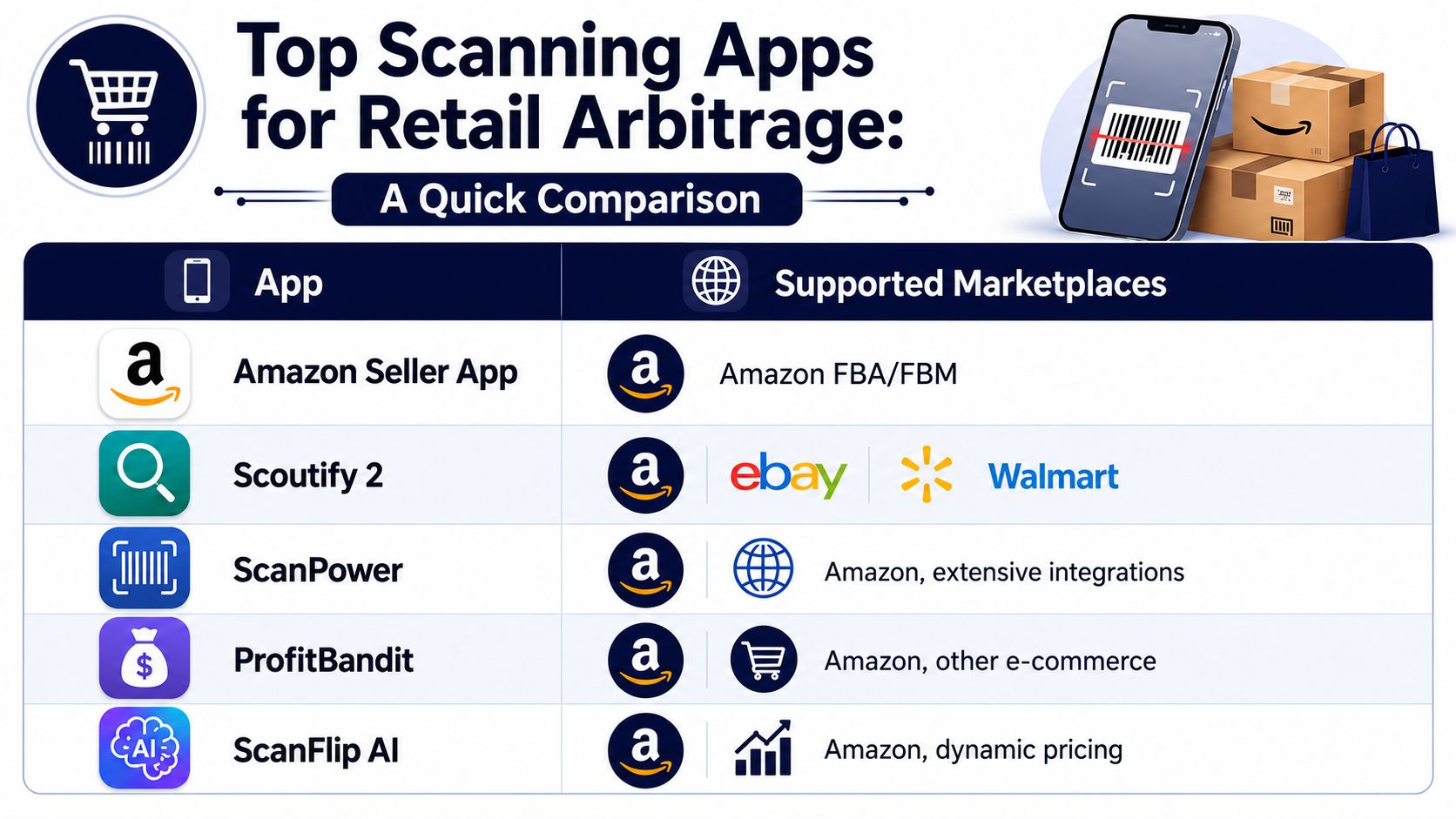
Quick comparison table
| App | Best fit | Supported marketplaces | Identification method | Profit view | Key trade-off |
|---|---|---|---|---|---|
| Amazon Seller App | New Amazon sellers | Amazon | Barcode scan | Basic sourcing view | Good free baseline, limited for deeper margin analysis |
| Scoutify 2 | InventoryLab users | Amazon-focused workflow | Barcode scan | Detailed profitability insights | Best when paired with an existing Amazon stack |
| ScanPower | Higher-process Amazon resellers | Amazon with operational integrations | Barcode scan | Detailed profitability insights | Strong for structured workflows, less flexible for mixed-market comps |
| ProfitBandit | Budget-conscious and book-adjacent sellers | Amazon-focused, with broader e-commerce orientation noted in industry coverage | Barcode scan | ROI and fee-focused decision support | Better for value seekers than for broad visual identification |
| ScanFlip AI | Secondhand and mixed-category sourcing | Amazon, eBay, Poshmark, Mercari, Depop, Whatnot, with Marketplace and TikTok Shop coverage noted on site | Camera-based visual identification | Net profit after fees and shipping with flip/pass thresholds | Better suited to barcode-missing inventory than listing workflows |
For a wider look at adjacent tools in the reseller stack, this roundup of best reseller apps helps place scanners in context.
What stands out immediately
The table separates into two practical groups. Amazon-first apps dominate when the item has a clean barcode and the seller already knows Amazon is the target channel. Tools such as Scoutify 2, ScanPower, and ProfitBandit make more sense once sourcing volume is high enough that fee accuracy, ROI filters, and workflow speed matter more than broad item recognition.
A second group is built around messier sourcing conditions. That includes thrift, liquidation, and mixed used inventory where UPCs are missing, labels are damaged, or the best resale channel is not obvious from the shelf. In those cases, visual identification, cross-marketplace visibility, and configurable flip/pass thresholds matter more than one extra Amazon field.
That distinction changes profitability more than many roundup articles admit.
A seller who sources mostly new retail products can accept a barcode-first tool because product matching is usually straightforward. A seller working secondhand shelves needs more context around hidden margin loss. Shipping drag, marketplace-specific fee differences, and the ability to review prior scan history often determine whether a borderline item deserves capital. The better app is the one that matches the sourcing environment, not the one with the longest feature list.
Amazon Seller App still has a clear role as the no-cost reference point. It is useful for checking rank, restrictions, and basic offer economics before paying for a more specialized workflow. Its limitation is narrower decision support, especially for sellers who need faster pass/buy rules or who source inventory that does not fit a clean barcode path.
In Depth Feature Comparison of Scanning Apps
The strongest way to compare scanning apps is not by counting features. It's by asking where each tool removes uncertainty.
Where each app is strongest
Amazon Seller App is still the cleanest zero-cost starting point for Amazon sourcing. Its advantage is directness. Scan a UPC, check Amazon, and move on. Its limitation is that it leaves several layers of analysis outside the app, especially when an item's best exit isn't on Amazon or the product lacks a usable barcode.
Scoutify 2 earns its place with serious Amazon sellers because it pushes beyond lookup into decision support. In the verified data, it's grouped with ScanPower as one of the primary upgraded tools for resellers who need more precise profitability insight than the free app provides. That makes it a practical step up when your bottleneck is no longer finding items, but filtering them accurately.
ScanPower fits sellers who want a more operational Amazon workflow. Its value is less about novel identification and more about reducing friction between source, calculate, and process. If your business already leans Amazon-heavy, that matters.
ProfitBandit occupies a useful middle ground. Verified data from LushDollar's retail arbitrage app review notes that ProfitBandit and ScoutIQ are specifically optimized for book resellers and entry-level users. That tells you something important. Its strength is not category breadth. It's practical affordability and clearer decision support for sellers who need more than a free scanner but aren't building a full-stack workflow yet.
A different model is represented by apps centered on real profit accuracy. Verified data from ProfitPath's scanner app analysis states that high-accuracy fee calculation apps like ProfitGo match Amazon's official Revenue Calculator with 99.99% accuracy, including marketplace-specific fee structures, VAT handling for European marketplaces, and FBM versus FBA distinctions. That matters because it defines the precision standard serious sellers should expect, even if they don't use that exact tool.
Feature Comparison of Top Scanning Apps
| Criteria | Amazon Seller App | Scoutify 2 | ScanFlip AI | ScanPower | ProfitBandit |
|---|---|---|---|---|---|
| Identification method | Barcode-first | Barcode-first | Camera-based visual identification plus pricing workflow | Barcode-first | Barcode-first |
| Best marketplace orientation | Amazon | Amazon | Multi-marketplace resale workflows | Amazon | Amazon-focused budget sourcing |
| Net-profit depth | Basic | Stronger profitability insight | Net profit after platform fees and shipping | Strong profitability workflow | ROI and fee-focused decision support |
| Handles no-barcode items well | Limited | Limited | Yes, built for barcode-free item recognition | Limited | Limited |
| Cross-marketplace comps | Limited | More limited than broad cross-market tools | Designed to aggregate sold comps across multiple marketplaces | More Amazon-centric | More limited |
| Threshold-based verdicts | Manual interpretation | Better custom decision logic | Configurable flip/pass thresholds | Workflow-dependent | Some alert-style support |
| Historical scan context | Basic account-linked history | Tied to Amazon-centric workflow | Persistent history with photos, timestamps, and location | More operational than contextual | Functional but less contextual |
The overlooked layer of scan history and thresholds
Most comparisons stop at scan and price. That's too shallow.
The more useful question is whether the app helps you make consistent decisions. A configurable threshold changes the workflow from “interpret every scan from scratch” to “compare every scan against a known standard.” That's especially important for part-time sellers who source across different stores and categories.
Persistent scan history matters for the same reason. It turns sourcing from a string of isolated guesses into a reviewable process. If you store photos, timestamps, location, and comps, you can revisit misses, compare stores, and tighten your thresholds over time.
Sellers usually think they need more scans. Often they need better memory. History gives context to pricing decisions that felt uncertain in the aisle.
That's why I treat hidden profitability metrics, threshold logic, and contextual history as the dividing line between a scanner and a sourcing system. An app may identify an item correctly and still fail the reseller if it can't surface the few inputs that determine take-home profit.
Matching Tools to Reseller Personas
Tool choice gets easier when you stop asking which app is “best” in the abstract and ask which app matches the seller's sourcing environment.

A useful benchmark comes from cross-platform sourcing tools. According to Aura's review of retail arbitrage apps, scanners like SellerAmp SAS provide coverage across iOS, Android, and Chrome with unified scan history, letting users process over 30 items per sourcing trip without reloading data. That benchmark matters because it marks the point where a unified workflow starts beating a scattered stack of separate apps.
Five seller profiles and the best fit
Thrift store flippers
These sellers face the highest rate of barcode failure. Apparel, shoes, accessories, and home goods often require recognition first and pricing second. A barcode-only scanner can slow them down because the item has to fit the tool. A visual-first app with multi-market sold comps is usually the cleaner fit.Estate sale hunters
Estate sourcing is chaotic. Inventory is mixed, timing is tight, and decision quality matters more than listing integrations. These sellers benefit from fast recognition, hidden-fee awareness, and a history log they can revisit later when the house is crowded and signal is inconsistent.Garage sale shoppers
They need low-friction sourcing, not a complex subscription stack. The Amazon Seller App still makes sense when the goal is testing the process cheaply. If they source mixed inventory and sell beyond Amazon, they'll eventually outgrow that setup.Professional resellers
This group usually values consistency over novelty. If they run Amazon-heavy operations with repeatable prep and shipment workflows, tools like Scoutify 2 or ScanPower are the stronger fit because they reduce operational drag. If they source across marketplaces or categories with weak barcode coverage, they need broader identification and comparison capability.Side-hustle marketplace sellers
Side hustlers often have the hardest sourcing problem because they have the least time. They don't need every metric. They need a fast verdict they can trust during limited sourcing windows. Configurable buy rules and saved scan history often matter more for them than deep backend integration.
Field note: The more mixed your inventory becomes, the less useful a pure Amazon barcode workflow feels.
The practical takeaway is simple. Amazon-first tools remain the strongest choice for Amazon-first businesses. The best scanning app for retail arbitrage changes when your sourcing mix shifts toward secondhand, cross-listed, or barcode-missing inventory.
Analyzing Cost and Pricing Structures
Price matters, but not in the way most sellers frame it. The key comparison isn't free versus subscription. It's whether the app eliminates enough bad buys and manual checks to justify its place in your sourcing workflow.
Free versus paid is the wrong framing
The Amazon Seller App has the clearest cost advantage because it's free. That makes it the right starting point for experimentation. But “free” can still be expensive if it pushes work back onto the seller through slower decisions, marketplace switching, or manual net-profit calculations.
Paid tools usually charge for one of three things: more accurate profitability analysis, better speed in live sourcing, or tighter integration with a larger workflow. That's why two apps with similar scan functions can feel very different in practice.
If your main weakness is margin estimation, a calculator-focused app may be worth more than a faster scanner. If your main weakness is identification, especially in secondhand categories, a visual recognition workflow can remove more friction than a deeper Amazon dashboard.
How to judge total ownership cost
Use this checklist instead of headline pricing:
Count the extra apps you still need
If one tool gives only Amazon data and you still check eBay or Poshmark manually, your stack cost is higher than the subscription fee suggests.Check whether fee schedules stay current
A low-cost app with stale assumptions can create expensive mistakes. For a practical grounding in margin math, this walkthrough on how to calculate net profit for resale is a useful reference.Factor in workflow fit
Bundled tools can be efficient if you already use the ecosystem. They can also be wasteful if you're paying for features tied to listing or inventory processes you don't use.Evaluate history and review value
Saved scans aren't just convenience. They help you refine sourcing behavior, revisit borderline buys, and train repeatable standards.
A cheaper app often wins for low-volume sellers. A more complete app often wins for anyone who values consistency under time pressure.
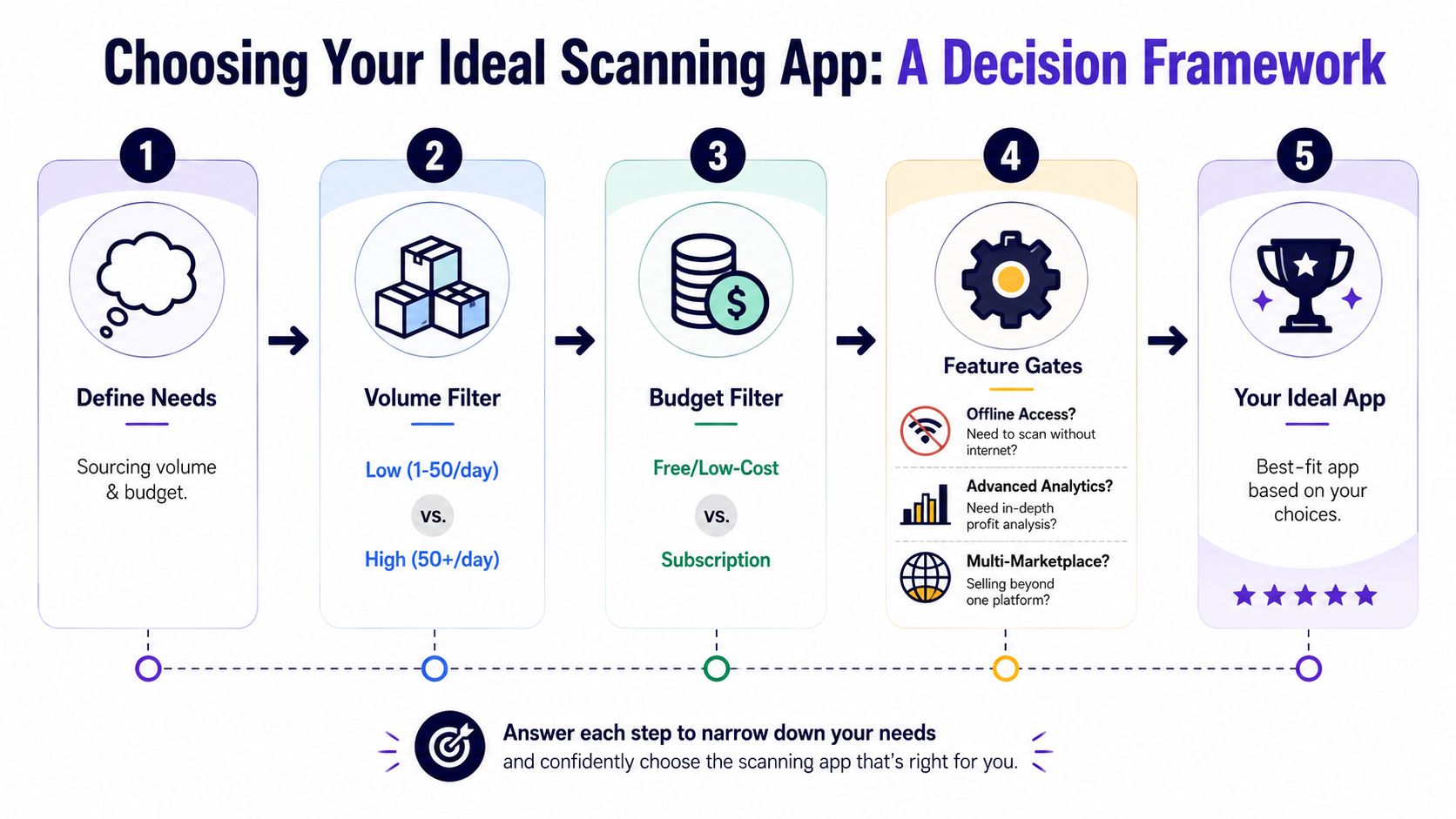
Decision Framework for Choosing the Right App
Most sellers don't need five apps on day one. They need one app that fits how they source.
A practical selection checklist
Start with your inventory, not the tool.
If you source mostly barcode-labeled products for Amazon, begin with the Amazon Seller App. Upgrade only when speed, fee detail, or workflow friction becomes the bottleneck.
If you already run an Amazon-centered operation, look at Scoutify 2 or ScanPower. Their value comes from deeper profitability support inside an Amazon-first process.
If you sell books or want a lower-cost step up from free tools, ProfitBandit makes sense because it's positioned toward budget-conscious and entry-level use.
If you source secondhand items with inconsistent barcodes, use a tool that can identify products from images and show net profit across more than one marketplace. That's where ScanFlip AI fits. It uses camera-based item identification, calculates expected take-home after platform fees and shipping, and lets sellers apply configurable flip/pass thresholds with saved scan history.
If you keep hesitating on borderline items, prioritize threshold logic and history over one more pricing datapoint. Those two features improve consistency more than most sellers expect.
Before you commit, ask one final question. Does the app help you decide, or does it just help you look up?
The best scanning app for retail arbitrage is the one that matches your inventory reality, marketplace mix, and tolerance for manual math. For Amazon-only sourcing, that answer can stay simple. For mixed secondhand sourcing, the winner is usually the app that compresses identification, comps, fees, shipping, and thresholds into one verdict.
If your sourcing trips involve untagged, secondhand, or cross-market inventory, ScanFlip AI is built for that workflow. It identifies items from photos, pulls sold comparables across major marketplaces, calculates expected net profit after fees and shipping, and stores scan history with context so you can make faster buy-or-pass decisions in the aisle.