
Book Scanner App for Selling: A Reseller’s Guide
You're in a Goodwill book aisle with a cart that's already half full of maybes. The hardcover in your hand looks like money, the paperback next to it looks like a dud, and another picker is working the same shelf from the other end. A book scanner app for selling should settle that in seconds, not give you a price that falls apart once fees, shipping, and a beat up dust jacket enter the picture.
Table of Contents
- The Aisle Problem That Started This
- How Each Scan Method Actually Works
- What a Book Scanner App Needs to Actually Do
- Reading the Number After Shipping and Fees
- Why the ISBN Is Not Enough
- Three Buying Moments the Workflow Has to Handle
- The Flip-or-Pass Rule Worth Memorizing
The Aisle Problem That Started This
I learned this the expensive way at a library sale, filling a box fast because every barcode beeped back a number that looked fine. At home, half of that box turned into a death pile. Wrong printings, ex-library stamps, a missing supplement, and a few low priced titles that never should have been shipped alone.
That's the aisle problem. Identification is easy to sell as speed, but speed without a copy level check just helps you buy mistakes faster. You don't need to know only what an ISBN sold for. You need to know whether this copy, at this cost of goods, can clear net profit after fees and shipping.

Why the Shelf Keeps Winning
Books aren't going away as a sourcing category, which is why sloppy buying keeps costing people money. The Association of American Publishers reported $32.5 billion in U.S. publishing revenue for 2024, with online retail as the largest channel at approximately $12 billion and print formats accounting for 57.1% of online retail revenue, according to the AAP StatShot annual report for calendar year 2024. That's new publishing, not secondhand sales, but it tells you buyers still want physical books and they're buying them online.
Faster scanning doesn't fix a bad buy. It just shortens the time between picking it up and paying for it.
The wider market pushes the same way. The U.S. Census Bureau estimated total retail e-commerce sales at $1.1926 trillion for 2024, representing 16.1% of all U.S. retail sales, in its Quarterly Retail E-Commerce Sales report for the fourth quarter of 2024. You're not guessing in a vacuum anymore. Buyers, sold comps, and competing sellers are all online, so your decision in the aisle has to be based on evidence you can check before money leaves your pocket.
A useful scan does three jobs at once. It identifies the book correctly, checks recent demand, and shows a realistic net. Skip any one of those and you're back to hoping the cover was telling the truth.
How Each Scan Method Actually Works
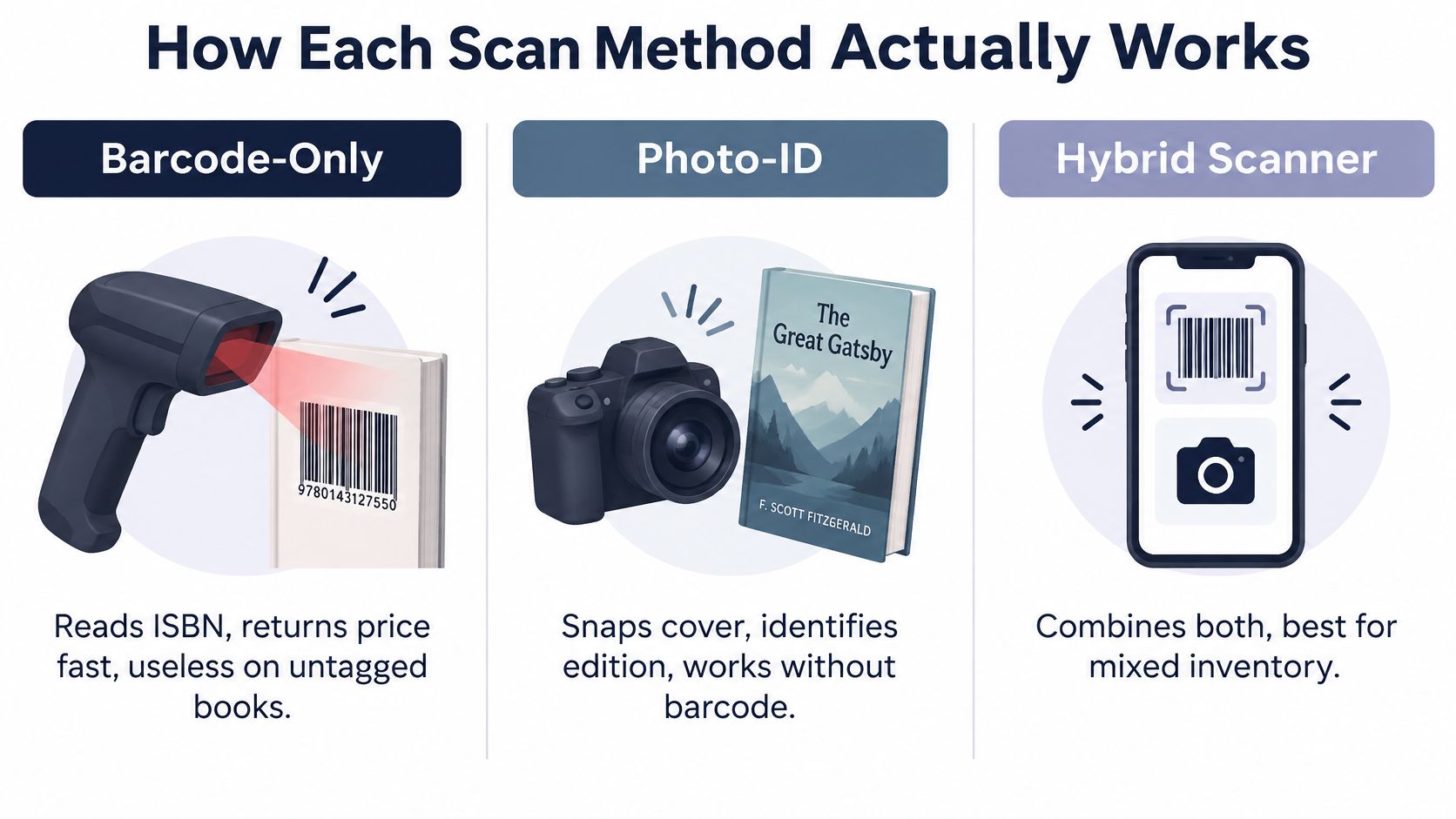
Most scanners fall into three families, and they don't fail in the same places. Picking the wrong family for how you source is why a tool can feel great at a retail clearance rack and useless in a garage sale bin.
Barcode Only Tools
A barcode tool reads the ISBN and pulls the matching catalog record. On clean, modern books with intact back covers, it's the fastest thing in the aisle. You can work a thrift shelf cover to cover without typing a title.
The failure mode is obvious once you've sourced older stock. Pre-ISBN books, stripped covers, scratched barcodes, and books with a store sticker slapped over the code stop you cold. It also tells you what edition the barcode claims to be, not whether the copy in your hand matches that claim.
Photo ID Tools
Photo tools use the camera to identify a cover, spine, or title page when there's no usable barcode. That's where they earn their keep, on vintage hardcovers, scuffed bin finds, and oddball editions that a barcode reader can't touch. At an estate sale table full of older books, photo ID is often the only method that moves at all.
The trade-off is precision. Similar covers across printings and formats can confuse an image match, and a pretty cover photo won't tell you about writing inside or a missing dust jacket. You still need to confirm format and edition before you trust the comps it pulls.
Hybrid Tools That Chain All Three
Hybrid tools let you start with a barcode, fall back to a photo, and finish with text search when both get messy. That chain matters on mixed sourcing trips, where one bin holds new paperbacks and the next holds unmarked hardcovers. You don't stop and switch apps, you switch methods.
- Barcode first: best for fast passes through modern, tagged inventory at thrift stores and clearance aisles
- Photo second: best when the barcode is missing, damaged, or covered
- Text search last: best for confirming an edition, printing, or title variant by hand
For most flippers who don't source one narrow category, hybrid is the practical fit. Single method tools work until your sourcing changes, and sourcing always changes.
What a Book Scanner App Needs to Actually Do
Forget feature lists for a minute. In the bin, you feel five things: whether the ID is right, whether the comps are real, how many marketplaces are covered, whether fees are in the number, and whether you get a decision or just data to interpret while someone else grabs the next book.
Sold Prices or It Didn't Happen
The biggest split is sold comps versus asking prices. A row of unsold listings tells you what sellers hope to get, not what buyers paid. If an app won't show recent sold prices, you're pricing off optimism, and optimism is how slow inventory happens.
Coverage matters for the same reason. A book that's dead on one marketplace can move on another, and checking eBay, Mercari, and Poshmark by hand in an aisle burns the time you were trying to save. One search that pulls sold prices across platforms gives you a fuller read on sell-through rate (STR) and where to list it.
Scanner Categories Side by Side for Book Resellers
| Criterion | Barcode only | Photo ID only | Hybrid (barcode + photo + text) |
|---|---|---|---|
| Identification accuracy | Strong on clean ISBNs, blind without one | Works without a barcode, can confuse similar editions | Barcode precision plus photo and text fallback |
| Marketplaces covered | Often narrow, varies by tool | Varies, sometimes thin comp depth | Best chance of broad cross-platform sold comps |
| Sold comp source | Depends on the database behind it | Depends on correct edition match | Multiple ID paths improve comp matching |
| Fee math | Frequently shows gross price only | Frequently shows gross price only | Most likely to pair ID with a net profit view |
| Speed at sourcing | Fastest on tagged shelves | Slower per item, better on vintage | Fast on tagged stock, doesn't stall on untagged stock |
That table is about categories, not brands, because tools inside a category still vary. The pattern holds, though. Barcode only loses the moment inventory gets old or damaged. Photo only struggles when you need ISBN level certainty on a modern book with five similar editions.
Practical rule: If the app can't tell you what you keep after fees, it's a price checker, not a buying tool.
Speed is the final test, and it's not just scan speed. It's total decision speed. A tool that returns a gross price in one second but forces you to estimate fees, shipping, and STR in your head is slower where it counts. A red or green flip-or-pass verdict built on net profit respects how sourcing feels at a crowded sale.
Reading the Number After Shipping and Fees
Low priced books are where scanner optimism dies. Used book median prices were reported at $4.95 in 2025, and 38% of observed used sales fell between $5 and $20, according to used book market data from Amazon US sales. That's exactly the range where a fee or a shipping label decides whether the flip works at all.
Run the Fee Math Before You Celebrate
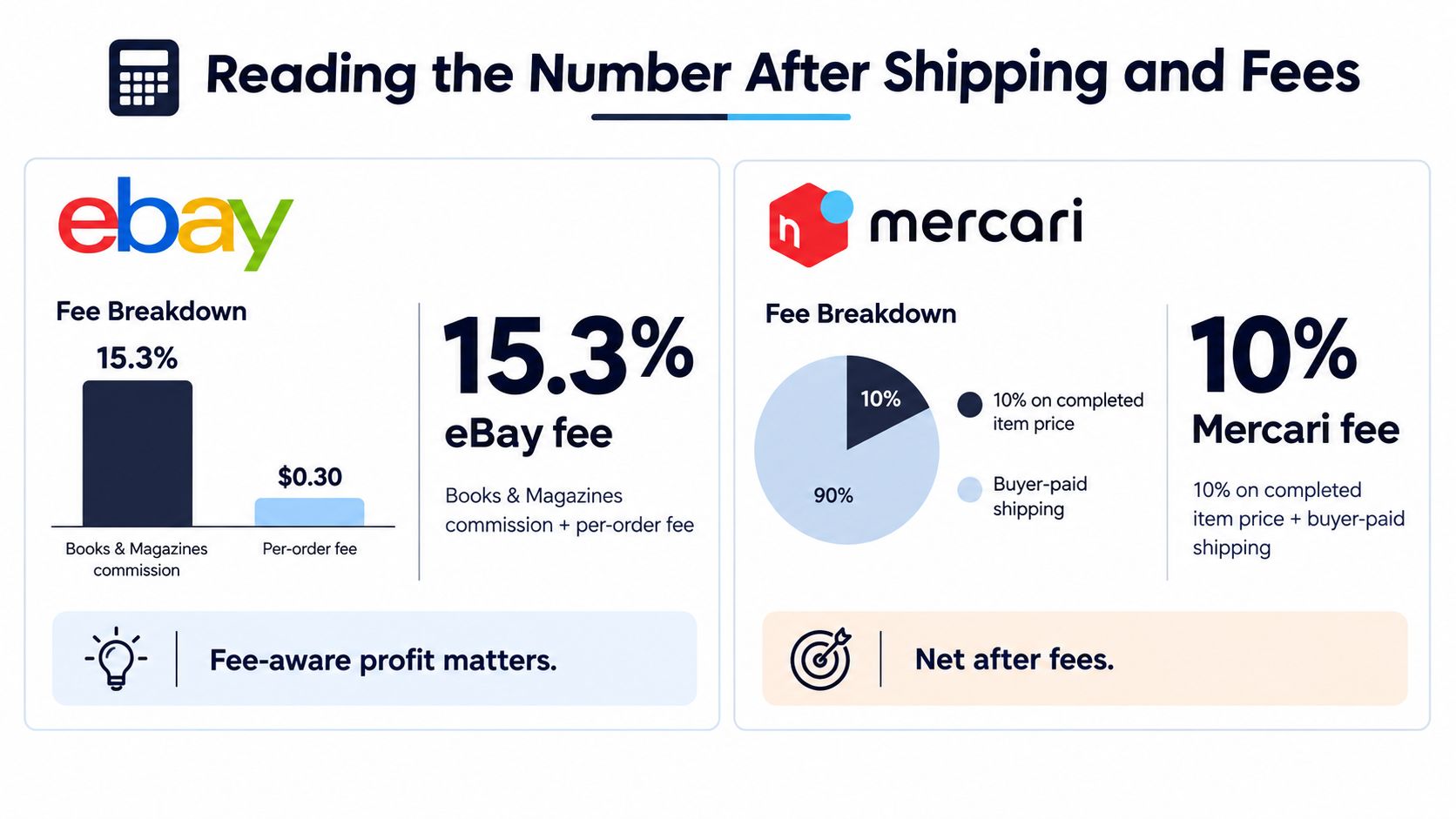
On eBay, the final value fee can be 15.3% for Books & Magazines plus a per order fee, and the fee base can include shipping and other amounts charged to the buyer, per eBay's seller fees page for Books & Magazines. Gross comp minus gut feeling is not math. That fee structure turns a lot of nice looking low dollar comps into very small checks.
Mercari works differently, and the fee base catches people. Mercari charges a flat 10% on the completed item price plus buyer-paid shipping for new and updated listings, as stated in Mercari's selling fee help article. Buy a book for $3 at a garage sale, sell it for $28 with $6 buyer-paid shipping, and the fee is $3.40 on the $34 total, not on $28 alone. If you also pay $4.99 for shipping, the rough net is $15.61 before packaging.
Poshmark has a threshold you need in your head. Sales under $15 incur a flat $2.95 commission, while sales of $15 or more carry a 20% commission, according to the Poshmark FAQ on seller commissions. A paperback bought for $1 with sold comps around $12 leaves $9.05 after that fee, for roughly $8.05 before other expenses. Stretching to $15 only helps if buyers will pay $15.
Why a Lower Comp Can Win
A $20 comp isn't automatically better than a cheaper book. The $20 title may be slow, crowded with sellers, or condition sensitive, while cheaper books can work when they're bundled or move fast. Weight matters too, especially on boxed sets. Mercari's reporting can deduct seller-paid shipping, selling fees, and shipping adjustments from payout, a mechanic spelled out in Mercari's gross sales reporting help article. Buy a boxed set for $8, sell it for $45 with $9 buyer-paid shipping, pay a $5.40 fee, a $9.99 label, and a $4 underweight adjustment, and you're at $17.61 profit after cost of goods. Still a buy, but only because you checked packed weight first.
If your shipping estimates are guesses, your net is a guess too. Tighten that part up with a grounded approach to how to estimate shipping costs before you buy, then set a minimum net you won't go below for your time to photograph, list, pack, and ship.
Why the ISBN Is Not Enough
A clean scan can still be a bad copy. The barcode identifies a broad edition. It doesn't inspect the book in your hand, and buyers absolutely will.

Defects That Kill the Margin
I've put back books with perfect comps for reasons a barcode never shows. Ex-library stamps, highlighting, a cracked spine, and a missing dust jacket each change what a buyer will pay and whether they return it. Remainder marks and book club editions masquerading as trade editions do the same damage in a quieter way.
- Edition and format: confirm hardcover, paperback, mass market, or board book matches the comp set
- Completeness: check for missing supplements, CDs, maps, or volumes from a set
- Markings: look for ex-library stamps, writing, highlighting, and remainder marks
- Dust jacket: note tears, price clipping, sun fading, or a missing jacket
- Authenticity: watch for counterfeit printings and incomplete or mismatched sets
Each defect pushes you toward a lower price, a longer wait, or a return you have to eat. That's why the question worth asking isn't what this ISBN sells for. It's why this exact ISBN looked profitable but your copy isn't. Checking recent sold prices by condition, not just by title, closes a lot of that gap.
Identification speed is not valuation accuracy. The scan starts the decision, the inspection finishes it.
Build a scan-to-inspection habit that takes seconds. Scan, flip to the copyright page, check the jacket and page edges, confirm nothing's missing, then decide. Fast scanners who skip that sequence don't source more profit. They source more returns, low offers, and relists.
Condition disclosure also costs time. A flawed copy needs more photos and more description to sell well, and that labor belongs in your buy price. If the net only works by pretending the defect isn't there, it doesn't work.
Three Buying Moments the Workflow Has to Handle
Tools look similar on a product page. They separate fast in real sourcing spots, where inventory is mixed and you don't control the conditions.
The Estate Sale Box Lot
Estate sales give you boxes, not shelves. Older hardcovers sit next to modern paperbacks, barcodes are hit or miss, and the seller wants the whole table gone. A hybrid workflow matters most here, because barcode only leaves half the box unchecked.
That's the moment where ScanFlip AI fits how I work a table. It offers three ways to scan, an AI photo scan with no barcode needed, a barcode scan, and text search, then pulls sold comps from eBay, Poshmark, Mercari, Depop, Amazon, Whatnot, ThredUp, Facebook Marketplace, and TikTok Shop, and shows net profit after fees with a red or green flip-or-pass verdict. One tool, one pass through the box, then you make the lot offer or walk.
The Goodwill Bin Dig
Bins are rougher. Covers are scuffed, barcodes are scratched, and you're digging, not browsing. Photo ID carries more of the load here, and condition inspection matters even more because bin books take abuse.
My call in bins is stricter. If the copy is tired and the comp range is low, I pass even when the title is recognizable. Cheap cost of goods doesn't rescue a book that needs heavy disclosure and ships for more than it nets.
The Library Sale Table
Library sales reward speed but punish ex-library blindness. The hardcover table can hold good BOLO titles, and the clearance cart next to it is mostly filler. Barcode scanning moves fast here, but every promising scan still gets a stamp and jacket check.
That mix of shelf stock and retail style turnover is also why tactics from retail arbitrage for books carry over better than people expect. In both spots you're reading sold demand against a low buy price, not collecting titles you personally like. The workflow is the same. Identify it right, inspect the copy, run the net, decide.
The Flip-or-Pass Rule Worth Memorizing
Keep it short enough to use with a book in one hand. Mine has four checks, and a book has to pass all four before it goes in the cart.
- Right identification: the edition, format, and printing match the comps you're reading
- Sellable copy: no undisclosed defects, nothing missing, condition matches the price
- Real demand: recent sold comps show buyers paying, not just sellers listing
- Honest net: profit after fees, shipping, packaging, and cost of goods clears your labor floor
Scanning is overkill on an obvious BOLO pile you've sold repeatedly at a price you know cold. It's mandatory on mid priced lots, slower categories, and niche nonfiction where one wrong edition eats the margin. Knowing which situation you're in is part of the skill.
Keep your stack clean while you're at it. A scanner answers the buy question at sourcing, and tools like Vendoo or List Perfectly handle crosslisting after you've bought well. Don't ask one app to do both jobs badly. Buy right in the aisle, then list with the right tool at home.
Next time you're working a shelf or a box lot, scan the book, inspect the copy, and check the net before it hits your cart. ScanFlip AI gives you photo, barcode, and text scanning with cross-platform sold comps and a clear flip-or-pass verdict after fees, so you can leave the slow, low margin books on the table and spend your money on copies that pay.