
Book Scanning App Buyer’s Guide for Resellers
You're standing at a library sale with a tote, a phone at 12% battery, and a table full of paperbacks that all look like dollar books. One scan shows a promising price. The next gives you the wrong edition. A third barcode won't read because the back cover is curled, and someone else is already working down the same row.
That's the true test for a book scanning app. It shouldn't merely identify a title. It should help you decide whether the exact book in your hand is worth buying after sold comps, fees, shipping, condition, and edition differences. A fast lookup that produces a bad buy is still a bad tool.
| Book scanning approach | Best use | Main weakness | Reseller verdict |
|---|---|---|---|
| Barcode only | Clean ISBNs on newer books | Fails on missing, damaged, or unreadable codes | Fine for narrow sourcing |
| Barcode plus OCR | Older books and damaged labels | Needs usable light and readable text | Better for mixed inventory |
| Barcode, AI photo, and text search | Thrift stores, estate sales, library shelves, and mixed lots | Requires confidence checks on uncertain matches | The strongest sourcing workflow |
Table of Contents
- Why Most Book Scanning Apps Stop Working at the Bin
- How a Book Scanning App Actually Identifies a Book
- Barcode-Only Versus OCR-Plus-Barcode Versus Three-Input
- Why Sold Comps and Net Profit Matter More Than Scan Speed
- Matching the App to Where You Actually Source
- The Four-Step Workflow That Actually Makes Money on Books
- Choosing the Right Book Scanning App Without Getting Burned
Why Most Book Scanning Apps Stop Working at the Bin
At a busy library book sale, I might have 200 paperbacks in front of me and less than 90 seconds to decide whether each interesting one deserves space in my tote. I don't need a catalog record. I need a reliable answer to four questions: What exact edition is this, what are the recent sold comps, what will I net, and should I buy it?
A barcode-only app handles the first question when the ISBN scans cleanly. It usually doesn't settle the other three. A gross price from Amazon or eBay can look attractive until marketplace fees, shipping, condition, and the wrong format turn the apparent margin into a death-pile donation.

The aisle test
Standing at the table, I want the scan to move through a short loop:
- Identify the item: Match the title, author, ISBN, and edition.
- Check sold comps: Use completed sales, not optimistic listing prices.
- Calculate net profit: Deduct the buy cost, platform fees, shipping, and other direct selling costs.
- Make the call: Show a clear flip-or-pass result based on my minimum threshold.
If the app only tells me “this is a paperback by this author,” I still have to do the work that determines whether it belongs in the cart. That's lookup software, not sourcing intelligence.
Practical rule: A scanner earns its place in my phone only when it helps me reject bad inventory before I pay for it.
The distinction matters most at estate sales and library clearances, where older books often have no usable ISBN and where a collection can mix common paperbacks with scarce editions. It also matters at the Goodwill bins, where the cost of stopping for a manual search is losing the next promising item.
I'm not impressed by a one-second scan if it returns an ordinary edition while I'm holding a signed hardcover, a translated edition, or a box set. Identification speed is useful only when the match is accurate enough to support a buy decision.
How a Book Scanning App Actually Identifies a Book
A modern book scanning app should give you three inputs, because no single input works across the inventory resellers encounter.
Start with the ISBN barcode
The ISBN system turned books from manually identified objects into machine-readable products. The International Standard Book Number began in the United Kingdom in 1967 as a nine-digit identifier and became an international standard in 1970. It later moved to 10 digits, then to 13 digits from January 1, 2007, aligning book identifiers with the EAN-13 barcode system used in retail. The familiar 13-digit format begins with 978 or 979 and is usually printed as a barcode on newer books. BiblioScan's overview of ISBNs and used-book scanning provides the historical background.
That barcode identifies a specific edition and format, not just a title. A hardcover, paperback, revised edition, translation, and e-book can each have different ISBNs. Scan the barcode first when it's clean, but verify that the result matches the physical book in your hand.
Use photo recognition when the barcode fails
AI photo identification and OCR can read the cover, spine, or title page when the book has no usable ISBN. Older library inventory, self-published books, foreign-language titles, damaged copies, and unusual editions therefore stop being automatic rejects.
The image still needs a confidence check. Glare, a curved spine, faded ink, and crowded typography can create a convincing but incorrect match. If the title, author, publisher, and edition signals disagree, take another image instead of trusting the first result.
Fall back to text search
Text search is the fastest escape route when the spine is unreadable or you don't have time to line up a photograph. Search the title and author, then confirm the publisher, publication details, format, and condition manually.
Mobile scanning isn't guaranteed. In a controlled study of 11 mobile 1D barcode scanners, only two decoded every barcode correctly. Seven of the 11 had reliability below 90% under nearly optimal lighting, and three were below 60%, according to the ETH Zurich mobile barcode scanner study. That's why a curled paperback cover, glare at a garage sale, or a worn spine can break a barcode-only workflow.
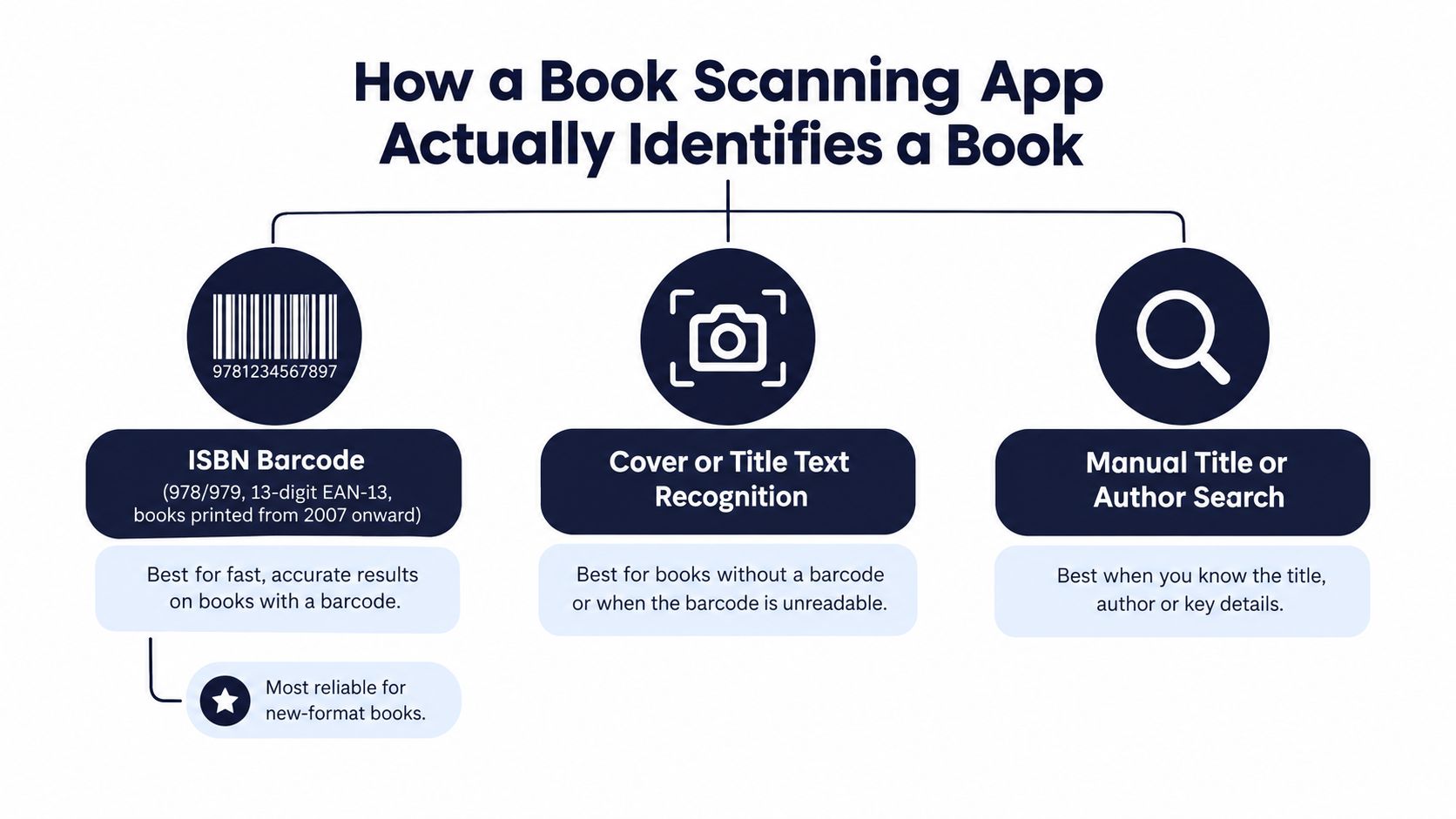
For a broader look at how item identification tools fit into sourcing, see this guide to an item identifier app. The important point is simple: barcode first, photo second, text search when needed.
Barcode-Only Versus OCR-Plus-Barcode Versus Three-Input
The three-input model is the one that matches real sourcing. Barcode-only apps are efficient in a clean Amazon arbitrage workflow, but estate-sale and library inventory doesn't stay clean for long.
A 1972 hardcover may have no ISBN at all. A mass-market paperback may have a curled barcode. A foreign edition can show a readable code that resolves to a different market or format. An OCR-plus-barcode app improves coverage, but it still depends on readable cover or spine text and decent lighting.
| Approach | Best For | Common Failure | Edition Sensitivity |
|---|---|---|---|
| Barcode only | Newer books with clean ISBN labels | Missing, curved, faded, or blocked barcode | Can return the wrong format if the reseller doesn't verify the physical copy |
| Barcode plus OCR | Older, damaged, or partially labeled books | Poor light, blurred photos, crowded spines, weak OCR | Better coverage, but title-level matches still need edition confirmation |
| Barcode, AI photo, and text search | Mixed lots, estate sales, library shelves, and thrift sourcing | Conflicting signals or uncertain visual matches | Strongest option when it exposes uncertainty and requests confirmation |
Barcode-only apps
The advantage is speed. At a Ross clearance rack, where retail books have intact packaging and clean labels, barcode scanning can be enough to check whether the item fits an Amazon flip.
The weakness appears when the code doesn't decode. The app may leave you with no result, and that blank result tells you nothing about whether the book is worthless, unlisted, vintage, or just hard to photograph. At an estate sale, that is a serious blind spot.
OCR plus barcode
OCR adds a useful second route. It can pull title or author text from the spine and cover, which gives you a path into a catalog even when the ISBN is damaged.
Don't treat OCR as definitive. A study of library book call-number recognition found success rates of roughly 40% or less for some spine-label tasks, and reported that poor image quality caused all tested OCR systems to fail. The library book-spine OCR research supports a conservative workflow: combine OCR with visual cover signals, metadata, and ISBN validation.
Three-input tools
A three-input tool keeps the sourcing decision alive after the first method fails. Scan the barcode, photograph the cover or spine, or type the title and author. That covers a 1972 hardcover, a pre-ISBN book, and a new paperback with a damaged label without forcing you to abandon the item.
For a closer look at the difference between barcode lookup and broader sourcing workflows, read this guide to a barcode scanner for books. App store ratings won't tell you which method survives the bin. Your sourcing locations will.
Why Sold Comps and Net Profit Matter More Than Scan Speed
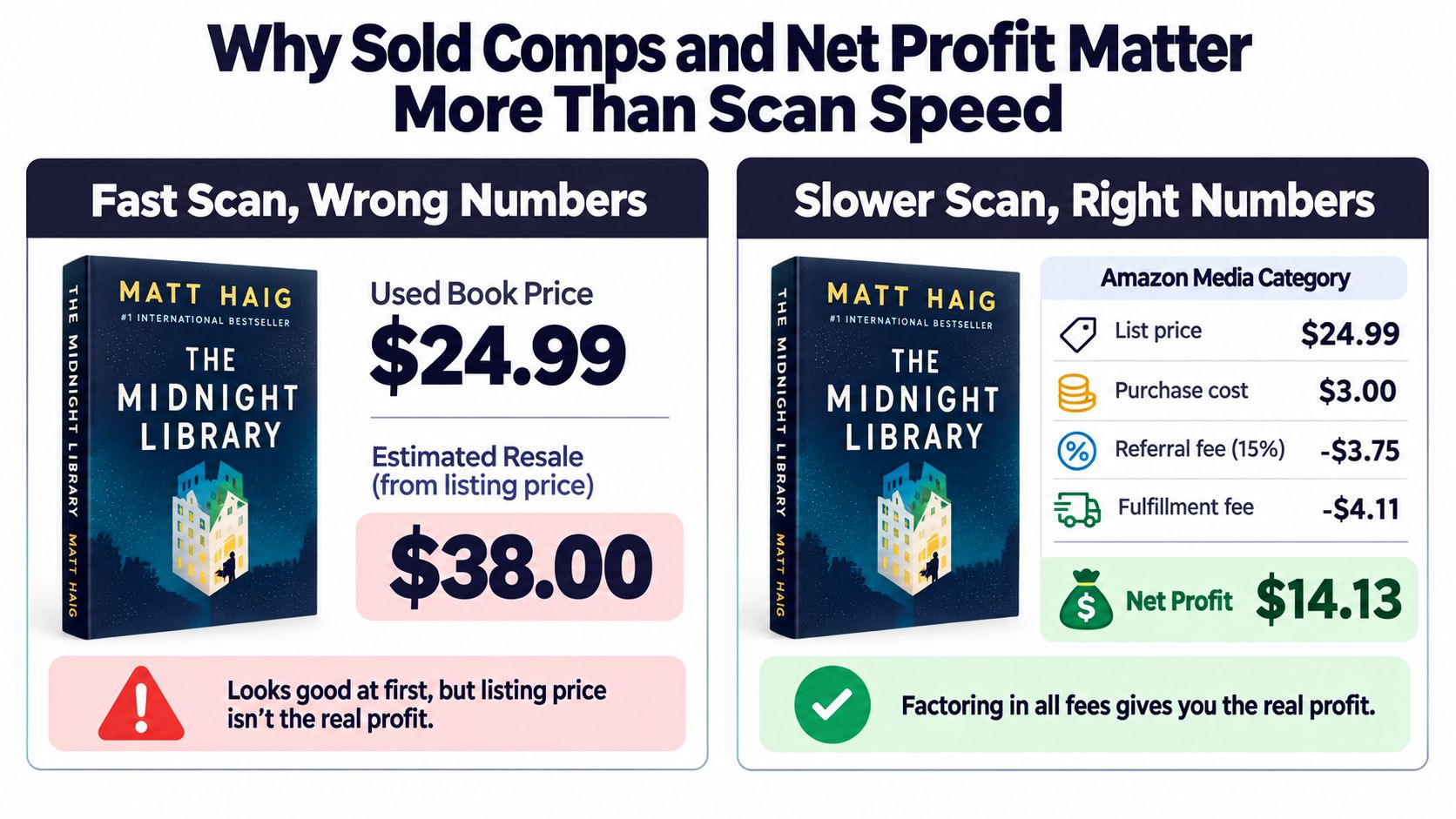
A fast book scanning app with wrong numbers is worse than a slower app with accurate math. It encourages you to buy inventory based on a gross figure that ignores the costs waiting behind the sale.
Take a used book listed at $24.99, bought for $3 and sold through Amazon's Media category. Amazon's published seller schedule sets the referral fee at 15%, adds a $1.80 closing fee per item, and charges Individual sellers $0.99 per item sold. Those deductions total $6.54 before shipping or fulfillment, based on Amazon's current seller fee schedule. After $4.39 for Media Mail, the rough take-home is $11.06, not the $21.99 you get by subtracting only the cost of goods.
That book might still be worth buying. The point is that the scan must show the actual decision, not flatter you with a gross sale price.
The eBay version
Now use a book sold for $42, bought for $6, with $4.39 shipping. In an eBay category carrying a 13.6% fee, the fee calculation includes a $0.40 order fee for orders over $10. The fee comes to about $5.71, leaving approximately $25.90 before supplies and taxes:
$42 − $5.71 − $4.39 − $6 = $25.90
eBay calculates its final value fee on the total sale amount, including shipping, and its published range is 2.5% to 15.3% depending on category and seller circumstances. Check the eBay seller fee schedule before relying on an app's default assumptions.
A $42 sold comp isn't a $42 profit. It isn't even close once the fee base, shipping, and cost of goods enter the calculation.
This is why I care about sold comps, not asking prices. An unsold book can sit at a high price for months. A completed sale tells you that a buyer paid, while still requiring you to check condition, format, and sell-through risk.
A proper sourcing tool should let you enter the buy cost, apply the relevant fees, include shipping, and set a minimum net threshold. For practical pricing decisions, use a guide to how to price items for resale, then reject any app that shows only a gross figure and calls that a verdict.
Matching the App to Where You Actually Source
The right book scanning app depends on the source, not on a universal ranking. I use a different scanning habit at the bins than I do at a quiet estate sale because the inventory, lighting, signal, and time pressure are different.
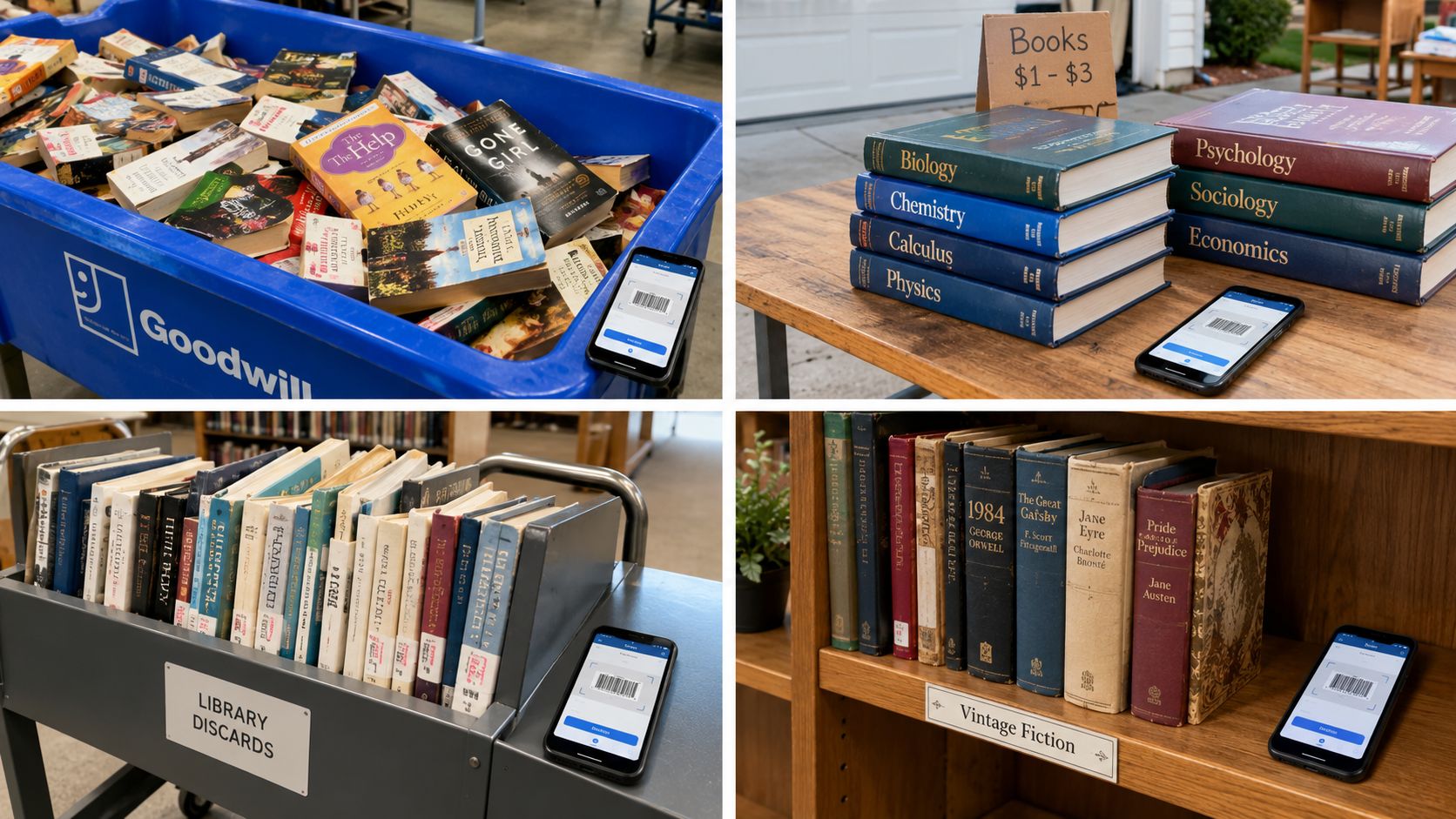
Goodwill bins
At the bins, mixed paperback lots favor barcode first with a strong text-search fallback. You're moving quickly, books are often bent or scuffed, and the item cost can be low enough that you're looking for repeatable net profit rather than a perfect collectible discovery.
Don't let the low buy cost excuse weak comps. A dollar book with poor demand still becomes a death-pile resident when the expected net doesn't justify photographing, listing, storing, packing, and shipping it.
Library sales
Library sales and pre-1980s collections are where OCR and AI photo identification earn their keep. Books published before the early 1970s often have no ISBN, so a barcode-only workflow can miss exactly the older material that deserves a closer look. Photograph the cover and copyright page, search the title and author, then verify publisher, edition, and condition.
A failed barcode doesn't mean “pass.” It means switch valuation methods.
Garage and estate sales
At a garage sale, one photo scan is often better than trying to find a barcode on every book. Lighting can be bad, tables are crowded, and the seller may be watching the same box you're inspecting.
For a single-book table, grab the cover, confirm the edition, and check sold comps before negotiating. If the title is unusual or the cover is damaged, text search gives you a second route without wasting time fighting the camera.
Ross and TJ Maxx clearance racks
Retail overstock is the cleanest environment for barcode scanning. Intact retail packaging and readable labels make the barcode the natural first input, especially for fast-flip Amazon arbitrage.
The trap is assuming retail price equals resale opportunity. Run Amazon's fee math, check the exact format and condition, and compare the expected net with your minimum ROI before buying a stack.
The Four-Step Workflow That Actually Makes Money on Books
A working scan should move from identification to a buying decision in four steps.
Identify with the best available input. Scan the ISBN first. If it fails, use an AI photo of the cover or spine, then text search. Show a confidence state when title, author, edition, or ISBN signals conflict. Some library spine-recognition tasks have produced success rates around 40% or less, which is why one OCR string shouldn't control a purchase. The library OCR study supports asking for a second image or manual confirmation.
Verify the exact edition. ISBNs identify editions and formats, not merely titles. Check hardcover versus paperback, revised edition, translation, box set, dust jacket, signatures, completeness, and condition before using a comp.
Pull sold comps. Compare recent completed sales on the marketplaces where you sell. Ignore optimistic asking prices, and don't use a different edition's sale as your baseline.
Calculate net and decide. Subtract cost of goods, marketplace fees, shipping, and direct selling costs. Apply your minimum net-profit threshold, then mark the book green for flip or red for pass.
For books with no readable ISBN, the dead-book fallback is not abandonment. Photograph the cover and copyright page, search the title and author, verify publisher and edition, then assess scarcity and condition separately from ordinary used-book pricing.
After the buy decision, tools such as Vendoo and List Perfectly can handle listing and crosslisting workflows. That's a separate job from sourcing, and your scanning app doesn't need to pretend otherwise.
Choosing the Right Book Scanning App Without Getting Burned
I'd reject any app that fails this checklist:
- Multiple inputs: It needs barcode scanning, AI photo identification, and text search.
- Edition-aware matching: It should distinguish formats rather than stopping at the title.
- Sold comps: It should use completed sales, not inflated asking prices.
- Net-profit math: It must account for fees, shipping, and buy cost.
- A configurable threshold: You should be able to set the minimum profit or margin that makes a buy worthwhile.
- Confidence handling: Borderline matches should be flagged for another image or manual confirmation.
The trap is the app that shows a $24 sale and lets you mentally call it a $24 win. That workflow ignores the costs that decide whether the book earns its place in your inventory. A gross price can be useful as an input, but it isn't a sourcing answer.
What I'd use in different conditions
For clean ISBNs and offline sourcing, a barcode-focused tool can make sense. For collections dominated by older hardcovers, choose OCR or photo support. For mixed thrift inventory, use all three inputs so a failed barcode doesn't automatically erase a potential BOLO.
A tool such as ScanFlip AI combines AI photo scanning without a barcode, barcode scanning, and text search with sold comps from eBay, Poshmark, Mercari, Depop, Amazon, Whatnot, ThredUp, Facebook Marketplace, and TikTok Shop. It also calculates expected net profit after fees and shipping and returns a red or green flip-or-pass verdict. That makes it a sourcing tool, not a listing, crosslisting, inventory-management, or bookkeeping system.
Your decision filter is straightforward. If the app identifies only clean barcodes, it belongs in a narrow workflow. If it identifies the exact edition, checks sold comps, calculates net profit, and tells you when the match is uncertain, it can earn a place in the aisle.
Visit a real sale and test the workflow on books you already understand. Don't judge the app by a polished demo. Judge it by how often it prevents you from buying the wrong edition, missing an unbarcoded book, or mistaking gross revenue for take-home profit.
Use ScanFlip AI to scan books by AI photo, barcode, or text search while you're sourcing. It combines sold comps across major marketplaces with fees, shipping, and a red or green flip-or-pass verdict, so test it on your next Goodwill run, library sale, or estate-sale box before you spend.