

Barcode Scanner on iPhone for Resellers
You're standing in a Goodwill aisle with a boxed video game in one hand and your iPhone in the other. The barcode looks readable, but the native Camera app gives you nothing useful, and the shelf tag has a price you can't afford to guess against. A scan only helps when it leads to the exact item, real sold comps, marketplace fees, shipping, and a buy-or-pass decision.
That distinction matters for every reseller, from book scanners and retail arbitrage sellers at Ross to vintage pickers digging through a garage-sale bin. A barcode is an identification shortcut, not a profit report. The right workflow handles clean scans quickly, catches wrong variations, and switches to text or image search when the label fails.
Table of Contents
- Why the Native iPhone Camera Fails Resellers
- Getting a Clean Scan on Damaged Packaging
- Calculating Net Profit After Marketplace Fees
- Three Ways to Identify Items Without a Barcode
- Building a Rapid Sourcing Decision Tree
- Rules for Keeping Your Sourcing Workflow Fast
Why the Native iPhone Camera Fails Resellers
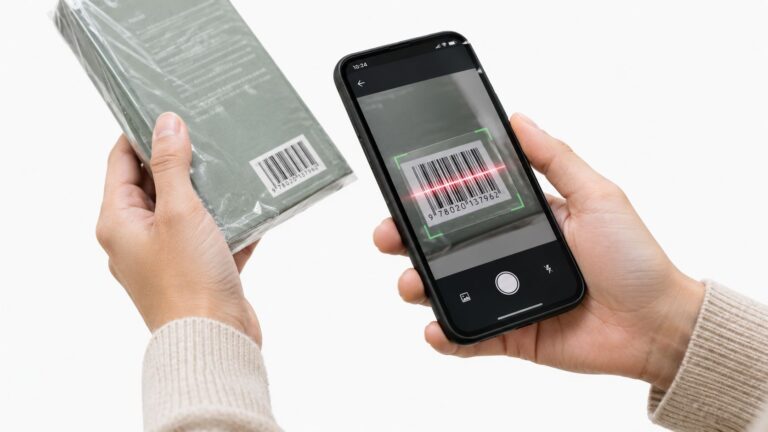
The built-in iPhone Camera is useful in a Goodwill aisle, but not for the job many flippers expect. Apple's documented Camera workflow detects QR codes, then lets you open the linked content. It isn't a guarantee that a UPC or EAN on a video game, boxed appliance, book, or media item will produce a product record or sold comps. Apple's QR-code scanning instructions are about opening code-driven links, not pricing inventory.
That's why the native camera can appear to “fail” even when the barcode is perfectly printed. It may see the pattern but have no product database attached to the result. At a Ross clearance rack, a QR code might open a webpage instantly, while a retail barcode still needs an app that interprets the identifier and matches the exact model, edition, bundle, or size.
Practical rule: A readable barcode is only the first half of the sourcing question. The second half is whether the match has profitable sold comps.
Barcodes are particularly useful on standardized, packaged merchandise. The system behind them dates back to April 3, 1973, when grocery-industry leaders in the United States created the Universal Product Code system. On June 26, 1974, a 10-pack of Wrigley's chewing gum became the first retail product scanned with a UPC at a Marsh Supermarket in Troy, Ohio. GS1 later reported that more than 1 billion products carried GS1 barcodes and that barcodes were scanned more than 10 billion times per day worldwide. GS1's barcode history explains why a barcode connects packaged goods to a broader product-identification infrastructure.
For resellers, that infrastructure works well for books, media, games, electronics, and boxed retail goods. It's much less useful for untagged vintage apparel, shoes, handmade items, and many collectibles. A dedicated sourcing app bridges the gap between the raw number and a buying decision, which is why comparing a barcode scanner app for price checking matters more than finding an app that can trigger the camera.
Getting a Clean Scan on Damaged Packaging
A thrift-store barcode has usually lived a rough life. Glossy shrink-wrap throws a reflection across the bars, curved bottles distort the symbol, and a torn box can remove part of the quiet zone. The quiet zone is the blank space around a barcode that helps the camera locate its edges, so squeezing the phone tightly against a package edge can make a good code unreadable.
Start with the physical label, not the app.
Fix the angle before changing the app
Tilt the phone or the item until glare moves away from the bars. Don't aim a direct light straight at glossy packaging. Angled illumination is usually more useful because it reveals the printed contrast without creating a hard reflection over the symbol.
Center the entire barcode, including its blank margins, inside the preview. Tap the bars to focus, then move the phone closer until the symbol takes up a substantial part of the screen. Digital zoom often enlarges a blurry image instead of giving the camera more usable detail, so physical distance and focus should come first.
Apple documents that barcode detectability depends on capture resolution, illumination, symbol density, and distance from the lens. Higher resolution can help, but photo-resolution settings may also increase exposure time and motion blur in dim conditions. Apple's barcode capture guidance supports a simple aisle habit, steady the item, add light, and adjust distance before repeatedly tapping scan.
Use a deliberate retry sequence
If the first attempt fails, use this order:
- Flatten the label: Smooth a folded box or rotate a curved package so the bars face the camera more directly.
- Remove glare: Change the phone angle rather than shining a light straight onto the surface.
- Refocus: Tap the barcode and hold the phone steady.
- Fill the frame: Move closer before using pinch-to-zoom.
- Check the label: A damaged or overprinted code may not be a valid retail identifier.
A properly engineered scanner should pause after the first stable decode and suppress duplicate callbacks for roughly 0.5 to 1 second, rather than querying marketplaces repeatedly with the same value. If an app keeps firing scans, step out of the camera view or stop the session before moving to the next item.
Books are a good example of where technique pays off, because crowded shelves often force awkward angles and narrow working space. The same physical habits apply when using an iPhone barcode scanner for books, especially with dusty covers or faded stickers.
Calculating Net Profit After Marketplace Fees
A barcode result showing a $42 sold comp doesn't mean you have $42 available after the sale. The fee base, buyer-paid shipping, your shipping expense, and cost of goods decide whether the item belongs in your cart or becomes another piece of death-pile inventory.
For eBay, listings are free up to 250 items per month for most casual sellers. After that, insertion fees are $0.35 per listing. Final value fees vary by category from 2.5% to 15.3%, with a per-order fee of $0.30 for orders of $10 or less or $0.40 for orders above $10. eBay's seller-fee schedule provides the current structure.
Using the verified eBay example, a $42 sold comp at a 13% fee plus a $0.40 order fee produces a $5.86 marketplace deduction before shipping and cost of goods. If you paid $6 and spent $4.50 on shipping, the rough profit is $25.64, not the $36 suggested by subtracting only the purchase price.
Mercari applies a different calculation. For new and updated listings beginning January 6, 2025, its U.S. seller fee is 10% of the completed item price and buyer-paid shipping. On a $42 sale with $8 buyer-paid shipping, the fee is $5, because the shipping amount is included in the fee base. With $6 cost of goods and $4.50 in shipping or packing expense, the rough take-home is $34.50 before other expenses. Mercari's fee explanation shows why the buyer-paid shipping line can't be ignored.
Real Fee Math on a $42 Sold Comp
| Marketplace | Gross Sale | Fees & Shipping | Net Profit (Before COGS) |
|---|---|---|---|
| eBay | $42 | $5.86 fee plus $4.50 shipping | $31.64 |
| Mercari | $42 item plus $8 buyer-paid shipping | $5 fee plus $4.50 shipping | $40.50 |
The table's net figure is before cost of goods. After a $6 purchase, the eBay example leaves $25.64, while the Mercari example leaves $34.50. That's why a scanner that reports only gross sold prices can make a $6 thrift-store buy look stronger than it is.
Use a net-profit calculator for resellers before walking to the register. The useful output isn't the biggest sold price. It's the amount left after the platform takes its cut and the item reaches the buyer.
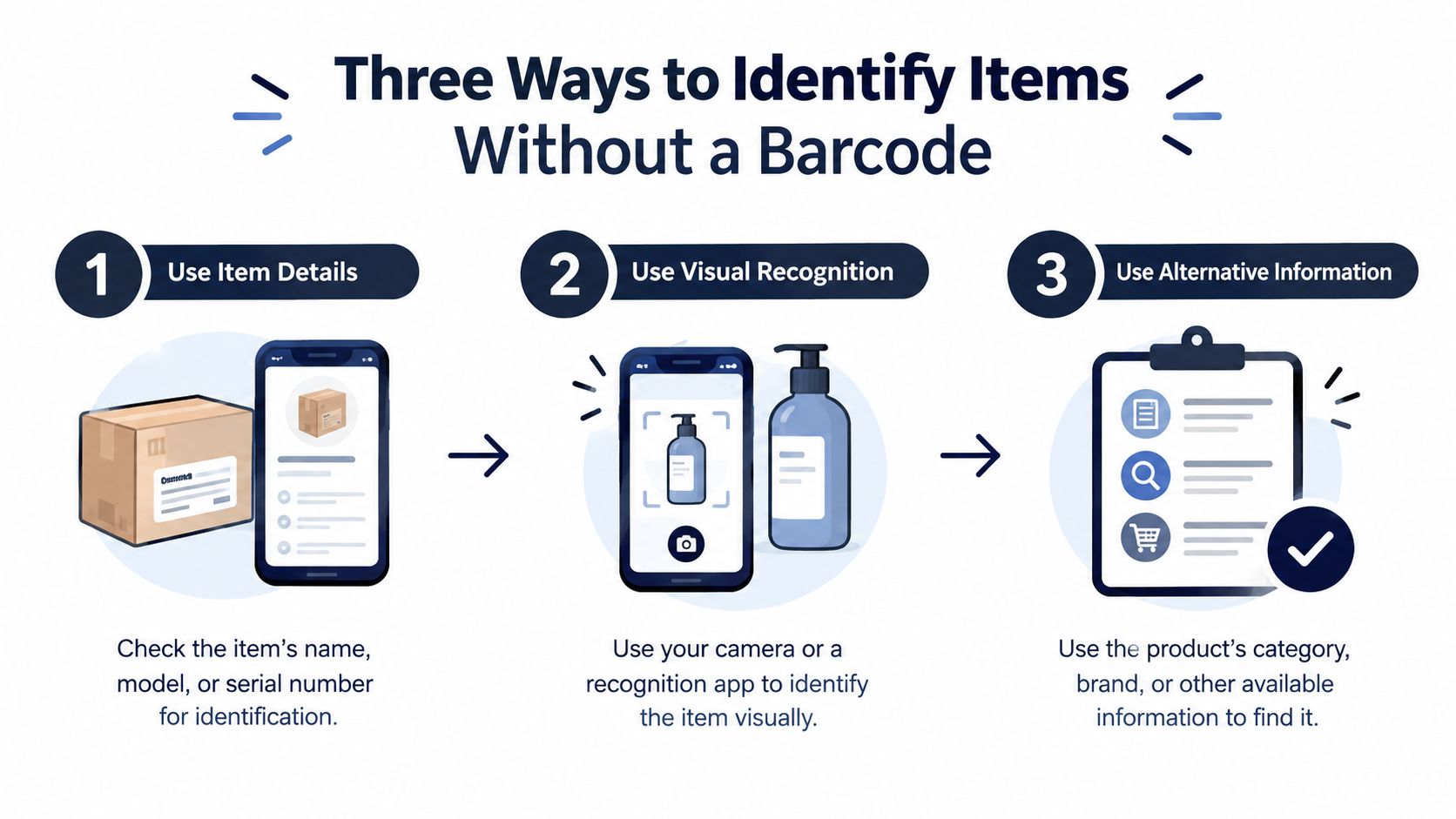
Three Ways to Identify Items Without a Barcode
You pick up a pair of shoes with no box, no UPC, and no size sticker you trust. That does not mean you walk away. It means you stop treating identification like a barcode problem and treat it like a buy decision problem.
Some categories break barcode-first sourcing fast. Untagged vintage clothing, loose shoes, handmade items, decor, and mixed collectibles often have no usable code at all. Other items do have a code, but it points to a broad product family instead of the exact version sitting in your hand. That gap matters, because a readable identifier is not the same as a profitable match.
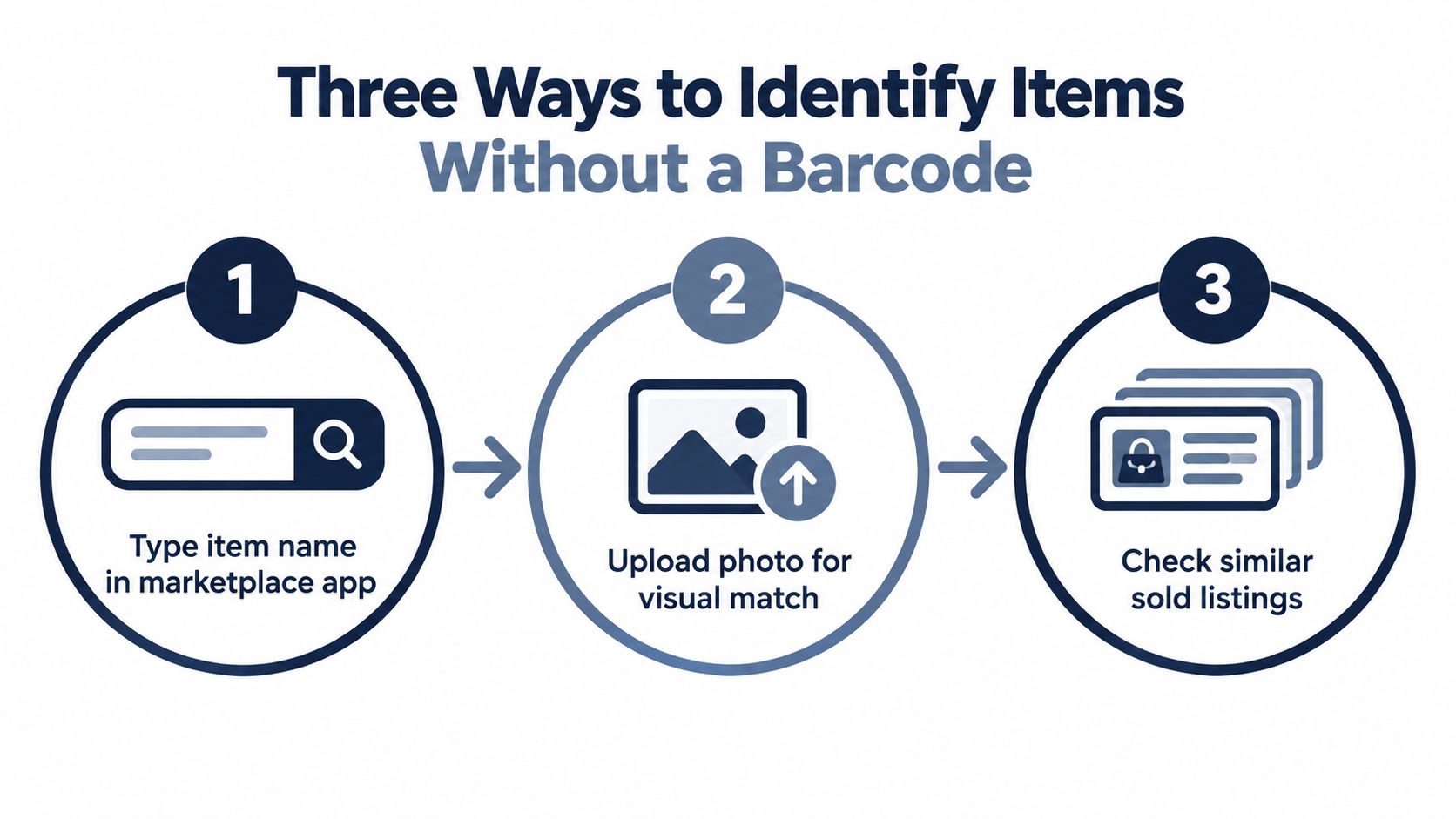
A practical setup uses three inputs, and the job is knowing when to switch.
- Barcode scan: Start here for books, media, games, electronics, and boxed retail goods. Then verify the title, model, edition, size, and included pieces before you trust the result.
- Text search: Use the brand, model number, style name, or visible keywords when the label is damaged or the scan returns nothing. In a store aisle, this is often faster than forcing a tiny code on curved or glossy packaging.
- AI photo scan: Use a photo when there is no UPC, such as with untagged shoes, vintage apparel, decor, cards, or odd collectibles. Let the image narrow the match, then compare condition, variation, and sold comps yourself.
The pivot rule is simple. Retry once or twice, then move on. Wipe the label, change the angle, and try again. If the code still fails and the digits are readable, enter the UPC or EAN manually. If the result lands on a generic listing instead of your exact variation, switch to text or photo before you trust the comp.
That one habit saves money.
Apple's VisionKit scanner can read barcodes and text, but the tool is only as usable as the phone and permissions behind it. Its Live Text style scanning requires an A12 Bionic chip or later, and scans can fail when camera access is blocked or the device does not support the feature. Apple's VisionKit documentation is worth checking when a scan problem looks like a bad label but is really an iPhone limitation.
If you use an app that puts barcode, photo, and text search on one screen, keep the same rule. Confirm the variation before you trust the match, and do the fee math only after you know you found the right item.
Building a Rapid Sourcing Decision Tree
At a busy estate sale or in the Goodwill bins, you can't research every item for several minutes. Use a quick filter that protects your time first, then spend extra effort only on items with a plausible margin.
Start with the item, not the number
Give the item an initial ten-second assessment. Look at brand, condition, completeness, size or edition, and likely shipping difficulty. A sealed boxed game with a clear code deserves a scan. A stained garment with a missing size tag may not deserve a deep comp search unless the brand and style are unusually strong.
Then choose the input:
- Code visible and flat: Scan the barcode.
- Code damaged or ambiguous: Enter the visible number manually, then verify the title, model, edition, and variation.
- No usable code: Search the model or style text.
- No useful text: Use a photo and compare the visual match against sold listings.
A scan that returns a product family is not enough. Check whether the sold comps are for the same edition, colorway, bundle, storage capacity, shoe size, or clothing size. Wrong-variation matches are one of the easiest ways to buy an item that looks profitable on paper and performs poorly after listing.
Confirm demand and the actual take-home
Look at sold comps, not active listing prices. A high asking price proves that someone wants the item badly enough to post it, not that anyone paid that amount. Compare the number and recency of sold results with the active competition to judge sell-through qualitatively, then consider how long you're willing to hold the inventory.
The buy decision should include:
- Cost of goods: What leaves your account at the register?
- Platform fees: Which marketplace will likely produce the sale?
- Shipping burden: Can you ship it safely without destroying the margin?
- Condition risk: Are missing parts, odors, flaws, or authenticity concerns likely?
- Net profit: What remains after all costs?
There's no universal margin target that fits a $3 book, a fragile appliance, and a high-value collectible. Set your own minimum net profit by category and skip anything that falls below it. If the item needs a long explanation, repair, or uncertain authentication, price that risk into the decision or leave it behind.
The fastest resellers aren't the ones who scan every item. They're the ones who reject weak items before weak research consumes the trip.
Rules for Keeping Your Sourcing Workflow Fast
A barcode scanner on iPhone should answer one question while you're sourcing: should I buy this item at this cost? It shouldn't become a substitute for checking condition, variation, demand, or the fees that turn gross revenue into net profit.
Keep these boundaries in place:
- Never buy from one sold comp: One result can represent a different edition, bundle, condition, or size. Confirm that the match describes your item.
- Never use active prices as your forecast: Sellers can ask anything. Sold prices show what buyers have paid.
- Never ignore the shipping shape: Oversized boxes, fragile glass, and awkward packaging can erase an otherwise attractive spread.
- Never treat a successful decode as an identification guarantee: The number may be valid while the commercial match is wrong.
- Never let repeated scans slow the aisle: After a stable result, move on. If the label keeps failing, pivot to text or photo identification.
- Review scan history for patterns: Note which Goodwill locations, garage sales, Ross aisles, or product categories produce worthwhile finds. A record of photos, locations, and timestamps can reveal where your sourcing time is paying off.
- Keep sourcing separate from operations: Use the scanner for the buy decision. Listing, crosslisting, inventory management, and bookkeeping belong in the tools you already use for those jobs, such as Vendoo or List Perfectly.
Camera access also deserves a little discipline. Apple requires explicit camera permission for camera-based scanning, and a denied permission blocks the workflow. Grant access only to the relevant app, avoid continuously filming bystanders or receipts, and switch to text search when glare, shaky hands, low vision, or poor lighting makes camera work unreliable. Apple's camera-scanning guidance covers permission, focus, zoom, highlighting, and on-screen guidance, but those aids can't fix a missing label or a wrong variation.
At the register, buy only when the item clears your minimum net-profit rule after fees, shipping, and cost of goods. If the result is uncertain, pass it and keep your cash for the next shelf.
ScanFlip AI gives resellers three ways to identify inventory on the spot, AI photo scan, barcode scan, and text search, then compares sold comps across major marketplaces and calculates net profit after fees. Use it in the aisle when a barcode is dead, a variation looks questionable, or a gross sold price needs a red or green flip-or-pass decision before you buy.