


eBay Fee Calculator: How to Price for Real Net Profit
You're standing in a Goodwill aisle with an $18 vintage camera bag in your hand. Recent eBay sold comps are around $55, so the first thought is easy: $37 profit. That calculation is also wrong.
The core decision starts with the total amount the buyer pays, the current category fee, the per-order charge, your actual shipping cost, and whether the sale comes through a promoted campaign. An eBay fee calculator belongs at the sourcing table, before money leaves your wallet, not two days later beside an unfinished spreadsheet.
Table of Contents
- The Thrift Aisle Moment That Changes How You Calculate
- What an eBay Fee Calculator Needs to Account For
- Doing the Fee Math by Hand on a Real Sold Comp
- Where Most eBay Fee Calculators Get the Math Wrong
- Worked Examples Across Categories and Price Tiers
- How ScanFlip AI Handles Fees at the Sourcing Table
- A Sourcing Day Checklist for True Net Profit
The Thrift Aisle Moment That Changes How You Calculate
You find an $18 vintage camera bag in a Goodwill aisle. Recent sold comps sit near $55, so the item appears to offer $37 before fees. That number is a sourcing signal, not a profit figure.
The key decision is the amount left after the sale. eBay's final value fee applies to the buyer's total, and the per-order fee reduces it again. Your shipping label, packing materials, and any promoted-listing charge come out of the payout. If advertising drives the sale, the ad fee stacks on the regular final value fee. Cleaning, photographing, listing, packing, and waiting for a buyer add labor that the sold comp never shows.
A sold price tells you what buyers paid. It does not tell you what you will keep.
Practical rule: A comp estimates revenue. Your buy decision requires a net-profit estimate.
The same calculation matters for a $7 blouse, a $15 home décor item, or a collectible with a low purchase cost. Fixed per-order fees consume more of inexpensive sales, and shipping can turn a promising listing into a low-margin project. Category rates and ad fees can narrow the result further.
Run the numbers before the item reaches your cart:
- Identify the item: Confirm the brand, model, size, edition, or pattern before accepting a comparable sale.
- Check sold comps: Use recent completed sales. Asking prices show seller hopes, not proven demand.
- Estimate the total sale: Add buyer-paid shipping, since eBay includes it in the fee base.
- Apply the current category rate: Do not rely on a generic calculator setting when the exact category changes the fee.
- Subtract every cost: Include cost of goods, actual postage, supplies, final value fees, and any ad fee.
- Make the decision: Buy only when the remaining profit clears your personal minimum.
A fee calculator earns its place at the sourcing table. Use sold comps, the current category rate, and the full ad-fee stack before spending money. Precision to the cent is unnecessary. Avoiding inventory that works only under best-case assumptions is the goal.
What an eBay Fee Calculator Needs to Account For
At the sourcing table, you are deciding whether an item deserves your money. The calculator must answer one question: how much money remains after the transaction is complete? That requires more than multiplying the item price by a familiar percentage. Use it before buying, while the sold comp and asking price are still in front of you.
For most U.S. categories, eBay's current fee basis is 13.6% of the total sale amount up to $7,500, then 2.35% on the portion above $7,500. The standard per-order fee is $0.30 for orders of $10 or less and $0.40 for orders over $10, according to eBay's final value fee update. A flat-rate calculator misses the category, threshold, and order-value details that change the payout.
Category selection matters. Athletic shoes can use a different rate, books and media can be higher, and trading cards, comics, women's bags, and jewelry can each have their own brackets. Current eBay fee guidance shows why the calculator needs the exact category and applicable threshold, rather than a broad label such as “clothing” or “collectibles.”
The inputs that change the payout
The calculator should request the item price, buyer-paid shipping, category, seller status, actual shipping cost, cost of goods, and advertising rate. It should also show international charges and account-level adjustments instead of hiding them inside a generic estimate. Those inputs expose the fee stacking that turns a good sold comp into a weak purchase.
Seller performance can change the result. U.S. sellers rated Below Standard can face an additional 6% on applicable final value fees for sales in the following month. The eBay's selling-fee help information supports the core rule that the final value fee uses the total sale amount plus the per-order fee.
| Fee Component | When It Applies | Required Input |
|---|---|---|
| Final value fee | When the item sells | Category, market, total sale amount, and applicable tier |
| Per-order fee | On each qualifying sold order | Total order amount |
| Promoted Listings fee | When a promoted item sells | Ad type and campaign rate |
| Shipping cost | When you fulfill the order | Package size, service, destination, and actual label cost |
| Seller-status adjustment | When account performance triggers it | Seller rating or account status |
| Insertion fee | When a listing is created under applicable store plans | Store plan and listing terms |
Payment processing belongs to the managed-payment fee structure for current sellers, rather than a separate PayPal-style line. Do not add a second processing deduction unless the calculator identifies another applicable charge.
Net profit = total sale amount − final value fee − per-order fee − ad fee − actual shipping − cost of goods − supplies.
The eBay UK seller-centre rate-card notice shows why market selection matters. UK fees use their own category and order rules, so change the market inputs before evaluating a UK transaction. Use sold comps, current category rates, and the full ad-fee stack at the sourcing table. The goal is a reliable buy decision, not false precision.
Doing the Fee Math by Hand on a Real Sold Comp
Take a brand-name pair of running shoes with a $68 total sale, a $14 source cost, and $9.95 buyer-paid shipping. For this worked example, assume the $68 is the full amount used for the fee calculation, and the applicable shoes rate is 13.25% plus $0.30, as specified in the category example.
The final value fee is:
$68 × 13.25% = $9.01
Add the per-order fee:
$9.01 + $0.30 = $9.31
Because the buyer paid $9.95 for shipping, you still pay the actual postage from the payout. Assume the label costs the same $9.95 in this example. The running calculation without advertising is:
$68 − $9.31 − $9.95 − $14 = $34.74
That is the estimated net before tax and before supplies. The buyer-paid shipping isn't profit. It passes through your account and then pays for the label.
For sold-comps research, use this guide to finding sold prices on eBay, and use the median of comparable sales rather than one unusually high transaction. The median gives you a more defensible revenue assumption when condition, size, color, and season affect the result.
Add the advertising layer
With Promoted Listings Standard at a hypothetical 2%, the ad fee is:
$68 × 2% = $1.36
The revised net is:
$34.74 − $1.36 = $33.38
With Promoted Listings Advanced at a hypothetical 5%, the ad fee is:
$68 × 5% = $3.40
The revised net becomes:
$34.74 − $3.40 = $31.34
These examples treat the stated ad rates as the applicable rates for the sale. eBay's promoted model matters because the ad fee stacks on top of the normal final value fee and is calculated against the total sale amount, including shipping, as explained in this Promoted Listings fee calculator methodology.
| Line Item | Without Promoted Listings | With Promoted Listings 2% | With Promoted Listings 5% |
|---|---|---|---|
| Total sale | $68.00 | $68.00 | $68.00 |
| Final value fee | -$9.01 | -$9.01 | -$9.01 |
| Per-order fee | -$0.30 | -$0.30 | -$0.30 |
| Ad fee | $0.00 | -$1.36 | -$3.40 |
| Actual shipping | -$9.95 | -$9.95 | -$9.95 |
| Cost of goods | -$14.00 | -$14.00 | -$14.00 |
| Estimated net before tax | $34.74 | $33.38 | $31.34 |
The return on the money risked is net profit divided by sold-comp price, or $34.74 ÷ $68, $33.38 ÷ $68, or $31.34 ÷ $68, depending on the ad scenario. Use that ratio alongside your own minimum return standard. A flip can have acceptable dollars and still tie up too much cash for too little return.
Where Most eBay Fee Calculators Get the Math Wrong
You find a lamp for $12, see sold comps around $25, and a calculator shows a reasonable margin. Then the buyer pays $8 shipping, your label costs more than expected, and an ad fee takes another slice. The calculator answered a commission question. Your sourcing decision required a net-profit answer.
Stale or generic category data causes the first major error. eBay changed many U.S. standard selling fees on February 14, 2025, increasing numerous final value fees by 0.35 percentage points and changing the per-order fee structure, as noted in eBay's seller update. A fee calculator with an old category table can make borderline inventory look profitable at the sourcing table.
The fee base creates another common mistake. A $25 lamp with $8 buyer-paid shipping is a $33 fee base, not a $25 fee base. Start with the item price plus shipping charged to the buyer, then subtract the actual shipping label when calculating net profit. The fee rules described in eBay's selling-fee explanation support that distinction.
The quiet deductions
Promoted Listings adds a second blind spot. Some calculators show the final value fee while leaving advertising out of the result. If the listing is enrolled in a campaign, the promoted fee applies when the item sells and stacks on top of the standard fee. Check the ad rate before buying inventory, especially when the expected margin is narrow.
Low-ticket flips expose fixed fees quickly. A per-order charge barely moves a higher-dollar sale, but it consumes a noticeable share of a cheap transaction. A $7 item can look viable when that fixed deduction is missing, even before shipping materials, label cost, or ad spend.
| Fee Component | What Most Calculators Show | What eBay Charges |
|---|---|---|
| Category rate | One standard percentage | Rates vary by category and tier |
| Fee base | Item price | Total sale amount, including buyer-paid shipping |
| Per-order fee | Often omitted | $0.30 or $0.40 based on order amount |
| Promoted Listings | Ignored or shown separately | Stacks on the normal final value fee when applicable |
| Seller status | Generic seller assumption | Below Standard status can add a fee adjustment |
| Listing cost | Often omitted | Insertion fees can apply when a listing is created under applicable plans |
International transactions, store plans, seller discounts, and market-specific rules add more variables. Use a calculator that displays its category, fee base, ad rate, shipping cost, and seller-status assumptions. Those inputs determine whether the number is useful for a buy decision.
Worked Examples Across Categories and Price Tiers
A $7 blouse can look like an easy pickup at the thrift aisle. Run the fee math before buying, and the margin may disappear. These examples use the supplied category-rate assumptions and show why sold comps, shipping, fixed charges, and advertising belong in one sourcing decision. Where a cost is missing, the conclusion stays qualitative instead of pretending to know the final payout.
A $7 women's blouse is the warning case. At the stated 13.25% final value fee, the percentage deduction is $0.93. Add the $0.30 per-order fee, and the listed fees reach $1.23 before shipping, supplies, or advertising. That amount takes a meaningful share of a low-dollar sale. A promoted campaign cuts the same transaction further, so check the current ad rate before handing over cash.
A $45 collectible video game gives the percentage fee more room to work. The fee still uses the buyer's total, while a low source cost and compact package can preserve a healthier spread. Verify the exact title, edition, condition, sold-through demand, and package cost against current sold comps before buying.
Category and price comparison
A $120 brand-name handbag requires the correct women's bags bracket, not a generic clothing rate. The supplied fee guidance lists higher brackets such as 15% up to $2,000 or $5,000 before dropping to 9%, depending on the applicable category structure. That gap can materially change the net when the buy cost is high or the item needs authentication-related handling.
A $15 home décor piece can appear profitable until shipping and advertising enter the calculation. Fragile packing, dimensional weight, and a promoted sale can consume much of the spread, even when the sold comp sits well above the source price. For this tier, package size may matter more than the headline sale price.
A $250 refurbished laptop has more room for fixed fees, but it brings larger operational risks. International charges, category rules, shipping insurance, returns, and any Top Rated seller discount should appear in the calculator before you buy. A category cap or threshold can also change the result. Independent eBay fee guidance explains why rates and thresholds differ across categories and seller plans.
| Category | Sold Comp | Item Cost | FVF | Per-Order Fee | Ad Fees | Net Profit |
|---|---|---|---|---|---|---|
| Women's blouse | $7 | Source-specific | 13.25% of total sale | $0.30 | Campaign-dependent | Calculate only after shipping and cost are known |
| Collectible video game | $45 | Source-specific | Category-dependent | $0.40 if over $10 | Campaign-dependent | Usually more workable when cost and postage stay controlled |
| Brand-name handbag | $120 | Source-specific | Applicable bags bracket | $0.40 | Campaign-dependent | Sensitive to the correct category bracket and buy cost |
| Home décor | $15 | Source-specific | Category-dependent | $0.40 | Can materially reduce the spread | Shipping and packing decide whether it works |
| Refurbished laptop | $250 | Source-specific | Category-dependent tier | $0.40 | Campaign-dependent | International, shipping, and seller-status inputs matter |
Run a break-even price calculation before buying. Low sale prices give fixed charges and shipping more power over the margin. Higher prices create more room, but category knowledge, current sold comps, and controlled sourcing costs still determine whether the flip pays.
How ScanFlip AI Handles Fees at the Sourcing Table
A spreadsheet is useful after a sourcing trip. It's too slow when you're standing over an estate-sale table deciding whether to hand over cash.
ScanFlip AI is built for that pre-purchase decision. You can use its AI photo scan without a barcode, scan a barcode, or run a text search. It pulls sold comps, not asking prices, across eBay, Poshmark, Mercari, Depop, Amazon, Whatnot, ThredUp, Facebook Marketplace, and TikTok Shop, then factors platform fees, shipping, and buy cost into an expected net-profit result.
The important part is the verdict. You're not staring at a gross sale price and guessing whether the spread survives fees. The app returns a red or green flip-or-pass signal based on the minimum profit or margin threshold you set.
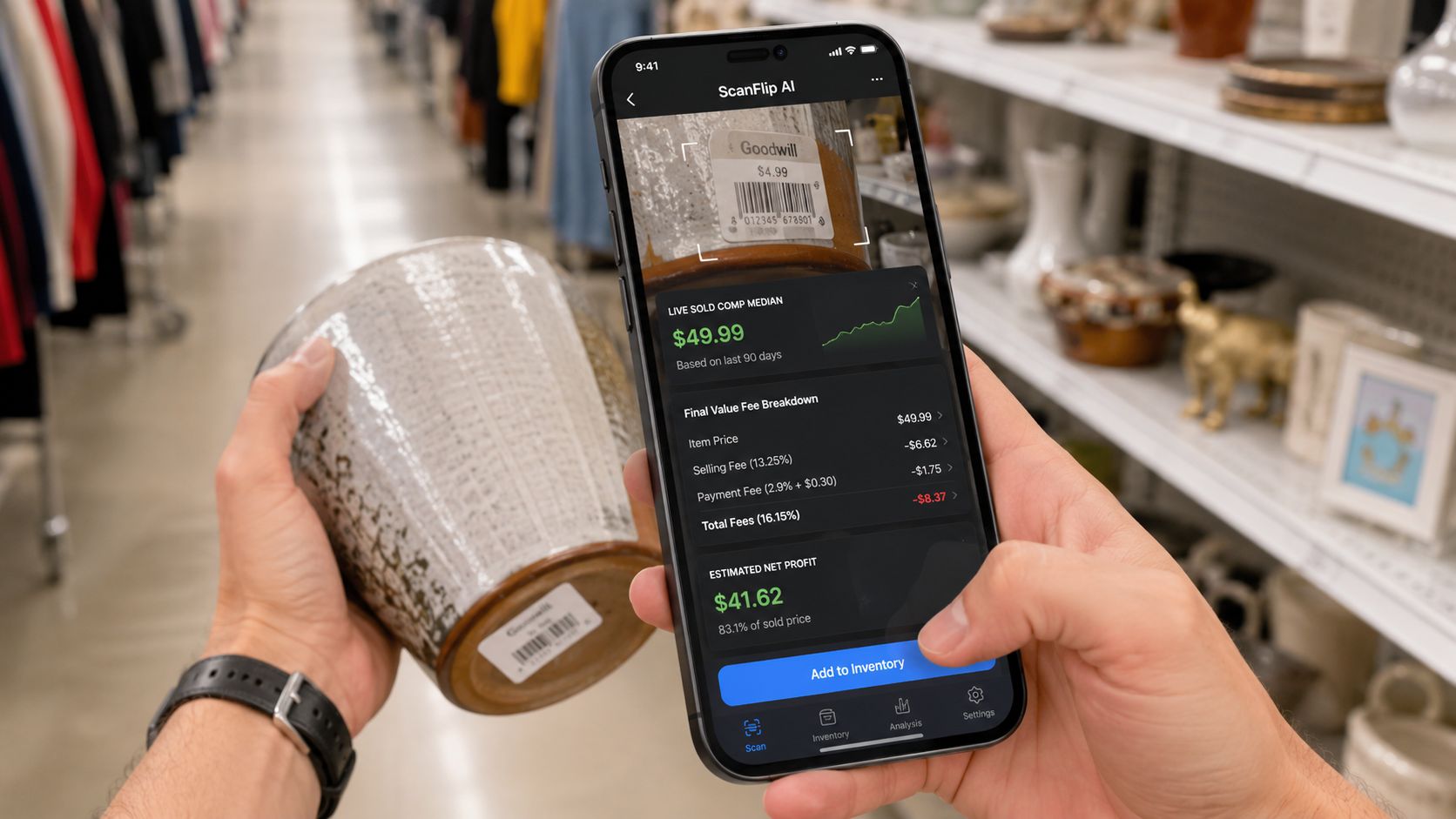
A sensible workflow is simple:
- Scan the item: Use the photo method for untagged vintage clothing, shoes, and collectibles, barcode scanning for books and boxed goods, or text search when the item can't be scanned.
- Check sold comps: Compare the median against condition, size, edition, and demand.
- Enter the buy cost and shipping reality: Don't treat buyer-paid shipping as profit.
- Review the net result: Check whether the item remains viable with advertising and platform fees included.
Use this scan-to-buy workflow as the model for making the decision before purchase. ScanFlip sits alongside tools such as Vendoo, List Perfectly, and Crosslist. Those tools can support multi-channel listing workflows, while ScanFlip handles the earlier question, should you buy this item at all?
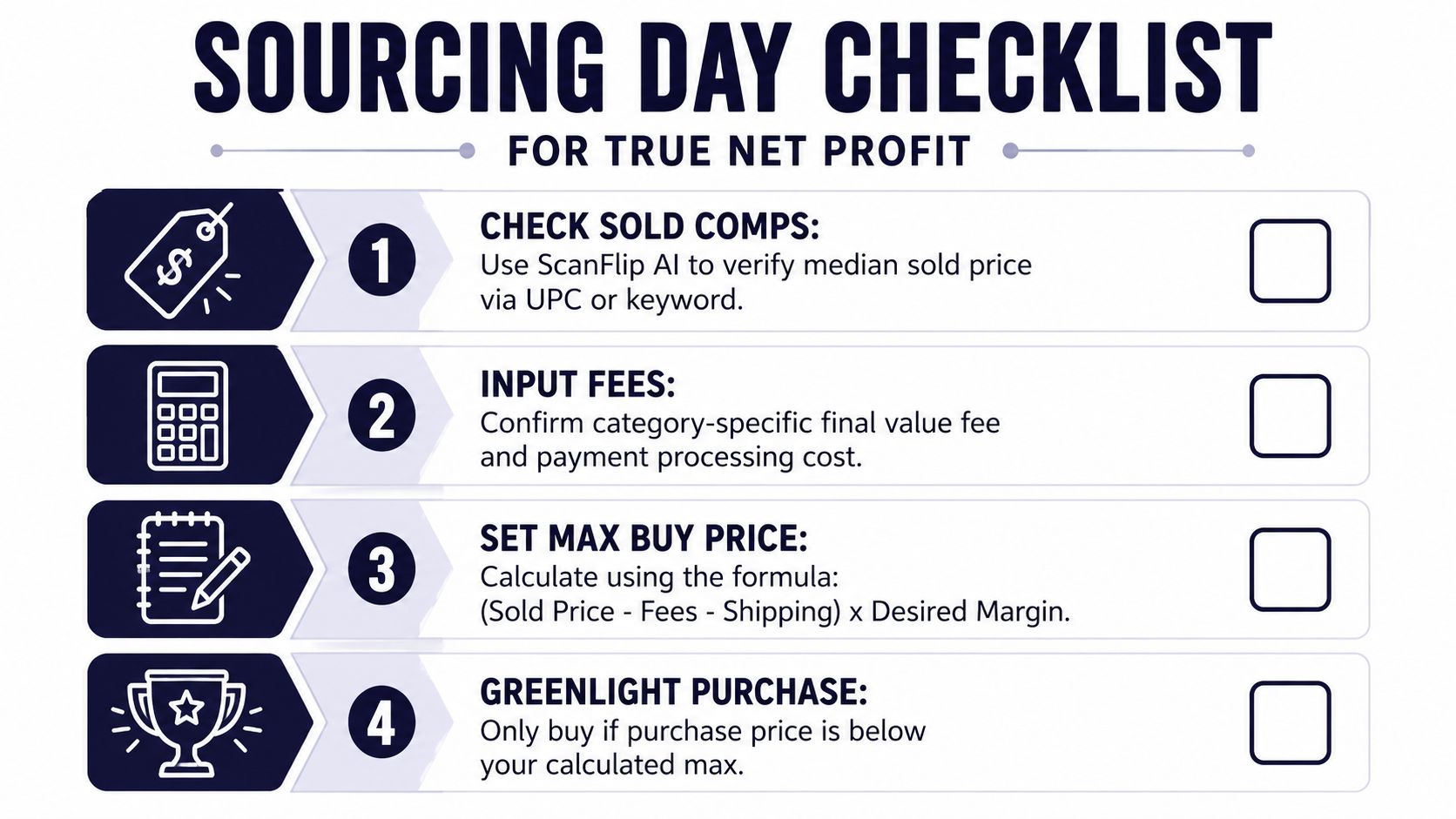
A Sourcing Day Checklist for True Net Profit
Keep this process short enough to use in a Goodwill aisle, garage-sale driveway, or estate-sale basement.
- Check sold comps: Scan the item or search the model, then use actual sold prices instead of optimistic asking prices.
- Confirm the category: Select the precise category rate, including any tier or threshold.
- Run the fee math: Include the total sale amount, buyer-paid shipping, final value fee, per-order fee, and any promoted ad fee.
- Subtract fulfillment costs: Estimate the actual label, packing supplies, and cost of goods.
- Set your minimum: Compare the remaining net profit with your personal return requirement.
- Make the call: If the item misses the threshold, leave it behind, even if the comp looks exciting.
Never buy first and calculate second. The best BOLO is still a bad purchase when fees, postage, and slow sell-through erase the margin.
ScanFlip AI combines AI photo scanning without a barcode, barcode scanning, and text search with sold comps across major resale marketplaces, then estimates net profit after fees, shipping, and buy cost with a red or green flip-or-pass verdict. Use ScanFlip AI at the sourcing table so the next purchase decision is based on real take-home profit, not a tempting gross sold price.