
Source Application Guide for Resellers: What It Does And
You're standing in a Goodwill aisle with a $4 candleholder in your hand, and the sold comp on your phone says $45. That feels like a buy until you subtract fees, shipping, and the time it'll take to move. By the time you get to the actual take-home, the deal can shrink to something closer to pocket change, and that's why a source application matters at the aisle instead of after you've already paid.
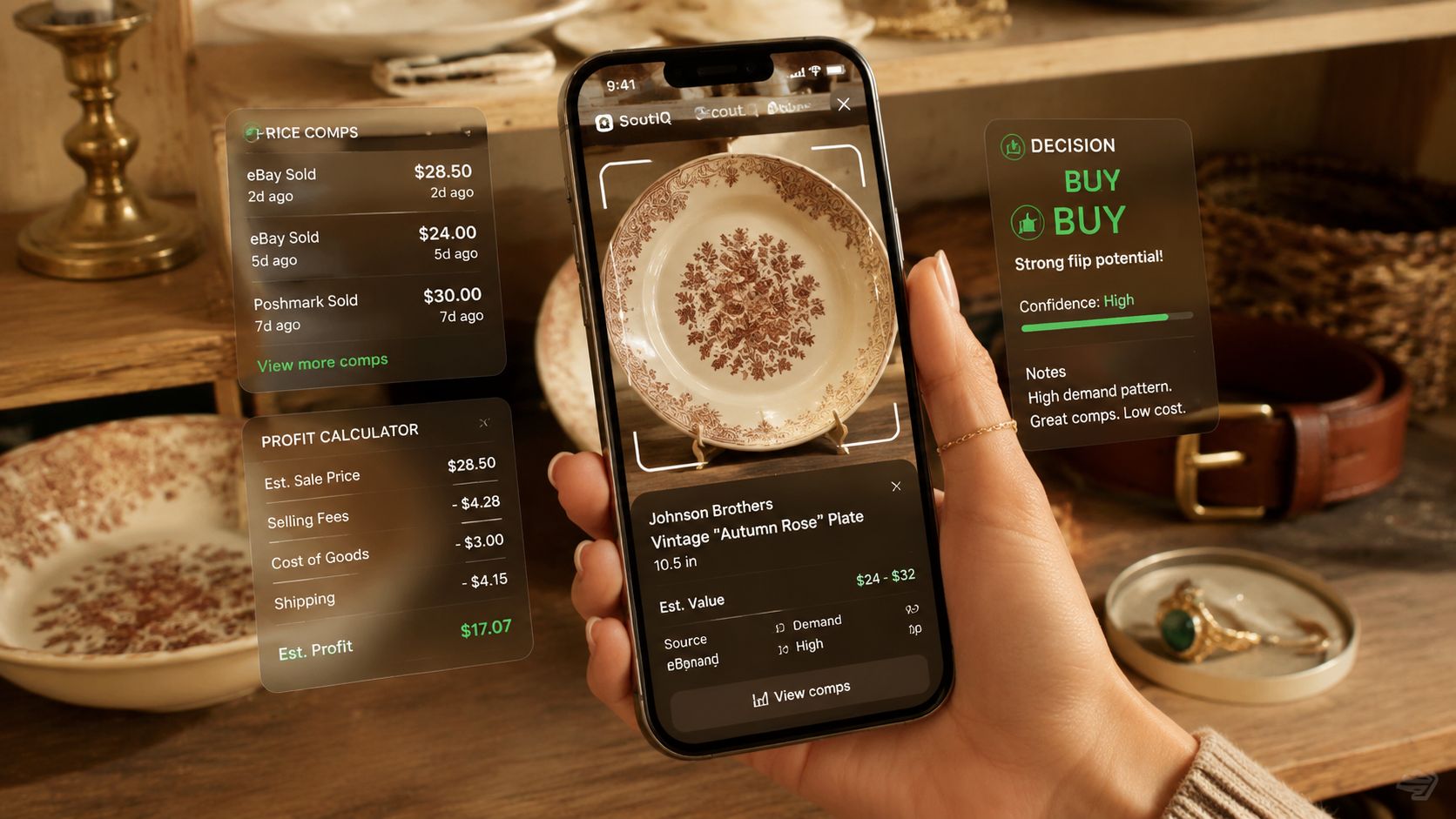
A source application is the buy-side tool that turns a quick scan into a decision. It identifies the item, pulls sold comps, runs the fee math, and gives you a flip or pass verdict before the cashier rings it up. For resellers, that means fewer guess buys, fewer death-pile regrets, and less toggling between apps while somebody else grabs the shelf space.
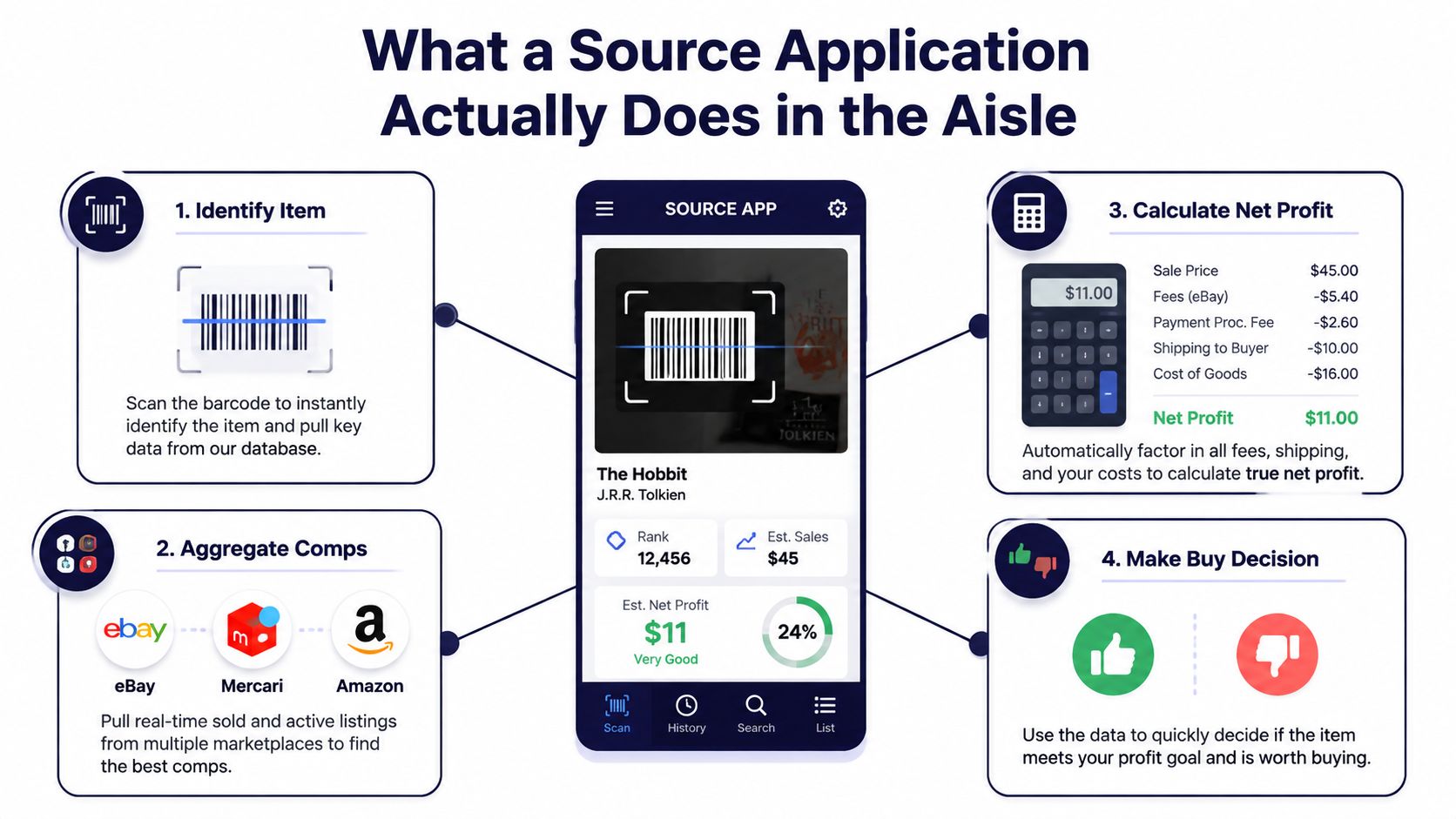
In the aisle, the job is simple. You need something that can tell you what the item is, what it sold for, and whether the net profit clears your floor after fees and shipping. That's why this kind of app is used by thrift flippers, estate sale pickers, retail arbitrage sellers, card scanners, book resellers, and side-hustle sellers who don't have time to manually check every marketplace one by one.
If you want a deeper breakdown of the item-ID side, this item identifier app guide is a useful companion read, but the bigger point stays the same. Identification alone doesn't pay you. The decision does.
Table of Contents
- What a Source Application Actually Does in the Aisle
- The Core Workflow From Scan to Verdict
- Sold Comps Versus Asking Prices and the Net Profit Test
- Three Ways to Scan a Single Item
- Practical Use Cases and Categories Where It Pays Off
- Reading Your Scan History to Improve Future Trips
- Common Pitfalls and Tips for Getting Real Value From It
What a Source Application Actually Does in the Aisle
A lot of sellers still confuse “I know what this is” with “I should buy this.” Those aren't the same thing. A source application is built for the moment your hand is on the item and you need to decide whether it belongs in your cart, your death pile, or back on the shelf.
The practical value is that it replaces a messy stack of steps with one buy-side flow. You scan a jacket, ring, paperback, or collectible, and the app turns that input into a decision fast enough to matter in a crowded aisle. That's the whole job, because the bottleneck in sourcing usually isn't curiosity, it's confidence.
A source application is useful across resale lanes, but the use case changes by category. A thrift flipper cares about untagged vintage and one-off housewares. An estate sale picker cares about fast sorting. A book scanner cares about UPC speed. A Poshmark or Mercari side seller cares about whether the item will still clear after fees and shipping.
Practical rule: if the app only helps you identify the item, it hasn't finished the job yet.
The reason this matters is obvious once you've gotten burned by a comp that looked strong on screen and weak in real life. A source application is meant to replace that awkward middle step where you're trying to guess whether the item is worth buying at all. That's a buy decision tool, not a curiosity tool.
The Core Workflow From Scan to Verdict
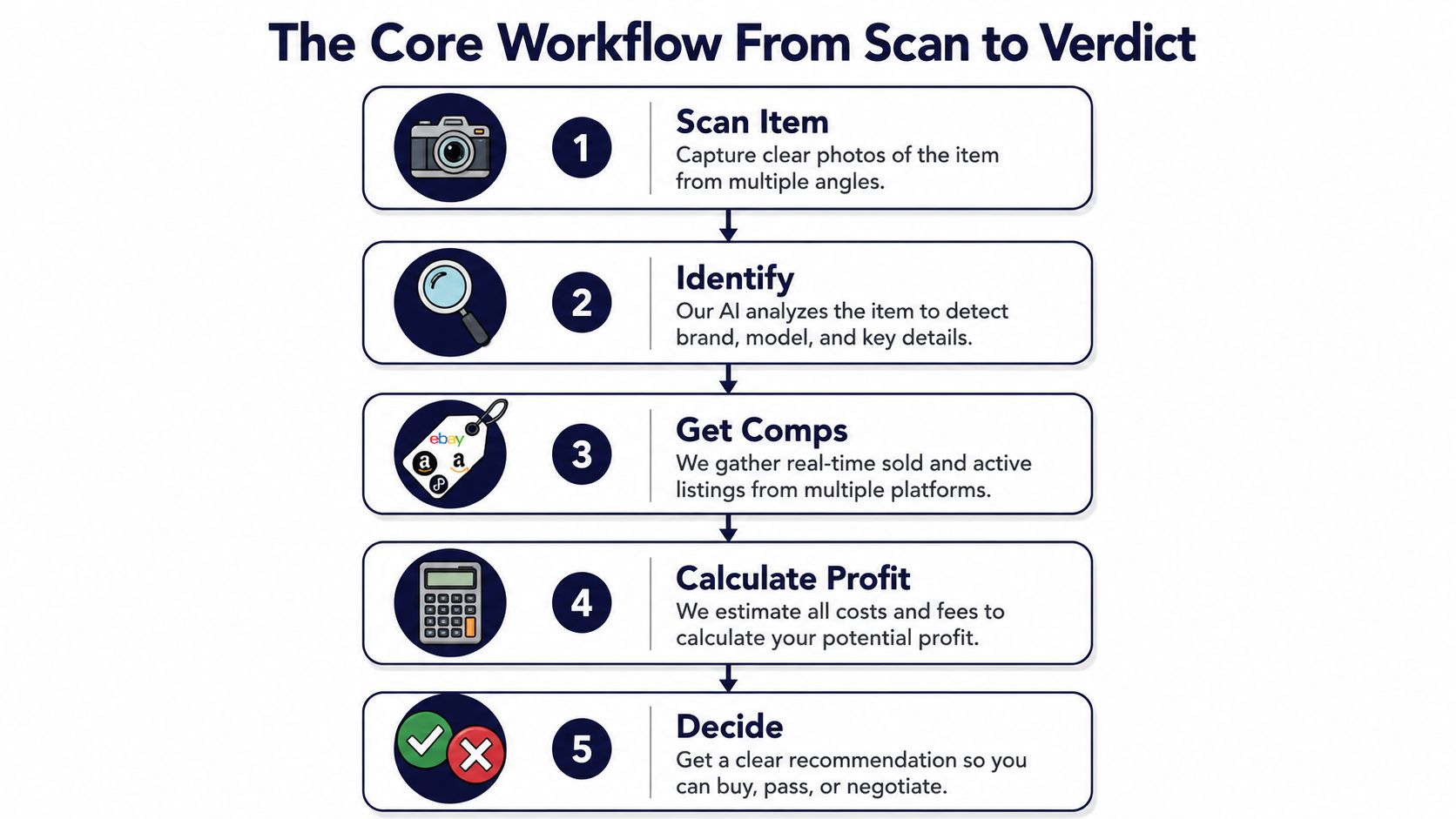
The best sourcing workflow is boring in a good way. You scan, identify, compare sold comps, calculate profit, and decide. If any one of those steps is weak, the whole aisle decision gets sloppy.
Start with identification
At a church rummage sale, a $6 sterling silver ring is a fair example. If the app can't identify it from a photo, barcode, or text search, you're already guessing. If it can identify it, you've got a real object to price instead of a hunch.
Then pull comps across marketplaces
The useful lane is not one marketplace in isolation. A serious source app looks across eBay, Poshmark, Mercari, Depop, Amazon, Whatnot, ThredUp, Facebook Marketplace, and TikTok Shop so you can see how the item behaves in different resale channels. That matters because an item that sells cleanly on one platform can stall on another.
Then run the math
For that $6 ring, the app should show the buy cost, likely fees, and shipping impact before you commit. If the expected take-home doesn't meet your threshold, the item is a pass even if the sold comp looks flattering. That's the difference between gross and net.
Then show a verdict you can act on
Red and green are easier to use than a long paragraph. If you're standing in a booth at an estate sale or trying to move through a crowded thrift aisle, you need a clear signal, not a research essay. A source application earns its keep when it tells you whether to keep walking or put the item in the cart.
Finally, save the scan
The history matters because it turns a one-off decision into a pattern. When the app saves the photo, store name, and timestamp, you can look back later and see what worked instead of relying on memory.
If you want a practical example of sold-price research, the guidance at how to find sold prices on eBay fits neatly into this workflow, because the scan is only as good as the comp data behind it.
Sold Comps Versus Asking Prices and the Net Profit Test
A vintage Pyrex dish can look hot on screen and still be a weak flip. If the asking price sits around $45 but the recent sold listings cluster around $28, the number that matters is the sold side, not the wishful side. Asking prices can sit there forever. Sold prices tell you what buyers paid.
The same logic applies when you strip the deal down to take-home. If a marketplace takes roughly 13% plus $0.30 in fees, and shipping runs $7, that $28 comp does not stay $28 in your pocket. Subtract the fees, subtract shipping, then subtract your cost of goods, and the margin can vanish fast. A comp that looks green at a glance can still be a pass once the math is honest.
Why asking prices mislead in the aisle
Asking prices are inventory in the wild, not proof of demand. They often reflect optimism, old listings, or sellers who haven't repriced in months. Sold comps are better because they reflect completed transactions, which is what you're trying to predict before you buy.
Why net profit beats gross comp every time
A good sourcing app should let you care about take-home, not bragging rights. A shirt that “sold for $30” might leave you with almost nothing after marketplace fees and shipping. A smaller comp with a tighter fee structure can be the stronger buy if it clears your minimum more reliably.
Bottom line: gross comps are a starting point. Net profit is the decision.
That's why a source application should never stop at “similar item found.” It needs to show whether the item survives the fee stack and still clears your floor. For a reseller, that's the ultimate test, and it's the one that protects you from overbuying stuff that only looks profitable.
For a deeper look at building resale math the right way, the how to price items for resale guide pairs well with this approach.
Three Ways to Scan a Single Item
The right scan method depends on what's in your hand. A photo scan, a barcode scan, and a text search each solve different aisle problems, and none of them covers everything alone. That's why barcode-only tools leave money on the table in categories that don't come with clean UPCs.
AI photo scan handles the messy long tail
A vintage jacket with no tag, a pair of shoes with worn labels, a baseball card without certification, or a mid-century ceramic piece all fit this lane. In those cases, the camera is doing the heavy lifting because there's nothing reliable to scan except the object itself. That's where photo-based identification earns its keep.
Barcode scan wins on speed
A paperback with a UPC, boxed retail, media, and a lot of book inventory are barcode territory. If the code is clean and visible, barcode scanning is usually the fastest route to a verdict. In a crowded estate sale, speed matters because you don't want to be stuck photographing every single item in a box lot.
Text search fills the blind spots
Some items live behind glass, some are sealed, and some just don't photograph well. A text search helps when you know the brand, model, or title but can't get a clean image or barcode. That rescue lane matters more than people think, especially with electronics or gear that has no obvious printed code on the outside.
Most barcode-only competitors miss the photo and text lanes entirely, which is a problem once your death pile includes mixed categories. If you source across apparel, collectibles, books, and oddball housewares, one method won't cover the whole cart. The useful tool is the one that matches the item, not the one with the prettiest demo.
Practical Use Cases and Categories Where It Pays Off
A $3 leather belt in a Goodwill blue bin is the kind of find that makes this tool feel real. If a photo scan pulls comps around $28 and the fee math still clears your minimum, that's a buy. If it doesn't, you put it back and move on, which is often the better win.
At an estate sale, a $20 box of paperback books is a different kind of test. A barcode scan can rip through a stack fast enough that you know within minutes whether the lot is worth the haul. When three dozen books clear your floor and the rest don't, you're making a sorting decision, not a hope-based purchase.
Then there's the deliberate pass, which is where many sellers save the most money. A $15 framed art print can look decent on Poshmark comps, but if shipping is awkward and fees chew the margin, it stays on the wall. That's not missed profit. That's avoiding a slow mover that would've sat around and tied up cash.
The value shows up when you treat passes as data, not disappointment. Oversaturated categories like teacups, basic 1980s electronics, and unbranded fast fashion can look fine on a quick search and still be dead weight after fees and shipping. A source application keeps you honest when the shelf is full of things that only look like inventory.
What usually works
- Simple, underpriced condition: Items with obvious demand and enough margin to survive fees.
- Fast-moving categories: Books, boxed retail, and clean branded goods that can be scanned quickly.
- Clear pass decisions: Items that fail the net test, even if the comp looks tempting.
If you're the kind of seller who likes one tool to answer a very specific aisle question, ScanFlip AI fits that sourcing-stage job because it identifies items three ways, pulls sold comps across major marketplaces, and shows expected net profit with a red or green verdict. It's a buy-decision tool, not a listing tool, so it sits alongside your existing stack instead of replacing it.
Reading Your Scan History to Improve Future Trips
The underrated part of sourcing is the log. A history of every scan, photo, store name, and timestamp turns scattered impressions into usable patterns. Without that record, most sellers remember the exciting wins and forget the dry trips.
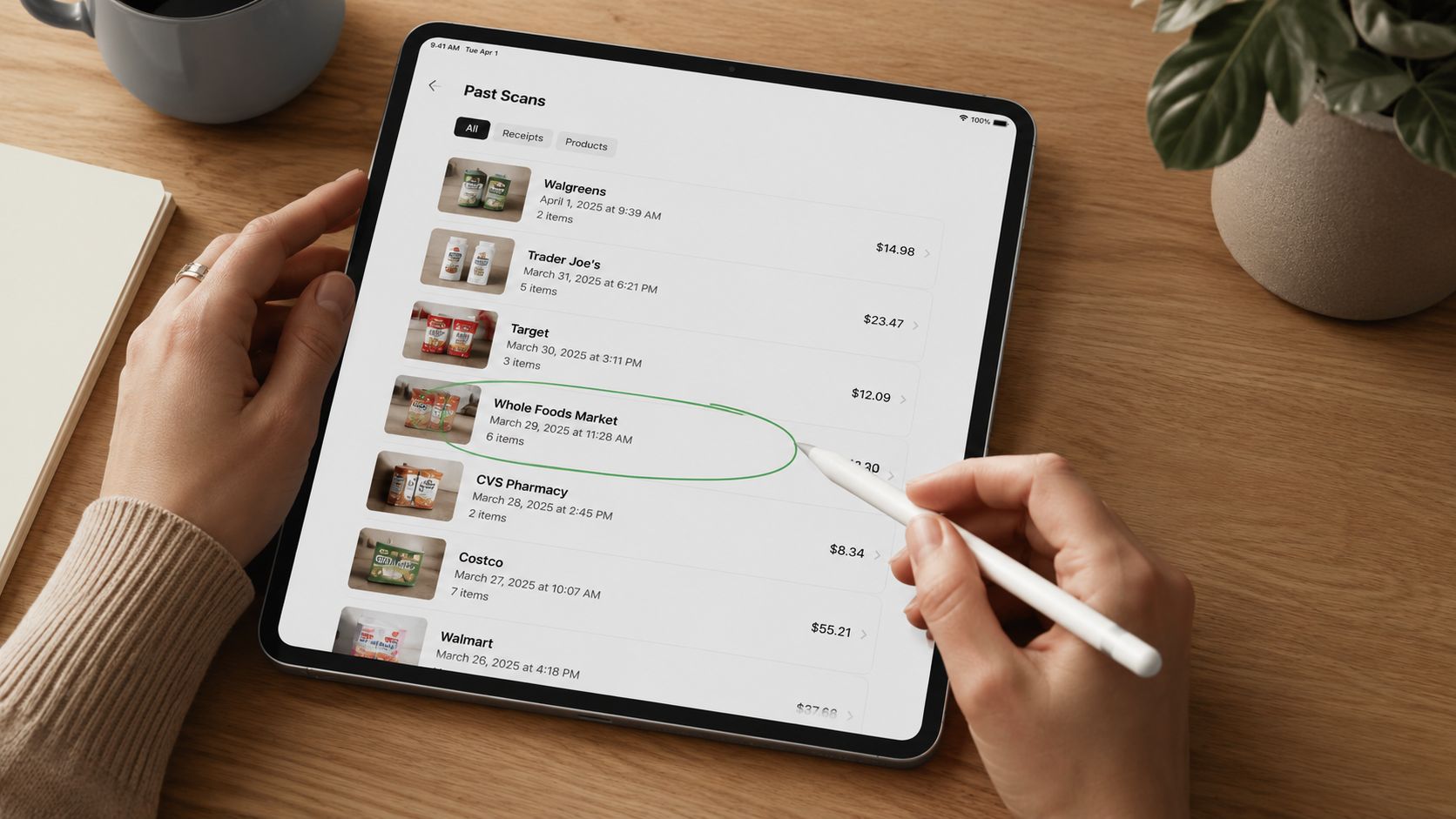
A 90-day review is usually enough to show what's really happening. You start noticing which Goodwill locations consistently produce, which estate sale companies price aggressively, which categories stopped clearing your floor, and what time of day tends to produce underpriced shelves. That kind of pattern used to live in a flipper's head, which means it was easy to lose and hard to prove.
A simple review ritual
- Sort by store: See which locations deserve a repeat visit.
- Sort by category: Spot what's getting too crowded or too slow.
- Sort by timestamp: Look for the times when shelves seem less picked over.
The point isn't to build a spreadsheet empire. It's to stop revisiting bad locations on autopilot and to stop underestimating the spots that consistently produce. When your scan history shows the truth, your route gets sharper and your buying gets less emotional.
The best sourcing memory isn't memory at all, it's a scan log you can check later.
That's why history matters as much as the first verdict. A buy decision helps you today. A good log helps you make better decisions next weekend.
Common Pitfalls and Tips for Getting Real Value From It
The fastest way to turn a sourcing app into a death-pile engine is to scan everything and buy too much. If you don't set a minimum net profit, every marginal item starts looking “close enough.” That's how carts fill up with stuff that was never strong enough to justify the money or the shelf space.
The second mistake is trusting wide comp ranges without checking condition and platform. A clean sold comp on one marketplace can be useless if your item is beat up, incomplete, or expensive to ship. The third mistake is ignoring shipping, which is where a lot of sideways flips get exposed.
Smart habits that actually help
- Set a minimum net profit: Make the app prove the margin before you spend.
- Use sold comps only: Ignore inflated asking prices when you're deciding.
- Count shipping every time: The take-home changes fast when the parcel gets bigger.
- Review scan history weekly: Patterns show up faster than memory.
- Treat red as a hard stop: If the verdict is pass, don't rescue it because it feels special.
A source application is strongest when it works beside your other tools, not instead of them. Crosslisting tools like Vendoo, List Perfectly, and Crosslist handle a different job. This one answers the aisle question, should I buy it or leave it.
If you want a buy-side tool that keeps the decision focused on sold comps, net profit, and a clean flip-or-pass call, visit ScanFlip AI. It's built for the aisle moment, when you need to know fast whether the item is worth your money. Use it to scan smarter, pass quicker, and stop buying margins that disappear after fees.